
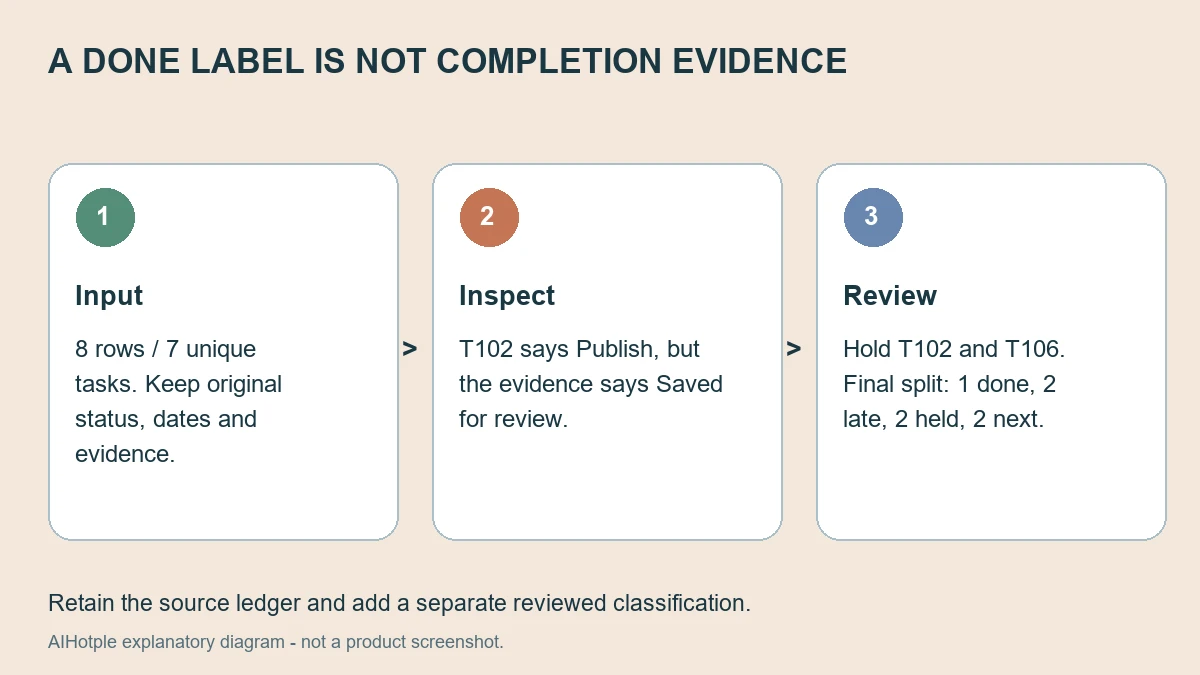
- Define the reporting period and what completion evidence must show.
- De-duplicate by task ID before counting outcomes.
- Keep a reviewed classification beside the original source fields.
Start with a dated task ledger and a clear reporting cutoff. Ask the Productivity plugin to organize the work, then check whether each completion claim is supported. Keep source status and reviewed classification separate.
Files for this exercise
AIHotple example files and prompts. Try the exercise before substituting real work data.
Give the assistant a reporting contract
A weekly report is useful when a manager can distinguish finished work, late work and claims that still need confirmation. A fluent paragraph is not enough. Start with task IDs, owners, due dates, source status, completion dates and evidence, then say exactly when the report is being evaluated.
Our example evaluates the week of 19–23 October 2026 at the end of 23 October in Europe/London. Eight input rows contain seven unique tasks because T102 is repeated exactly. Two other rows deliberately test the review process: one is marked done without a completion date; another says a guide was published while its evidence says only saved for review.
Download the kit and open tasks.json beside brief.txt. Every person and project in it is fictional. This first run needs no mailbox, calendar or project-management connection. That lets you test the reporting logic before giving an assistant a wider view of your work.
1. Find the official Productivity plugin
In Claude, open Customize → Plugins → Discover and search Productivity. Check that the publisher is Anthropic. Open the details and inspect the included skills and connectors before adding it. In our account it was already installed and enabled at version 1.3.1, so we did not reinstall it or connect any suggested service.
Choose Try in chat. Our page prepared the plugin’s start command, and the session showed task-management among the skills used. The account had the newer unified Claude experience, rather than a separate Cowork tab. Current Anthropic documentation describes plugin skills in web chat, desktop chat and Cowork; controls can differ between those surfaces.
The plugin’s source describes task files, workplace memory and a visual dashboard. Those are capabilities to configure and verify. A dashboard generated in one session does not prove that future sessions remember the project, read the right local folder or synchronize an external task tracker.
- Inspect the official listing
Confirm Anthropic as publisher and review what the plugin can access.
- Start a bounded practice session
Use the plugin’s Try in chat entry point or its start command. Supply the fictional files first.
- Keep connected data out of the first test
Explicitly prohibit email, calendar and other workspace access while validating the report contract.
2. Request files and evidence, not just a summary
Ask for TASKS.md, weekly-report.md and a self-contained dashboard.html. Require the source fields to remain unchanged. That gives you a stable input ledger, a human-readable report and a view you can reopen outside the conversation.
Our prompt also prohibited connector use, other-chat inspection, personal-memory updates, messages and scheduling. These restrictions matter because the plugin can support broader workflows, while this particular task only needs the supplied sample. Keep the same boundary when learning with your own non-sensitive test records.
Use an absolute reporting date in the prompt. A request for “this week” can change meaning when you run it again next Monday or use a different timezone. The supplied example is intentionally a fixed historical snapshot, not a live view of your workload.
/productivity:start Work only with the supplied fictional task ledger. Evaluate the week of 19-23 October 2026 at the end of 23 October, Europe/London. Count each unique task ID once. Create TASKS.md, weekly-report.md and a self-contained dashboard.html. Keep source fields unchanged and show a separate reviewed classification. A done label needs dated evidence of the outcome named in the title. Hold ambiguous completions for review. Do not use connectors, read other chats, update personal memory, send messages or schedule anything.3. Look for the difference between a status and an outcome
The initial output followed our first, looser rule: done status plus a date and some evidence counted as complete. It counted T101 and T102, while already noting that T102’s “saved for review” evidence did not establish publication. That caveat was useful, but the headline total still overstated what had been demonstrated.
Before publishing this exercise, we applied a stricter editorial rule: evidence must establish the outcome named in the task title. We asked Claude to move T102 into Held for review without changing its source status. T106, which lacked a completion date, stayed held. The revised files consistently showed one completed, two overdue, two held and two next-week tasks.
The distinction is practical. A saved draft is not a sent reply, an approved invoice is not a completed payment, and a passing local check is not a live deployment. Put the evidence requirement into the first prompt for your own workflow, then still inspect the result rather than assuming the instruction guarantees compliance.
| Measure | Initial loose rule | After evidence review |
|---|---|---|
| Input rows / unique IDs | 8 / 7 | 8 / 7 |
| Completed | 2: T101, T102 | 1: T101 |
| Overdue | 2: T103, T104 | 2: T103, T104 |
| Held for review | 1: T106 | 2: T102, T106 |
| Next week | 2: T105, T107 | 2: T105, T107 |
4. Reopen and check the actual report
Download each generated file and open the HTML dashboard in a browser. The final dashboard preserves all seven unique source rows and adds a separate classification column. Its totals reconcile to seven. The exact duplicate T102 input row is excluded from the counts, while the original eight-row input remains available.
We checked all seven rows against the input for title, owner, status, due date, completion date and evidence. The independent checker also verifies the expected reviewed categories and that the supplied dashboard contains no external script, iframe or URL. It does not verify that any fictional task happened in the real world. The downloadable editorial copies normalize the generated reviewer label to AIHotple editorial review; a raw-output ZIP is included. No human user review is claimed.
The final dashboard is a static snapshot. Editing its displayed text does not update tasks.json or an external project tracker. If you want an interactive board that writes back to TASKS.md, that is a separate persistence behavior to build and test; do not infer it from the appearance of task cards.
node check-report.mjs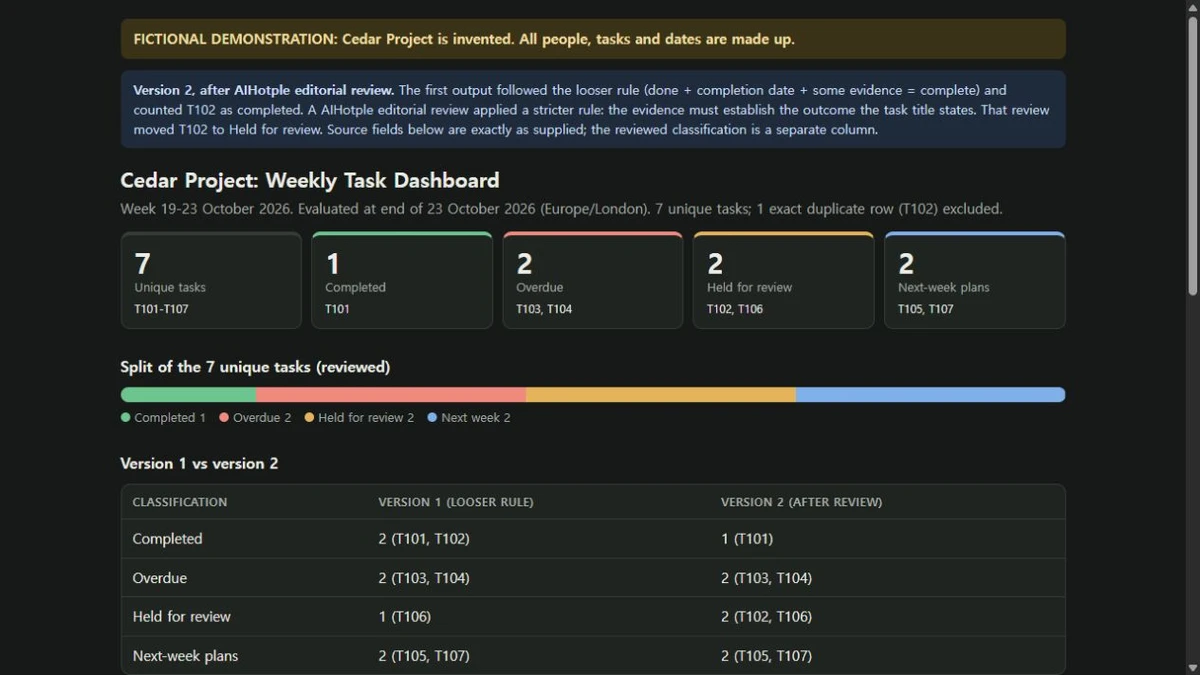
5. Make the next run repeatable before scheduling it
Save a short, reusable reporting brief with the input location, reporting timezone, date range, completion rule and output location. On the next manual run, add one deliberately late task and one ambiguous completion. Check that the assistant uses the intended snapshot rather than a stale file from a previous conversation.
If you want workplace shorthand or people mappings, add only the context the task needs and check where the plugin stores it. Our isolated example explicitly avoided global memory and did not test cross-session recall. Do not describe its fictional names as facts about your real colleagues.
For a real team report, keep unreviewed totals out of a manager-facing accomplishment claim. The source owner should resolve held items; the assistant can prepare questions and a draft. Sending the report to a colleague is another action, beyond producing a local file.
6. Add a schedule only when the manual result is reliable
Anthropic’s current documentation describes Scheduled in the sidebar and the /schedule entry point, with recurring tasks on paid plans. It says new scheduled runs execute remotely; older pre-6-October computer-based tasks may still run locally. Check the actual task type and accessible input location instead of assuming a local folder is available in a remote run.
A useful scheduled brief might ask for a reviewed Friday draft, with ambiguous completions kept in a separate list and no automatic sending. Confirm that the scheduled task can access the intended files, then inspect its first actual run before relying on it.
We did not create or trigger a Cowork schedule for this article, and did not test unattended delivery. The verified result is the manual plugin session and its reviewed files. This separation lets you learn the reporting pattern without leaving an unwanted recurring job or connecting private work accounts.
Continue this workflow
Interrupted by a limit? Separate account usage from conversation capacity →
Connect project notes through Notion MCP and review a source-linked status report →
Sources & verification
On 26 October 2026, an existing paid Claude account had Anthropic’s Productivity 1.3.1 plugin enabled. We launched its start command through the plugin page in the unified Claude web experience, supplied only eight fictional rows and observed task-management skill use. The session displayed Sonnet 5.5 High. Actual TASKS.md, Markdown report and HTML dashboard downloads were checked. A second bounded request moved one weakly supported completion into review, producing 1 completed, 2 overdue, 2 held and 2 next-week tasks across 7 unique IDs. No connector read, external message, scheduled run or global-memory update was requested or tested. This is not proof of persistence across future Cowork sessions.
- Anthropic · Productivity plugin
- Anthropic · Productivity source
- Anthropic · Use plugins in Claude
- Anthropic · Schedule recurring tasks
Sources checked: 2026.10.26