- Check the Calendar invite list. Internal invitees are the documented audience for the recap.
- Tell outside guests their comments can be transcribed if your organization allows Claude on the call.
- Check Claude’s meeting page and any Google Drive recording separately.
Claude saves a transcript, a summary and descriptions of shared screens. Anthropic says Claude Meetings does not save audio. Internal invitees can see the meeting page and get a recap link. When outside guests are allowed, their words can still be transcribed even though they do not receive that page or email.
Files for this exercise
AIHotple example files and prompts. Try the exercise before substituting real work data.
What gets saved after the call?
Open the meeting in Claude to find the transcript and notes, including the summary and any action items. Docs, whiteboards, slides and other artifacts created during the call are attached to that meeting page. Someone with meeting access can also ask about the meeting in a regular Claude chat.
Anthropic says Claude keeps descriptions of shared screens and does not store meeting audio. Google Meet’s own Record feature can separately save a video recording in the organizer’s Google Drive. If your meeting uses both features, check both places and review access independently.
The public Meetings instructions give no specific retention period for the meeting page or transcript. Anthropic documents separate Enterprise retention controls for chats, projects and artifacts. Ask your organization owner how your workspace handles meeting records before relying on a deletion date.
Who can see the recap, transcript and chat?
Start from the calendar invite. Anthropic ties access and the recap email to people from the organization who are on the invite. A link posted in Google Meet can be visible to everyone in the call, while the Claude meeting page has its own access rules.
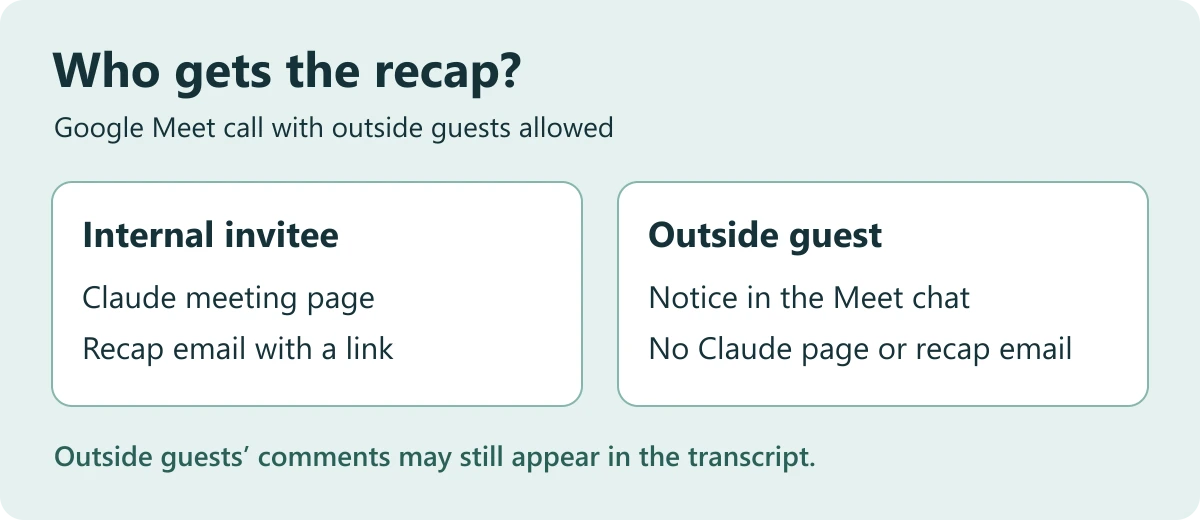
If Claude is allowed on a call with outside guests, it posts a notice in Meet but does not reply in that chat. Guests’ contributions can appear in the transcript and notes. The Claude page, its internal chat and the recap email stay on the organization side.
| Audience | What Anthropic says they get |
|---|---|
| Internal invitee | Meeting page and recap email. They can read the notes and edit artifacts Claude made. |
| Other colleague in the organization | Someone can share the meeting page with them internally. Check the page’s sharing before forwarding it. |
| Outside guest on an allowed call | They see the notice in Meet. They do not receive the Claude meeting page or recap email, although their words can appear in the transcript. |
| Anyone in the live Google Meet | They can see what Claude posts in the Meet chat. Claude’s separate meeting-page chat is internal. |
Check the settings before adding Claude
Claude Meetings is a Team and Enterprise beta. Anthropic lists Team as enabled by default and Enterprise as owner-enabled. Team allows external guests by default and Enterprise starts with internal-only meetings. Owners can change those defaults in Organization settings → Products → Claude Meetings (beta). Enterprise owners can also grant access by role. Some configurations, including zero data retention, customer-managed encryption keys and HIPAA-ready setups, are excluded from the beta.
Use Claude → Meetings → Connect Google Calendar, then select the event and choose Add Claude. Your owner must first allow the Calendar connection. Ask everyone if they are comfortable with transcription before adding Claude. For a first test, use one fictional event and add it manually. You can review Auto-join and Meetings with external guests under Settings → Capabilities → Meetings.
Claude appears as a participant and posts a notice when it joins. If outside guests are disallowed, Claude stays out when one is invited and leaves if one joins mid-call. During the call, you can ask Claude to pause or remove it through the meeting page. An owner can also control whether Claude can use members’ connectors in meetings.
Verify with a short fictional meeting
Use the fictional script in the download with a consenting internal colleague. Add an outside tester only if the organization allows guests. Say, “Avery will send the draft agenda by Thursday.” After the call, check the sentence in the transcript and confirm the action item has the right owner and deadline.
Ask each consenting tester to check their own view. Record who received a recap and who could open the meeting page. For an outside tester, check that they saw the in-call notice and compare that with the absence of a Claude recap. Avoid forwarding the page or enabling connected tools during this check so they do not change the result.
Sources & verification
The Meetings controls were unavailable in our account. The access rules and setup steps below come from official documentation checked on November 16, 2026. We did not run a live call, observe email delivery or test access by opening a link as a guest.
- Anthropic’s Claude Meetings announcement
- Claude Meetings setup, sharing and guest rules
- Google Meet’s own recording and Drive storage rules
- Anthropic’s Enterprise retention controls
Sources checked: 2026.11.16