- Agree on five questions and source-based answers before requesting the screen.
- Open the reference HTML from the ZIP to inspect the target behavior.
- Current Share controls differ from legacy Publish controls; verify access in your account.
Current Artifacts, Design and sharing documentation reviewed. AIHotple authored and browser-tested the supplied reference HTML. It is not a Claude-generated output or a product session screenshot.
Files for this exercise
AIHotple example files and prompts. Try the exercise before substituting real work data.
Put recurring answers in a small screen
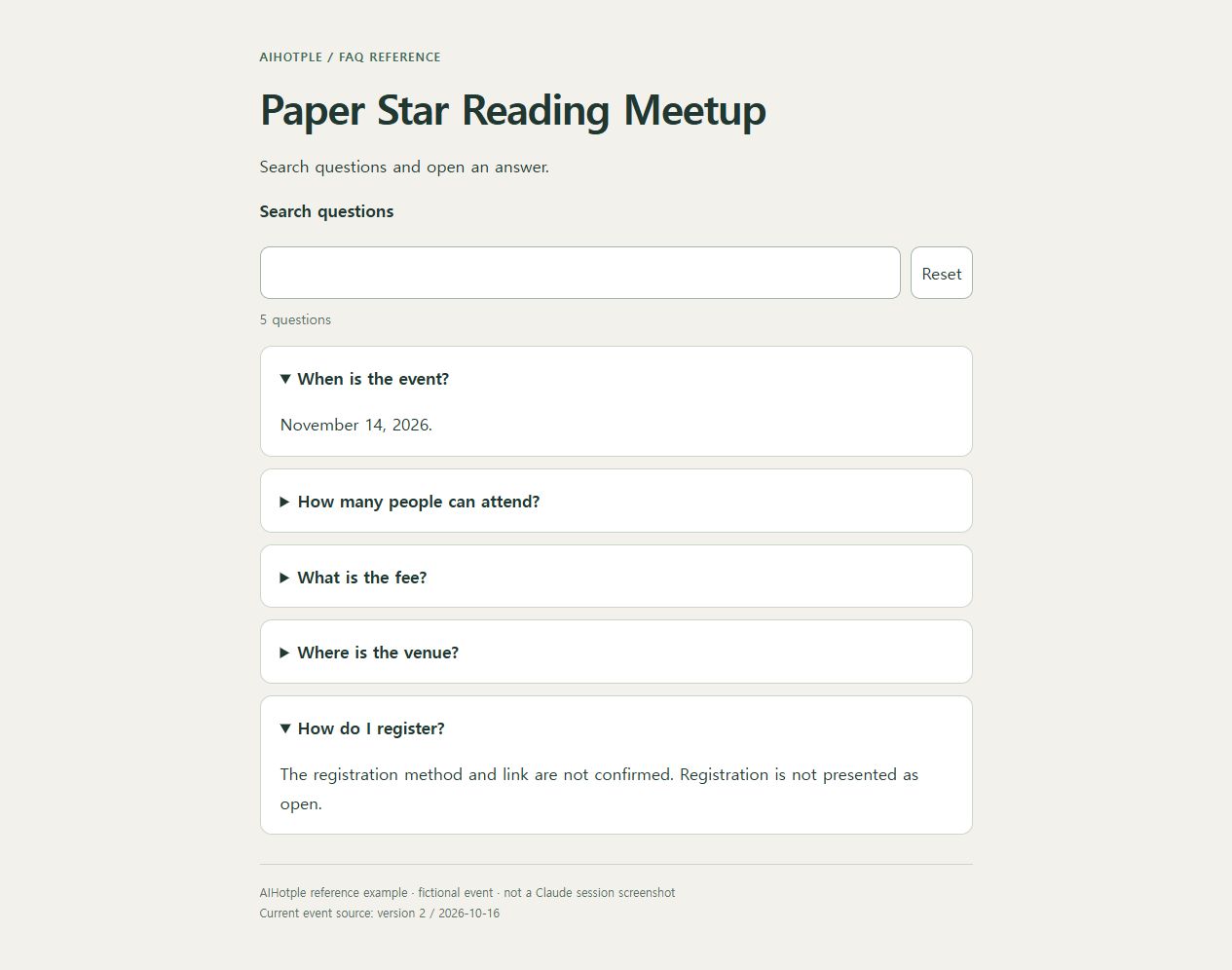
If attendees repeatedly ask about the date, fee or venue, a searchable FAQ can put those answers in one place. Our example uses five fixed questions: date, capacity, fee, venue and registration.
Search finds existing answers; it is not an AI chatbot or a booking system. A small scope makes the content and interaction easier to check.
1. Try the reference first
Extract the ZIP and open faq-example-en.html in a browser. Select a question, search for November, enter an unmatched query, then Reset. These local files need no login.
AIHotple authored this reference. It shows target behavior, not a promise that Claude will generate identical code. The ZIP includes the event source too.
2. Start in the current artifact interface
Open a new Claude conversation or start from Artifacts. Current documentation describes requesting a deliverable in chat or choosing a template from Output. Design can be a starting point for a one-page screen; follow the route shown in your account.
Official guidance requires Cloud code execution and file creation under Settings → Capabilities; organization settings can control availability. This exercise requires no external apps or MCP connection.
3. Attach the source and specify behavior
Attach event-current-en.txt from the ZIP, or confirm the same source is present in your project. Start by agreeing on an answer table before asking for the interface. The source leaves venue and registration unresolved.
Use event-current-en.txt to plan a FAQ artifact for the Paper Star Reading Meetup. First show a table of five questions and answers: date, capacity, fee, venue and registration. Leave unsupported details unconfirmed. After I approve the answers, build a one-page screen with search across questions and answers, keyboard-usable expandable answers, a no-results message and Reset. Keep it readable on a phone. Add no invented venue, registration link, booking, payment or AI chat.4. Approve content, then request the screen
Check November 14, capacity 20, free entry and unconfirmed venue and registration, then ask Claude to build the screen. Correct content before continuing if needed.
If you get only an explanation, ask for an artifact you can actually interact with. Request a standalone HTML export if that is useful, then inspect the export option available for the result in your account.
5. Revise one detail and test behavior
For example, ask for larger answer text and more spacing while preserving the date, capacity, fee and unresolved labels. Recheck facts after the visual revision.
We checked the following behavior in our reference implementation. Use these actions to inspect your generated screen too. Describe a specific failure if an empty result has no explanation or Reset does not restore the questions.
| Action | Reference result |
|---|---|
| Search November | One matching question |
| Enter an unmatched query | No-results message |
| Select Reset | Five questions restored |
| Open a question | Its answer appears; unresolved details remain unresolved |
6. Check who can open a shared result
Current artifacts start private. Share lets you choose access and copy a link, with options depending on plan, organization and artifact type. Sharing settings are handled on web or desktop rather than mobile.
Publish in an older tutorial may describe a legacy artifact. Check the current official sharing rules and the actual recipient experience, including any Claude account requirement. We did not create a Claude sharing link for this exercise.
Replace the sample with five real recurring questions
Try class preparation, meetup information or a small set of product instructions. Update the source and answers, then repeat search, Reset and expansion checks.
The useful first result is a small screen a reader can operate. Real registration or automated support requires a separate design for data and operations.
Sources & verification
Current Artifacts, Design and sharing documentation reviewed. AIHotple authored and browser-tested the supplied reference HTML. It is not a Claude-generated output or a product session screenshot.
- Claude · Create and work with artifacts
- Claude · Get started with Design
- Claude · Share artifacts
- Claude · Upload files
Sources checked: 2026.10.16