- Separate durable decision rules from current, dated evidence.
- A usable plan must expose conflicting appointments and exclude already-completed work.
- Test a change and verify arithmetic before granting an assistant any external actions.
This English exercise uses a private rules-and-reference plugin with fictional data. It checks a workday plan; it does not read a live inbox/calendar, change events, send replies or enable reminders. Plugin creation depends on account permissions.
Files for this exercise
AIHotple example files and prompts. Try the exercise before substituting real work data.
Start with a real job for the assistant
“Be my assistant” leaves too many decisions unstated. This example has one job: turn current appointments and incomplete tasks into a reviewable workday plan, then revise it when a task is completed and a call is added.
The assistant has rules and a bundled fictional reference file, with no external apps. A saved assistant is not a live calendar connection. First check whether it can read the evidence and reason within your limits; account actions are a separate layer.
1. Prepare current evidence and durable rules separately
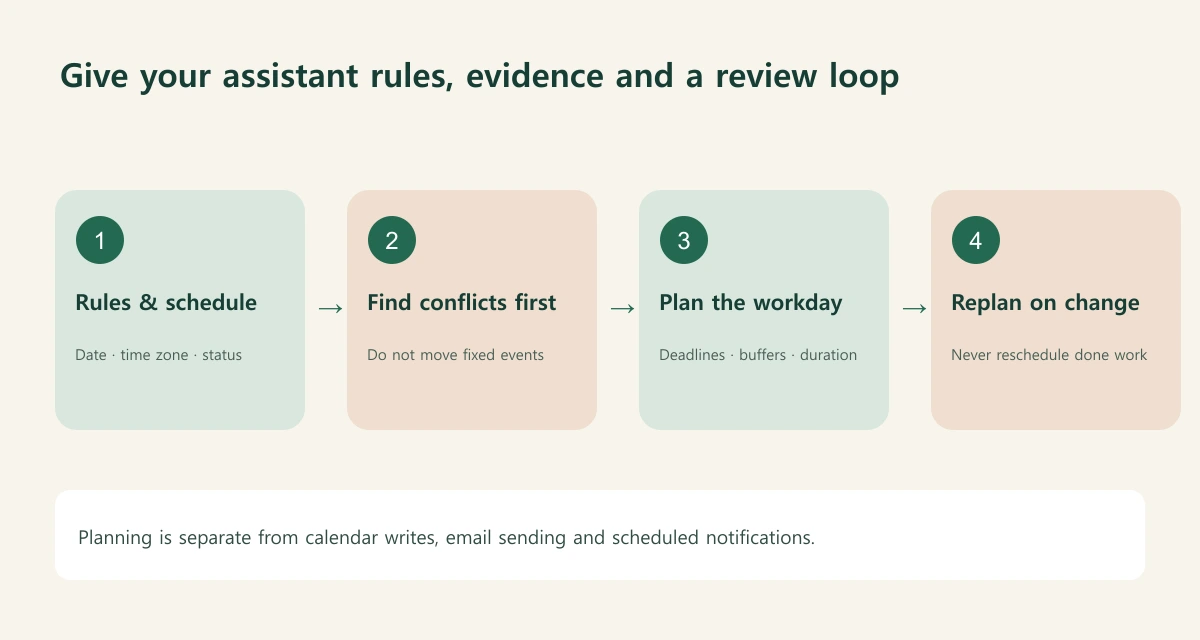
The practice file uses Thursday, October 22, 2026 in Europe/London. Work runs 09:00–18:00, with lunch 12:00–13:00 and ten-minute buffers around fixed events. The first plan starts at 09:00. London is UTC+1 on this example date; do not hard-code that offset for the rest of the year.
E1 is 10:00–11:00 and E2 is 10:30–11:00, creating an unresolved thirty-minute conflict. E3 includes travel from 15:00–16:00. T1 needs 90 minutes by 14:00; T2 needs 15 by 11:30; T3 needs 45 by 17:00; T4 needs 30 with no hard deadline. T5 is already complete. The file also contains a later v2 change, which must not be applied to v1 prematurely.
| Rule | Required behavior |
|---|---|
| Date, zone and current time | Ask when missing; do not assume the machine clock |
| Fixed appointments | Report overlap; never silently move them |
| Lunch, travel and buffers | Remove from available time |
| Task duration and deadline | Preserve both; split only into allowed blocks |
| Completed tasks | Do not schedule again |
| External actions | None in this practice assistant |
2. Package the workflow or use the available creation chat
Open the English practice ZIP. It contains the rules, dated reference file and a small installable plugin archive. The package has one skill and its supporting reference; it declares no apps or MCP servers. Keep your own future version private if it contains personal work material.
For the conversational route, use a ChatGPT surface where Plugin Creator is available: start a creation chat, select Plugin Creator through the plugin picker, attach the rules and example, and describe the reusable task. Review its instructions, files and sharing audience before saving. Availability depends on workspace permissions. AIHotple’s tested instance was instead authored as this downloadable package and saved through the packaging tool.
If plugin creation is unavailable, attach the same rules and current evidence in an ordinary chat or project to test the reasoning. That is a fallback conversation, not proof of a saved reusable plugin. The important first check is whether the assistant actually reads the named source.
Check official creation steps and permissions ↗
Create a private planning-only plugin called Daily Work Planner. Use the attached rules and fictional workday reference as a bundled skill with a reference file. It must ask for missing date, time zone and current time; report fixed-event overlaps first; preserve deadlines and durations; protect lunch, travel and ten-minute buffers; exclude completed tasks; and replan stated changes only. Give it no external apps, mail, calendar, payment or notification actions. Verify the packaged reference path, show the private audience and let me test v1 and v2 before sharing anything.3. Open the saved assistant and test the conflicting day
In the saved plugin’s page, choose Try in chat. Ask it to read the bundled v1 reference and plan from 09:00 in Europe/London. Do not reattach the file on this first retrieval test. If it cannot read the reference, it should say so instead of inventing appointments. Verify the bundled relative path or provide the current evidence explicitly before continuing.
The actual English reply identified E1/E2 overlapping from 10:30 to 11:00 and left both fixed appointments unchanged. It scheduled T2 at 09:00–09:15 and T1 in 30-, 45- and 15-minute blocks, finishing at 13:15. T3 received 45 minutes, T4 30, and completed T5 received no slot. The 180 minutes of incomplete work fit, but the meeting conflict remained unresolved.
Do not confuse a task-fitting timetable with a conflict-free day. The assistant still needs you to decide which meeting can move. Planned finish times are estimates in the proposed timetable, not evidence that the work was completed.
Use only the bundled fictional workday v1 for October 22, 2026, Europe/London, starting 09:00. Read the reference file. Report the exact fixed-event conflict first, then a task timetable, per-task minute totals, deadline status and decisions still needed. Do not apply v2, move appointments or act in external accounts.4. Complete one task and add an unexpected call
Now apply v2: the current time is 09:15, T2 has just been completed, and a fixed customer call is added for 13:30–14:00. Keep T1’s 14:00 deadline and all other fixed events. Replanning must exclude elapsed 09:00–09:15 and must not schedule T2 again.
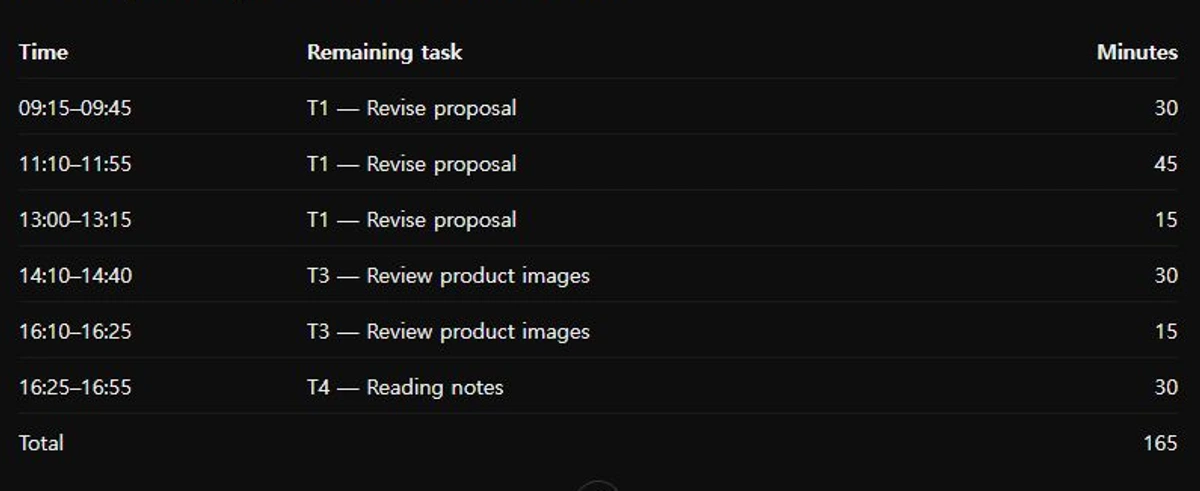
The second actual English response kept T1 finishing at 13:15. It moved T3 into 14:10–14:40 and 16:10–16:25, and T4 into 16:25–16:55. Remaining task totals were T1 90, T3 45 and T4 30: 165 minutes. The call’s protected block was 13:20–14:10, and the original thirty-minute E1/E2 conflict remained unresolved.
Apply only v2 from the reference. Current time is 09:15 and T2 is complete. Add the fixed 13:30–14:00 call with ten-minute buffers. Preserve all other appointments and T1’s 14:00 deadline. Replan remaining tasks only, exclude elapsed time, show per-task totals and keep unresolved conflicts visible. Do not perform external actions.5. Independently check the plan’s arithmetic
For every row, subtract start from end and compare it with the stated minutes. Add the rows for each task and check deadlines. Then inspect each row against lunch, fixed-event blocks and buffers. A task may be split only within available intervals; leftover fragments cannot be carried across an appointment.
In v2, available intervals are 09:15–09:50, 11:10–12:00, 13:00–13:20, 14:10–14:50 and 16:10–18:00: 255 raw minutes. Rounding each interval down to fifteen-minute capacity gives 30+45+15+30+105=225 minutes. We independently checked these totals and every scheduled row. The downloadable CSVs transcribe the actual replies for checking; they are not calendar exports.
A different valid run may choose different slots. Evaluate the constraints and totals rather than requiring one exact table. If work cannot fit, the assistant should identify the shortage and request a decision instead of creating extra time.
| Check | v1 | v2 |
|---|---|---|
| Current time | 09:00 | 09:15 |
| Incomplete task minutes | 180 | 165 |
| Raw available minutes | 320 | 255 |
| 15-minute usable capacity | 300 | 225 |
| T1 planned finish | 13:15 | 13:15 |
| Fixed-event overlap | 30 minutes, unresolved | 30 minutes, unresolved |
6. Keep the current version explicit when reusing it
Durable rules belong in the reusable skill; today’s changing appointments need a date, time zone, version and current time. If you replace a reference, verify which version is active in a fresh chat. Do not assume that an old conversation’s completed tasks or an uploaded file are synchronized with a real calendar.
The earlier Korean exercise used a migrated GPT and encountered unreadable reference material after migration. This English exercise used a newly packaged skill with an explicit bundled path, and its first call retrieved the bundled example facts and the second replanned in the same chat without reattachment. That result does not establish that all migrations or file types behave the same way.
What a scheduled morning assistant would need next
This assistant responds when called. A morning briefing would also need a supported schedule, current authorized data, a known execution identity, failure reporting and a way to stop it. Saving the planning plugin does not enable those features.
Begin by checking fictional evidence, then consider a narrowly scoped read-only connection, and only later reviewable actions. This exercise did not access real mail or calendars, send a reply, move an event, call a customer or enable a reminder.
Check scheduled execution environments and controls ↗
Understand state, duplicates and stopping a recurring workflow →
Sources & verification
On October 21, 2026, AIHotple packaged an English skill and bundled fictional reference file, saved the package privately through Plugin Creator, and invoked it in ChatGPT web. The first actual English request retrieved the bundled reference facts and produced a v1 plan; a second request in the same chat applied v2 without reattachment. AIHotple independently checked task minutes, deadlines, lunch, buffers, elapsed time and Europe/London’s UTC+1 offset for October 22, 2026. No connected apps, real-account data, calendar writes, sends or scheduled notifications were used. The conversational creation prompt below is a documented reader workflow; the tested package was authored by AIHotple and saved with the packaging tool, not generated from that prompt.
- OpenAI · Projects and shared materials
- OpenAI · Migrate custom GPT workflows
- OpenAI · Plugins and reusable workflows
- OpenAI · Automations
- OpenAI · Build plugins and review creation permissions
Sources checked: 2026.10.21