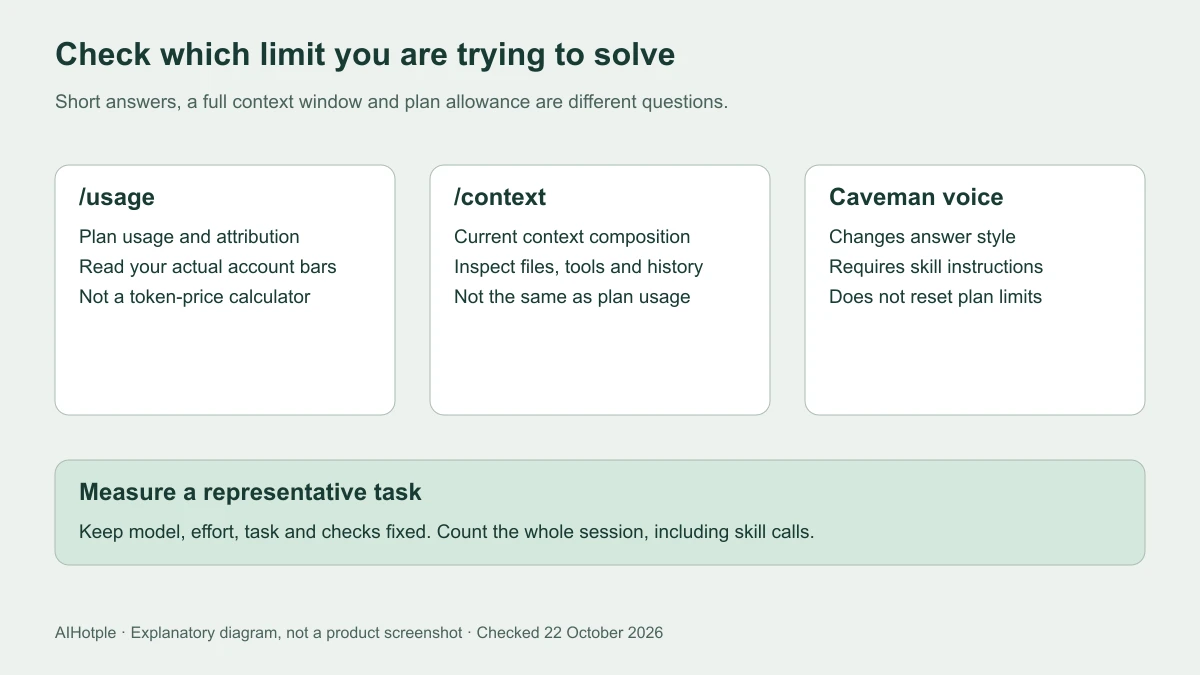
- Use /usage for account usage and /context for what occupies the current conversation.
- Measure the whole session, including skill/tool turns, instead of counting the final answer’s characters.
- Keep the model, effort, task and correctness checks fixed when testing a change.
Start with /usage and /context, then target the material your task does not need. Our usage inspector is offline; the 18-run comparison measures a specific code exercise, not guaranteed subscription savings.
Files for this exercise
AIHotple example files and prompts. Try the exercise before substituting real work data.
How to reduce Claude Code token usage: start with the right check
Start with /usage to inspect the session and any account allowance shown, then /context to see what occupies the current conversation. Reduce unnecessary files, repeated logs and unrelated history before testing a writing-style skill. A shorter reply can help readability, but it does not by itself prove a smaller bill or a longer subscription window.
This walkthrough separates three problems: reaching an account limit, filling one conversation, and sending more material than a small task needs. It includes an offline usage inspector and links to our actual log-reduction and instruction-file exercises. You can begin with the checks below without installing Caveman.
Write one sentence before changing anything: “I want less narration”, “I keep reaching my plan limit”, or “this conversation has almost filled its context”. Each needs a different check. The worksheet in the ZIP keeps those questions separate, so a shorter-looking reply does not become accidental evidence for a cheaper session.
1. Check /usage and /context before changing settings
In an interactive Claude Code session, type /usage and press Enter. Distinguish the Session token/cost estimate from any subscription allowance and reset information shown for your sign-in. Current official documentation places session statistics and subscriber plan bars on the usage screen; fields vary with version and account.
Then type /context to inspect the current conversation. Note whether the space is mainly history, files, project instructions or tool definitions. Record the model and effort too. Our 22 October native CLI reported these commands as available, but our measured comparison used structured print-mode results; we did not record these interactive account panels.
If /usage says Showing last-known usage or reports a rate-limited usage request, read the timestamp and retry guidance before drawing a conclusion. Official documentation distinguishes a failed request to fetch the meter from a limit on the coding work itself. The stale-display and retry procedures here are documentation-based, not an error we reproduced.
A nearly full context does not mean that the same percentage of a subscription window has been used. The Session cost estimate is also not a Pro or Max subscription invoice. For API-billed usage, reconcile charges with the provider or Console billing records.
| Question | Evidence to inspect | Avoid this conclusion |
|---|---|---|
| Is an account window exhausted? | The signed-in usage meter and exact limit message | A context percentage proves an account limit |
| What fills this conversation? | /context and the material read into it | A full context equals the same percentage of a plan |
| Did one change reduce usage? | Matching task, whole-session usage and correctness checks | A shorter final reply proves bill savings |
- Open /usage
Record the session figures, the account allowance shown, reset information and any last-known-data notice separately.
- Open /context
Identify which current conversation components occupy space. Do not read this percentage as your plan balance.
- Choose one change
Narrow a file read, shorten a repetitive log, or separate an unrelated task. Keep the model and task fixed when comparing.
2. Reduce repeated logs and always-loaded instructions
If the context view is dominated by material you no longer need, separate the next unrelated task into a fresh conversation. Save the decisions, current file paths and unfinished checks first. /clear starts fresh; /compact creates a summary when you want continuity. Compaction also performs work to read and summarize context, so repeatedly compacting is not a free reset.
For a recurring task, make the initial request specific: identify the file or function, give the exact failing behavior and ask for the smallest relevant investigation. If a log is enormous, supply the failing section and enough surrounding lines to understand it. Do not remove the error code or the condition that makes the failure reproducible.
Keep always-loaded project instructions focused on rules needed every time. Put occasional, detailed workflows in skills that can be loaded when relevant. These are official context-management recommendations; our short response experiment did not measure the savings of reorganizing a real repository.
Inspect the expiry check in this function only. Explain the cause in at most three bullets, return the corrected function, and state which checks you actually ran. Preserve exact operators, error messages and unresolved risks. Ask before expanding the investigation.Follow the actual 788-line log to 72-line failure brief →
Keep six core rules while moving an occasional checklist into a skill →
3. Read a real usage record without confusing cached input and output
Download the usage ZIP, extract it and run the command below with Node.js 24.x. This is an offline inspector: it reads the supplied example JSON and makes no AI call. We checked it with Node 24.20.0. It also accepts a JSON result containing a usage object or an array of parsed events with a result event.
Our first baseline expiry response reported 2 uncached input tokens, 3,125 cache-creation tokens, 2,549 cache-read tokens and 369 output tokens. A small input_tokens number therefore does not mean the model saw only two tokens. The caching documentation says cache creation and reads are reported in separate fields.
The inspector’s input sum is 5,676 across the reported requests. It is not a count of unique words in one context window. Cached and uncached categories also have different accounting rules; do not multiply that sum by one assumed price or equate it with a plan meter.
| Native usage field | Actual example | Meaning in this record |
|---|---|---|
| input_tokens | 2 | Uncached input |
| cache_creation_input_tokens | 3,125 | Input written to cache |
| cache_read_input_tokens | 2,549 | Input read from cache |
| output_tokens | 369 | Reported session output |
node inspect-usage.mjs example-usage.json4. Test one intervention on a task you can check
Start with a normal request, then try the same requirements with “Answer concisely, keeping every required technical detail.” Only after that consider a skill. Preserve complete code, exact commands and a truthful statement of unverified steps in every condition. Otherwise, fewer tokens may simply mean less work was delivered.
We ran three small JavaScript fixes twice under each of those conditions, with and without Caveman. The final Caveman answers contained fewer characters, but their combined whole-session output used 2,900 tokens against the baseline’s 2,696. The concise-request condition used 2,508. One Caveman run called the skill twice; it remains in those totals.
That result does not establish that Caveman always increases usage. It shows why you should measure your own workload and include the loading and tool turns. For these short tasks, the simple concise request was the useful first option. The full comparison explains the protocol, the unusual run and the code checks.
Read the full 18-run comparison and download every response →
5. Decide whether you need a voice skill or a different tool
The Caveman project now describes several components. Its voice skill changes how prose is written. The separately configured proxy can compress inputs or route models. Those are different interventions with different setup and data paths; installing a voice file is not evidence that routing, input compression or a usage reset is active.
If the only problem is verbose explanations, keep the simplest request that produces a readable, complete result. If you prefer Caveman’s style, try the project-local installation below and verify that it actually loads. If the problem is account allowance, use the account’s own usage view and representative repeated tasks before making any savings claim.
Install the voice skill in one practice project and verify removal →
Common Claude Code usage questions
Use the diagnosis to choose a small intervention you can verify. The table below separates documented product behavior from the bounded experiments reported in this series. It does not promise a fixed token reduction or extra hours of account access.
| Question | Practical answer |
|---|---|
| Does /clear reset my subscription limit? | No. A fresh session clears conversation state; it does not renew the account allowance. Preserve the handoff facts you still need. |
| Why are input_tokens tiny when the task read a lot? | Cache creation and cache reads have separate fields. Use the supplied inspector to view all four reported categories. |
| Should I run /compact after every task? | Use a summary when continuity matters. Compaction itself is work; do not treat repeated summaries as a free account reset. |
| Will Caveman save tokens? | Our 18 short code-response runs did not establish a universal saving. The concise-request condition used less total output than Caveman in that specific comparison. |
| What should a smaller test log retain? | The failed test, exact expected and actual values, error location and reproduction command. Follow the linked log example before cutting useful evidence. |
Sources & verification
Official commands checked on 22 October 2026. Our Windows Claude Code 2.1.301 tests collected native print-mode usage events; interactive /usage and /context screens were not recorded. The accompanying comparison used 18 English code-response runs with the project-local Caveman v4.0.1 voice skill. No proxy, model routing or plan-meter experiment was performed. English explanation and official cost/command references rechecked on 25 October 2026; the original experiments were not rerun as a new account-limit test.
- Claude Code · Manage costs and usage
- Claude · Prompt caching and usage fields
- Caveman · Pinned v4.0.1 README
- Claude Code · Run programmatically
- Claude Code · interactive command reference
Sources checked: 2026.10.25