
- Check the distribution channel as well as the extension ID.
- Record the historical install or update time with its time zone.
- Use Cursor’s current instructions and preserve evidence before cleanup.
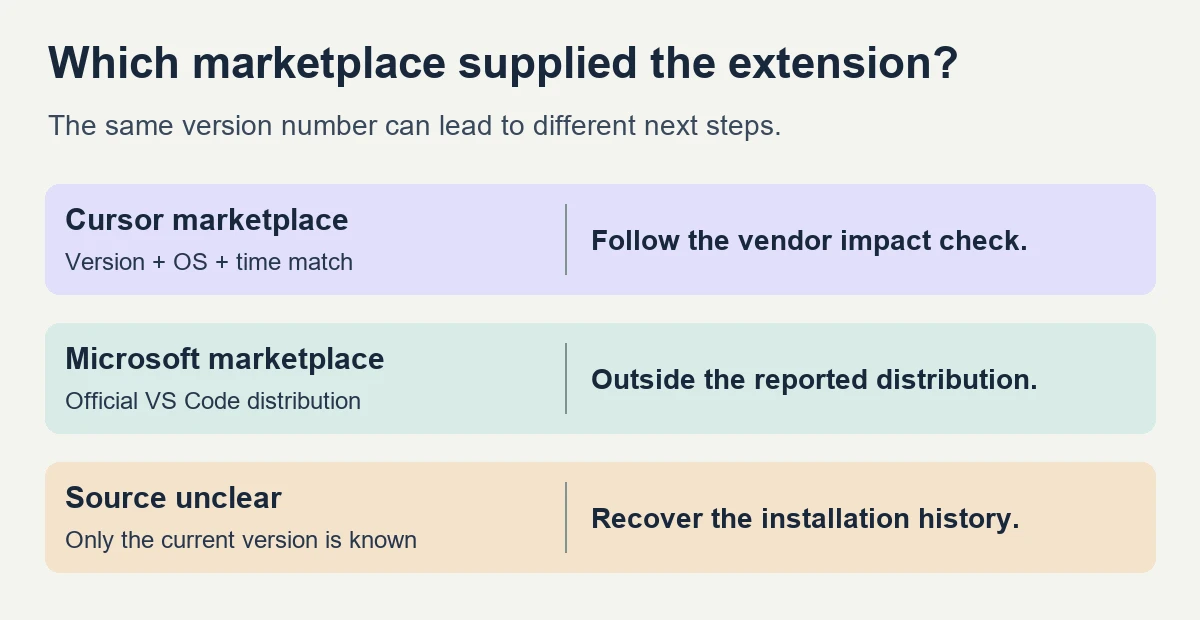
Start with where the extension came from. Cursor identified two modified packages served to Windows and macOS users through its own marketplace on October 29, 2026. A matching extension name alone tells you very little.
Files for this exercise
AIHotple example files and prompts. Try the exercise before substituting real work data.
Check these four facts before you change anything
In the editor where you used Claude Code, open Extensions and find the installed Claude Code entry. Record the editor, extension identifier and version displayed on the details page. Then find out how it was installed. A manually installed VSIX needs its own provenance. A marketplace name embedded in a filename is weak evidence.
Compare your records with the window below. Auto-updates count. If you only know today’s version, look for install history in your organization’s software inventory or endpoint logs. On a managed machine, ask IT to check the historical record before uninstalling anything.
| Field | What Cursor reported |
|---|---|
| Distribution | Cursor VS Code Extension Marketplace |
| Package | Anthropic.claude-code, versions 2.1.312 and 2.1.313 |
| Platform | Windows or macOS |
| Install or update window | October 29, 2026, about 2:27 a.m.–1:35 p.m. Pacific daylight time (09:27–20:35 UTC) |
Three similar-looking installations, three different next steps
Imagine three developers comparing notes. Each remembers using Claude Code that week. Only one has a record that matches all four details.
| Fictional installation record | What to do |
|---|---|
| Windows • Cursor marketplace • 2.1.313 • Oct 29 at 16:10 UTC | Matches the reported distribution window. Use the vendor impact check and involve the endpoint owner. |
| macOS • official Microsoft VS Code Marketplace • same version and hour | Anthropic staff confirmed that this marketplace was outside this incident. Keep the source record. |
| Mac • Cursor today • updated version • October history missing | Exposure is unresolved. Record what is known and request historical install or endpoint evidence. |
What the official check looks for
Cursor describes an attempt to establish persistent remote access over SSH. Its first platform-specific check looks for an added SSH key marked svc-telemetry. The advisory also lists package hashes and separate signs of persistence. An updated editor or an ordinary-looking Extensions screen cannot tell you what ran on October 29.
Open the advisory on a trusted device and go to “Check whether you are impacted.” Choose your operating system. A matching marker warrants immediate investigation. If the package history matches but the marker is missing, keep both findings and have the relevant installation, process and network records reviewed. A missing file is also worth recording as missing.
If you find evidence, hand off the right information
For a work computer, contact the incident-response owner through a trusted device. Record the host identifier privately, the time zone, the package source and which indicator matched. Avoid pasting credentials, private keys or entire security logs into a public chat. Use the downloadable worksheet to separate observations from missing evidence.
Cursor advises isolating machines that show execution or backdoor evidence. Its platform-specific remediation covers changes that can remain after the extension is removed. The response team should assess rebuilding the host and rotate exposed credentials and sessions from a trusted system. Use the scripts linked in the maintained vendor notice and follow your organization’s incident procedure.
Sources & verification
Based on Cursor’s October 29 advisory, its October 30 clarification and statements by Anthropic staff. The inventory examples below are fictional. We did not install a suspect package, scan a reader’s computer or test malware removal.
- Cursor security advisory and platform-specific checks
- Anthropic staff clarify the distribution channel on Hacker News
Sources checked: 2026.11.07