- Check authorization on the server for both reads and writes.
- Treat anything returned to the browser as public, including configuration.
- Retest a named failure and document what the exercise does not cover.
The read-only Agent Skills audit found missing access checks, weak input handling and a fake-key exposure pattern. The same 14 HTTP checks went from 4 passing in Before mode to 14 passing in After mode.
Files for this exercise
AIHotple example files and prompts. Try the exercise before substituting real work data.
Begin with the data an unauthorized caller must not get
A login-looking screen is not evidence that a server protects its records. Our fictional Cedar Desk server has two requests: Alice owns R-104 and Bob owns R-105. Before mode returns either record without requiring a fixture session and accepts a note from an unrelated caller. The UI can look ordinary while the server boundary is missing.
We asked Agent Skills’ security-and-hardening workflow to inspect the source without editing it. The response pointed to the skipped identity and ownership checks, the unvalidated note, the stack trace returned by an error path, and a fake providerKey exposed in client configuration. That gave us testable findings rather than a generic list of security advice.
The exercise intentionally separates identity from authorization. The browser’s fixture chooser supplies well-known Alice or Bob tokens so you can test ownership decisions. Anybody can choose either fixture. That is not a real login system, and the server must remain a local teaching tool. A production app needs an independently trustworthy session or identity provider before an ownership check means anything.
1. Read the small threat model before running the lab
The protected asset is a request’s title and internal note. The trust boundaries are an incoming HTTP request, the supplied session cookie, the selected record identifier and the JSON body. The unwanted actions are reading someone else’s request or changing its note. Keeping the scope this small makes an audit finding possible to verify.
Download and extract the security ZIP. It contains server.mjs, index.html, client.mjs, style.css and test.mjs in one security-lab folder, plus the instructions and review material. Use a current Node.js release. The server has no third-party runtime dependency and binds only to 127.0.0.1.
Start the corrected mode first using the command below. It opens on port 8592. The optional --before mode uses port 8591 and deliberately skips controls; use it only with this fictional local example. Do not publish either mode as a customer-facing app or add real credentials to make the tutorial feel realistic.
node security-lab/server.mjs
# Open http://127.0.0.1:8592/

# Optional, intentional Before behavior in a separate terminal:
node security-lab/server.mjs --before
# Open http://127.0.0.1:8591/
2. Ask for source evidence and a minimal test plan
Load the complete Agent Skills plugin, then send the request below from the extracted practice root. Ask the assistant to identify the boundary, the affected file and the condition that skips a check. Do not ask it to scan an unrelated public site. A source review of files you own is enough for this exercise.
Our Claude Code invocation read server.mjs and client.mjs. It correctly identified that before=true bypasses the missing-session gate and the owner comparison. It also recognized that the public providerKey value was deliberately fake, so there was no real key to rotate. The risk pattern still matters: a genuine credential in a browser response would be exposed.
Keep findings separate from repairs. The Before and After branches in the download are our original teaching implementations; we did not ask the assistant to modify production authentication or describe its review as an autonomous hardening run. We verified the stated failures with a separate HTTP test runner.
/agent-skills:security-and-hardening Audit only security-lab/server.mjs and client.mjs. Identify missing authorization, unsafe input acceptance and browser-exposed configuration. Cite file and line evidence, distinguish before=true from before=false, and explain why fixture tokens are not production authentication. Do not edit, scan external targets, use real secrets or claim tests you have not run.3. Check access through the server, not by hiding a button
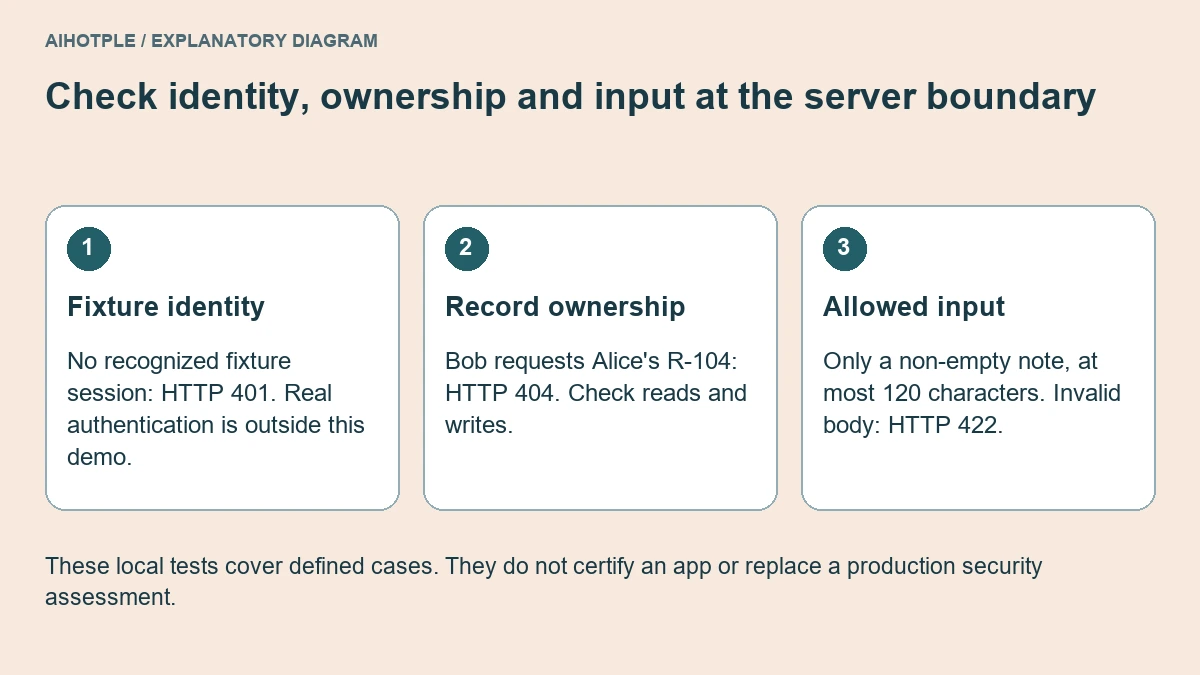
A fresh page resets the fixture cookie to match the visible Signed out chooser; we also checked that behavior after a prior Alice run. In the corrected UI, leave Fixture identity at Signed out and click Load request for R-104. The result should be HTTP 401. Then choose Bob fixture while keeping R-104 selected and click Load request again. The result becomes HTTP 404: the record is not returned to that fixture identity.
Choose Alice fixture and load R-104. You should now see HTTP 200 and Alice’s fictional record. The important comparison is the same record under different identity conditions. A frontend that simply hides R-104 from Bob would not protect an API request made outside that screen.
Our HTTP cases also checked writes. Bob could not overwrite Alice’s note in After mode, and an arbitrary x-demo-user header did not substitute for the expected fixture session. The server checked the record’s owner before reading or writing it. Using 404 for a cross-owner request avoids confirming the record’s existence in this small example; the access decision itself is the essential control.
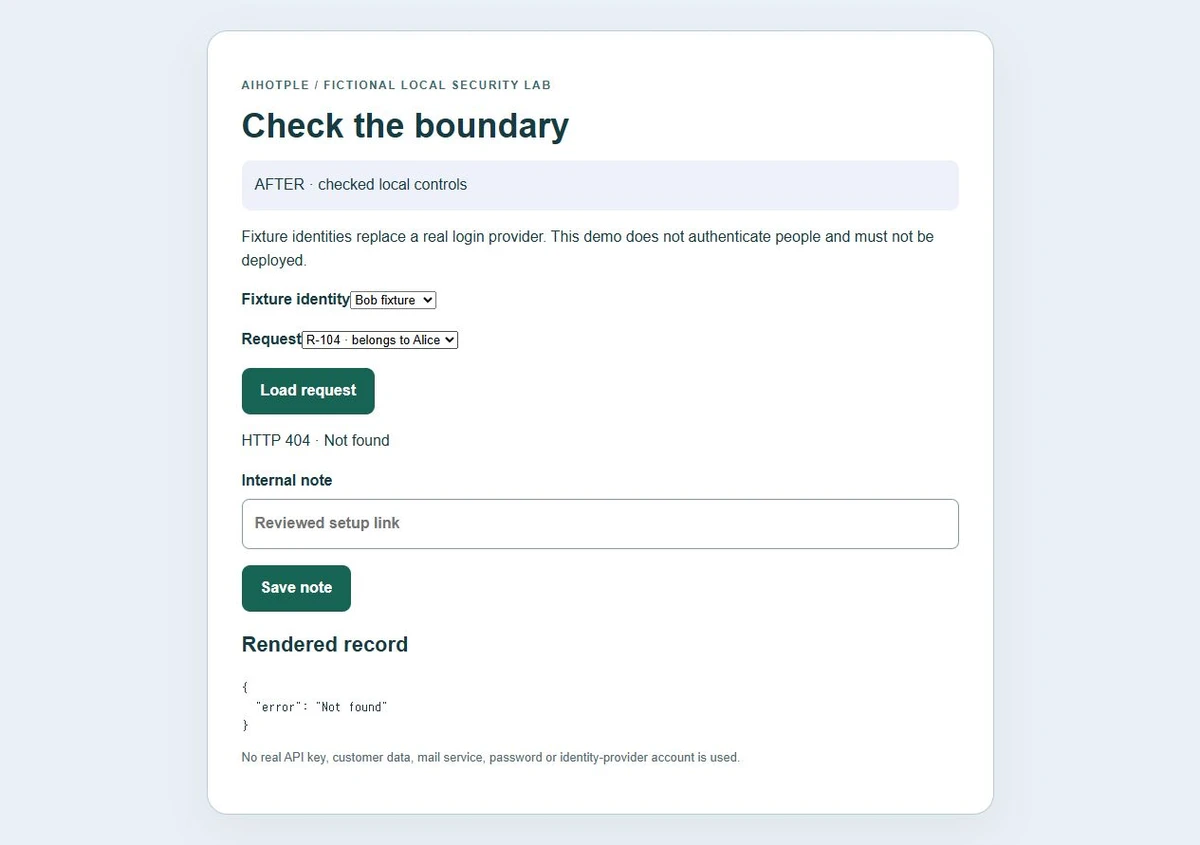
- Signed out → Load request
R-104 should return HTTP 401 without a fixture session.
- Bob fixture → R-104 → Load request
The corrected server should return HTTP 404 and no record body.
- Alice fixture → R-104 → Load request
The intended owner fixture should receive HTTP 200.
4. Validate the body, then inspect what the browser receives
With Alice selected, submit an empty Internal note. The corrected server returns HTTP 422. Its accepted shape is one field called note, containing a non-empty string of at most 120 characters after trimming. The HTTP tests also checked an oversized string, a non-string value and an extra ownership field. Validation is enforced on the server rather than relying on the form’s maxlength attribute.
A malformed JSON body receives HTTP 400, and a body above the 4,096-byte teaching limit receives HTTP 413. These cases were common controls in both modes and therefore already passed before the access and schema fixes. Before also accepted a body containing an extra owner field but did not assign that field to the record. Rejecting that field tightens the request contract; our test does not claim that it demonstrated an ownership-reassignment exploit.
Open the source route for /client-config.json. Before mode returns providerKey with the value DEMO_ONLY_NOT_A_REAL_API_KEY. After mode returns only a fictional-lab mode label. The fake string illustrates where a real secret would leak; it is not a usable provider credential. In an actual incident involving a real exposed key, removing the field would not replace revoking or rotating that credential.
The UI renders returned data through textContent. We saved the benign text <b>Reviewed setup link</b> and confirmed that the angle brackets remained literal text, with no b element created inside the result panel. That checks this rendering path; it is not an exhaustive XSS assessment of an entire application.
5. Run the same 14 HTTP checks before and after
Stop any foreground server if you no longer need its UI, then run the test command below from the extracted root. The runner starts each mode on an operating-system-assigned loopback port, exercises the same cases, closes the server and prints the outcomes. It does not contact an external target.
Our Before mode met 4 of the 14 expected outcomes and failed 10. After mode met all 14. The four unchanged passes were a valid own-record read, a valid note, malformed-JSON rejection and the request-size cap. The improvements covered unauthorized reads and writes, cross-owner access, invalid note shapes and removal of the fake-key field.
Read individual outcomes rather than treating the passing count as a security score. Ten of fourteen failures in an intentionally incomplete demo does not estimate the risk of another app. A server can pass this suite while still having a vulnerable feature the suite never exercises.
| Case | Before | After |
|---|---|---|
| Signed-out read or write | Allowed | 401 |
| Bob accesses Alice’s record | Allowed | 404 |
| Blank, long or non-string note | Accepted | 422 |
| Unknown ownership field in body | Accepted request | 422 |
| Public providerKey field | Present; fake value | Absent |
| Valid own read and note | 200 | 200 |
| Malformed JSON / oversized body | 400 / 413 | 400 / 413 |
node security-lab/test.mjs6. Turn findings into a release decision
For your own application, replace the fixture assumption with evidence from its real authentication design: who issues sessions, how the server validates them, how they expire and whether the authorization rule is enforced on every relevant request. A browser-controlled identity selector must never become the security boundary.
This local example does not implement production login, password handling, session issuance, CSRF defenses, persistent database policies, operational rate limits or a deployment review. The audit response called out those limits. Even the corrected mode remains a teaching fixture, not a ready-to-deploy login template.
Create a short release list with each unresolved issue, its affected feature, a way to reproduce it and the person responsible for the decision. Re-run the relevant failure after a repair and keep the positive path working. If authorization or a real exposed secret is unresolved, a reassuring AI summary is not a reason to launch.
The useful output is a traceable chain: a source finding, an observed failure, a bounded change, a repeated check and a clear statement of remaining scope. That is more actionable than either “AI says secure” or an unactionable page of every possible security concern.
Sources & verification
Agent Skills 0.6.13 security-and-hardening invoked in Claude Code 2.1.310 on 25 October 2026. The assistant inspected source only and did not execute scans or repairs. AIHotple authored both teaching modes and independently ran 14 HTTP cases against each local server plus six browser checks on the corrected UI. The known fixture tokens stand in for a verified identity provider; they are not secure authentication. The fake provider key is not a credential. No third-party target, live login, personal data, payment flow, production server or paid service was tested; these checks do not certify security.
- Agent Skills · tested release 0.6.13
- Agent Skills · security and hardening
- OWASP · authorization checks
- OWASP · input validation
Sources checked: 2026.10.25