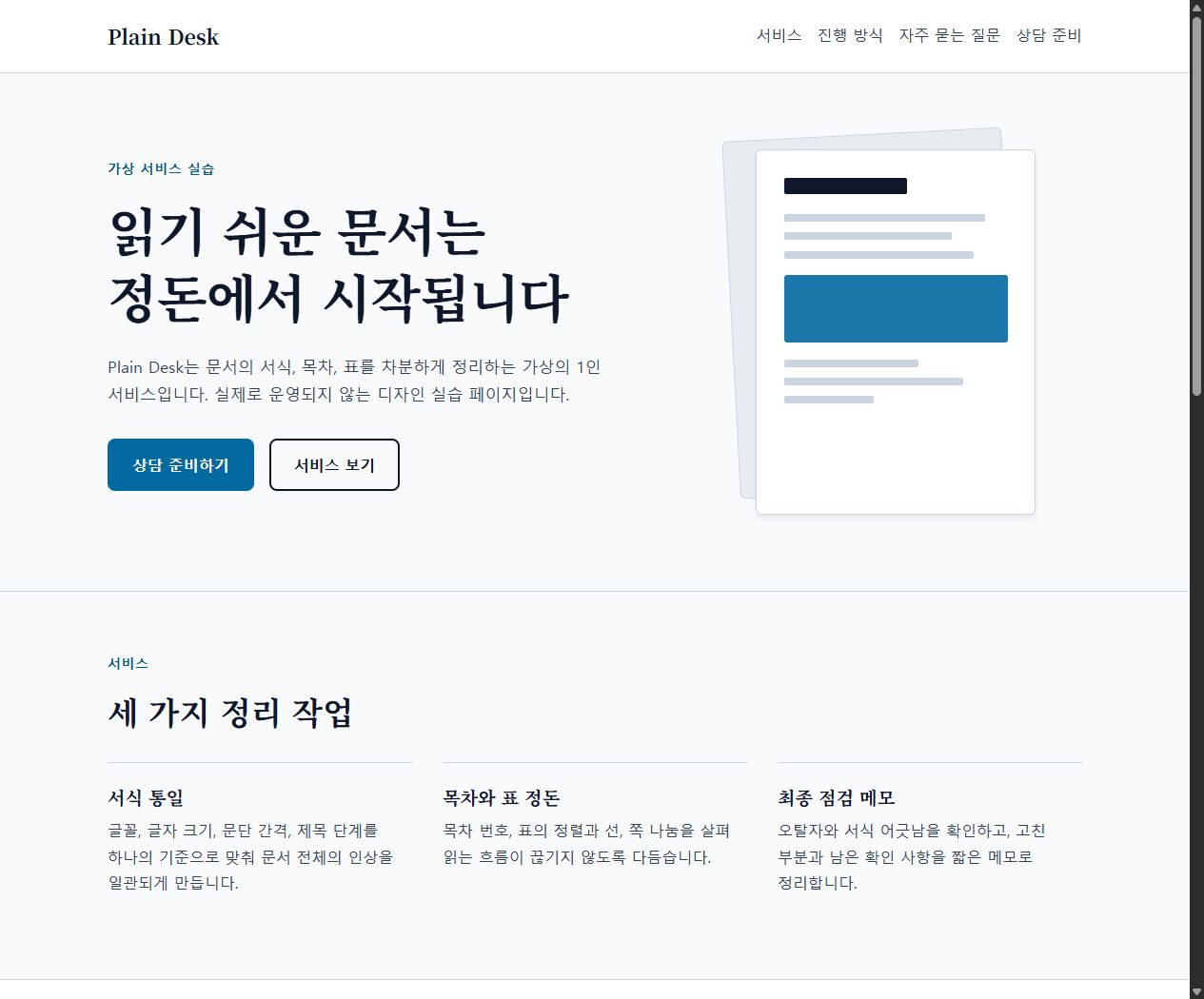
- Plain Desk includes an introduction, services, process, FAQ and consultation-preparation section.
- We defined button destinations, input validation and the resulting summary before implementation.
- Download the working files. Input is used on screen only, with no transmission or storage.
A fictional local-page exercise, not a real customer enquiry, booking, email, payment or operating business.
Files for this exercise
AIHotple example files and prompts. Try the exercise before substituting real work data.
Define the next action before requesting a homepage
A broad request for a service website may produce a heading and a button without a meaningful action behind it. We chose a fictional document-formatting service, Plain Desk, and defined a small next step: help a visitor summarize the document type and problem.
The page runs from introduction to three services, process, FAQ and consultation preparation. Below is an actual browser screenshot of the generated files. The exercise clearly identifies the service as fictional and does not invent customers, prices or testimonials.
1. Put content and button behavior in a brief
Install the skill in a new project and create brief.md with the brand, audience, factual services, required sections and button actions. We chose a Korean interface and plain HTML/CSS/JavaScript.
The consultation-preparation CTA links to #contact; it does not confirm a booking. The summary button displays a local result; it does not submit an enquiry. Button language should accurately describe the implemented behavior.
| Decision | This exercise |
|---|---|
| Service | Fictional document formatting |
| Main CTA | Move to consultation preparation |
| Input | Required document type and short note |
| Result | An on-screen summary |
| Excluded | Sending, booking, storage, prices and testimonials |
2. Select recommendations rather than applying everything
The query below returned an accessible style, navy/blue colours and a design record. We did not use the proposed proof sections based on logos, certifications or statistics: no real business evidence existed for this fictional service.
decisions.md specified system fonts, no unsupported performance claims and a working local preparation form. A recommendation supplies choices, not a finished page. After reviewing it, append --persist --output-dir . to save design-system/plain-desk/MASTER.md.
python .claude/skills/ui-ux-pro-max/scripts/search.py "professional document formatting service minimal trustworthy" --design-system -p "Plain Desk" -f markdown3. Include behavior and boundaries in the first request
The adapted request below captures the conditions used in the real exercise. Supply brief.md, decisions.md and the exact MASTER.md path. For your own service, replace fictional copy with verified facts and remove claims about functionality that does not exist.
The model produced index.html, styles.css and app.mjs. It did not run commands or a browser. After file generation, the editor opened a local server and tested the interactions separately.
/ui-ux-pro-max
Read brief.md, decisions.md and design-system/plain-desk/MASTER.md. Build Plain Desk.
Create a Korean fictional document-formatting service page: hero, three services, process, FAQ and consultation preparation.
The main CTA links to #contact. FAQ must work with a keyboard.
Require a document-type select and short-note textarea. The summary button displays the result locally using textContent.
Show field-level errors and focus the first invalid field for empty or whitespace input.
Clearly state that nothing is sent, stored or booked. Label the service as fictional.
Use system fonts, visible focus and 320px reflow.
No fake prices, customers, reviews, performance statistics, remote fonts, CDN or tracking.
Write index.html, styles.css and app.mjs; state which checks you did not run.
4. Open the files and start with the first button
The ZIP includes the finished page, preview.mjs, brief, design records and actual request/reply. With Node.js installed, run the command and visit http://127.0.0.1:5613/ . No dependency installation is needed.
Header links target the service, process, FAQ and preparation sections. Follow these steps to check the interactive elements rather than assuming a visible button works. Fictional input is sufficient.
node preview.mjs- Press 상담 준비하기 in the hero.
It should move to 상담 전에 정리해 보세요, the preparation section, without opening an external booking page.
- Leave both fields empty and press 요약 만들기.
Both fields should show errors, with focus moving to the document-type control.
- Choose 보고서 and enter a note.
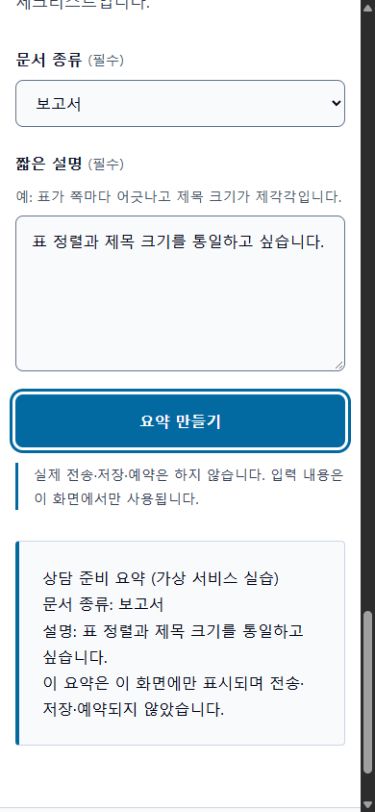
Use “표 정렬과 제목 크기를 통일하고 싶습니다.” Press 요약 만들기 and check that the summary includes the selected type and note.
5. Test missing and whitespace input as well as success
Empty fields produced individual errors. After selecting a report but entering only spaces in the note, focus moved to the note field. A valid input produced the result shown below.
Entering <b>Review table alignment</b> displayed it literally rather than creating an HTML element. Reloading cleared the input and result, consistent with this non-persistent example. Enter opened the first FAQ question; neither 320px nor 390px layouts had horizontal overflow.
| Action | Observed result |
|---|---|
| Leave both fields empty | Field errors; focus on first select |
| Use a whitespace-only note | Error; focus on note |
| Select report and enter a note | Summary includes both values |
| Enter HTML-like text | Literal text; no child HTML element |
| Reload | Input and result cleared |
| Press Enter on FAQ | Question expands |
What needs separate work for a real service
This page demonstrates clear information and a functioning next step. Receiving real enquiries needs a delivery method, privacy information, failure handling, spam controls and a response process. Do not describe the current local button as an enquiry submission.
Replace the brand and service copy with facts, choose the next action you actually need and implement it. If you already have a functioning app, the reading-queue example shows how to restyle its screen while preserving behavior.
Sources & verification
On 20 October 2026, Claude Code 2.1.301, recorded model claude-sonnet-5-5, read ui-ux-pro-max-cli 2.15.0 skill guidance and saved design records, then wrote HTML/CSS/JavaScript. The editor tested CTA navigation, FAQ Enter, empty/whitespace errors, a valid summary, literal HTML-like text, reload clearing and 320/390px overflow. No backend, transmission, booking, storage, customer-acquisition or revenue-effect test, or comprehensive accessibility audit. Actual UI and replies are Korean; this English article is an editorial adaptation.
- UI UX Pro Max · official README at the reviewed commit
- UI UX Pro Max CLI · npm release metadata
- Claude Code · skills
Sources checked: 2026.10.20