
- We reused the actual app from the previous Superpowers exercise and changed only HTML/CSS.
- Application logic and the existing tests remain byte-for-byte identical.
- Download both versions and see actual desktop and 390px screenshots.
An actual restyling example with independent editorial checks, not a controlled benchmark against an assistant without the skill.
Files for this exercise
AIHotple example files and prompts. Try the exercise before substituting real work data.
A working app did not need rebuilding
The reading queue already added links, marked them read and filtered unread items. Its interface gave similar emphasis to the heading, inputs and list. We therefore changed visual hierarchy and spacing while retaining its existing behavior.
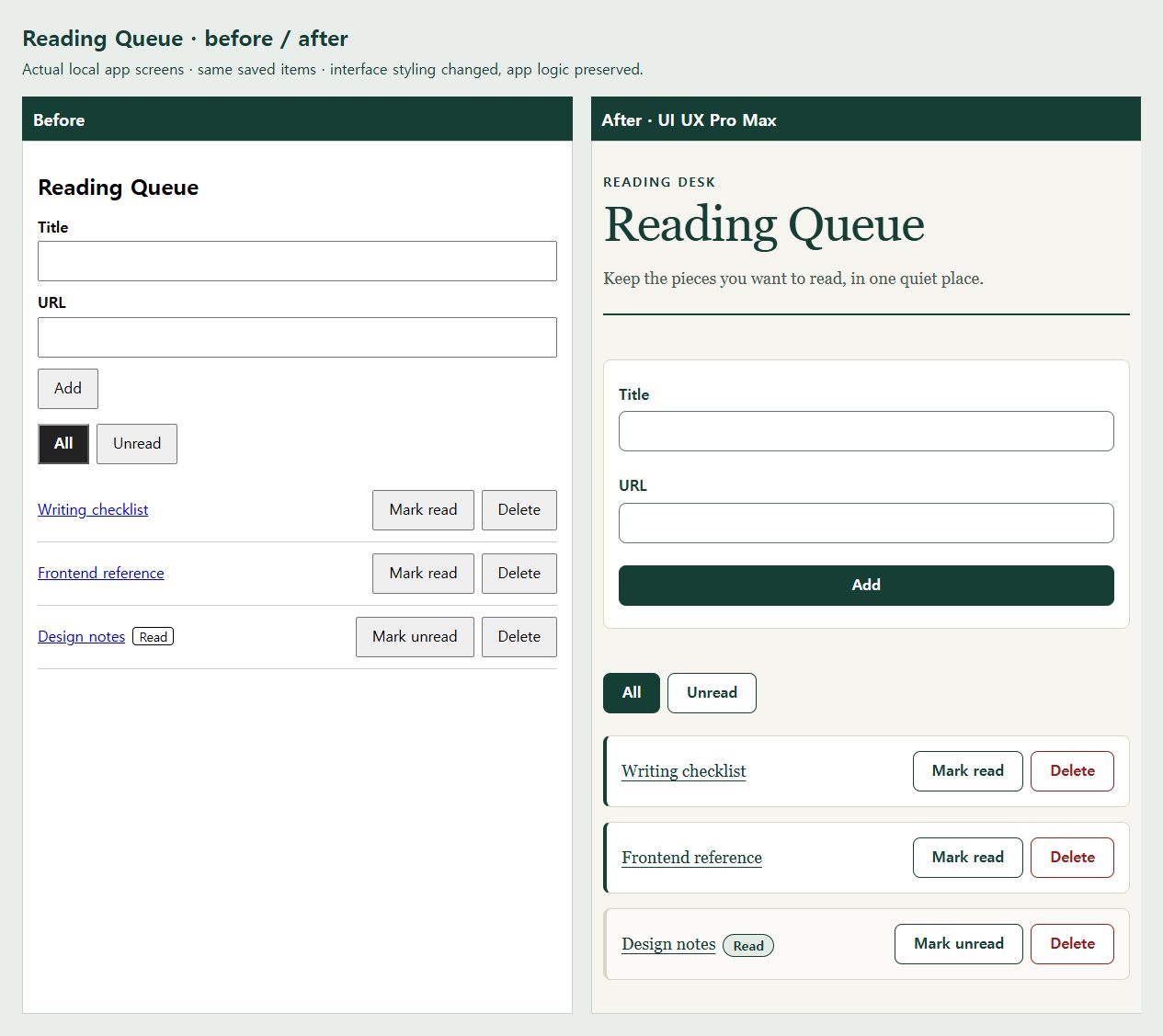
The two panels below are actual local apps with the same three saved entries and read state, displayed in a comparison page. Unlike the conceptual cover illustration, this image shows real browser-rendered HTML.
1. Separate the original from the files you will change
The ZIP contains before and after folders. Their app.mjs, queue.mjs and test/queue.test.mjs are identical. We limited changes to index.html and styles.css. A visual update that also changes storage or event handling can break existing behavior even if it looks better.
Copy the original or preserve version history first. List the button names and input IDs to retain. Search, tags, accounts and cloud storage are outside this exercise.
| Preserved | Changed |
|---|---|
| app.mjs, queue.mjs and existing tests | index.html and styles.css |
| Title/URL/Add and item actions | Heading, colour, spacing and cards |
| Filter/input IDs and storage structure | Focus, errors and empty-state presentation |
2. Supply preservation rules and concrete visual decisions
Prepare the skill and three records from the setup article, then send the request below in the project session. Give the exact document path. Our initial attempt missed MASTER.md; a subsequent request supplied its precise location and the brief before the final changes.
Cream and forest green were editorial project decisions, not an untouched recommendation. The model read those decisions with the skill guidance and wrote the actual hierarchy, cards, filters, error styles and small-screen layout.
/ui-ux-pro-max
Read brief.md, decisions.md, design-system/reading-desk/MASTER.md and the existing app.
Edit only index.html and styles.css. Do not modify app.mjs, queue.mjs or test.
Preserve IDs, labels, button names and add/read/filter/delete/storage behavior.
Use cream #F7F5EF, forest #153E35, system fonts and clear spacing.
Include 320px reflow, visible keyboard focus, errors and empty states.
Do not add remote fonts, images, packages or features.
List changed files separately from checks you did not run.3. Compare both versions with the same entries
Extract everything and run the command below in the extracted folder. Node.js is required; npm install is not. Visit http://127.0.0.1:5612/before/ or /after/ . The supplied server exposes the example only on your computer.
Both paths on this server share localStorage. Add entries in after, then reload before to see the same data. Different browsers or ports can use different storage. Use the fictional example.com links below rather than important personal links.
node preview.mjs- Fill Title and URL in after, then press Add.
Use Design notes / https://example.com/design . Add Frontend reference and Writing checklist with other example.com URLs.
- Press Mark read beside Design notes.
A Read badge should appear and the action should become Mark unread.
- Select Unread, then return to All.
Expect two items under Unread and three under All. Reload before to compare the same entries.
4. Check readability and controls, not colour alone
The redesigned screen separates its large heading, white input card, selected filter and saved-item cards. Read items retain a visible Read badge, and Delete has distinct red text.
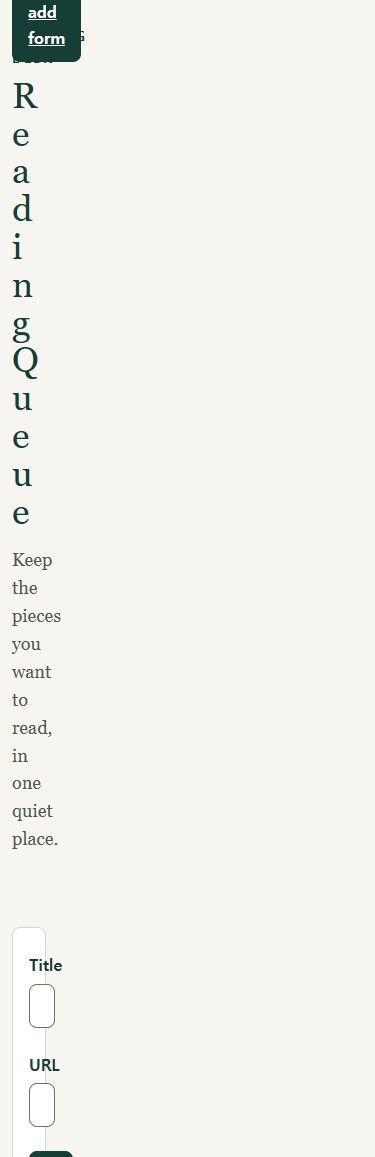
At 390px, inputs and buttons measured 44px high; at 320px the page had no horizontal overflow. The screenshot also shows the trade-off: larger spacing makes the page longer. Tune density to the information your own first screen needs to show.
5. Recheck behavior after the visual edit
The editor reran all 39 existing checks unchanged, and all passed. These primarily test pure logic; they do not establish that every browser control is wired correctly. We therefore performed browser actions separately.
Adding entries, changing read state, switching filters, deleting and refreshing behaved as expected. A javascript: URL showed an error and was not added. This combines a file comparison proving unchanged logic with direct interaction checks.
| Action | Observed result |
|---|---|
| Mark one of three entries read | All: 3; Unread: 2 |
| Return to All and refresh | 3 entries and read badge remain |
| Delete Frontend reference | 2 entries remain |
| Try adding a javascript: URL | Error; still 2 entries |
| Existing logic checks | 39 passed; 0 failed |
node --test after/test/queue.test.mjsStart with one screen in your own app
Choose one form or list screen and state which behaviors must survive. Treat liking the new style and confirming that yesterday’s buttons still work as separate questions.
Delete immediately removes the local entry without a confirmation dialog in this example. There is no account, backup or sync. Undo and server storage would need separate product work; installing a design skill does not implement them.
Sources & verification
On 20 October 2026, Claude Code 2.1.301, recorded model claude-sonnet-5-5, explicitly invoked the skill installed by ui-ux-pro-max-cli 2.15.0. The model edited HTML/CSS; the editor ran the existing 39 checks and browser interactions. app.mjs, queue.mjs and tests are unchanged. We checked 320/390px overflow and 44px input/button heights. No comprehensive accessibility audit, cross-browser survey, performance/conversion improvement measurement or cross-device sync test.
- UI UX Pro Max · official README at the reviewed commit
- UI UX Pro Max CLI · npm release metadata
- Claude Code · skills
Sources checked: 2026.10.20