
- The three earlier planning documents were preserved and handed to a real implementation session.
- The editor ran the 39 generated checks and separately exercised the browser controls.
- Storage is local to this browser origin. The sample has no account, backup or cross-device sync.
Actual file generation and independent editorial checks. The model did not run commands or the browser, and this was not the complete Superpowers TDD/review workflow.
Files for this exercise
AIHotple example files and prompts. Try the exercise before substituting real work data.
The plan now has a working reading list
Keep a title and URL for useful AI articles you want to revisit. This exercise continues the earlier Superpowers planning article using its original brief, design and implementation plan.
The finished scope is add, toggle read status, All/Unread filters, delete and browser-local persistence. We did not add search, tags or accounts. The ZIP includes the runnable files, original plan, actual request/reply and checks.
1. Extract the ZIP and use a local address
You need Node.js. Extract the whole archive into a new folder; index.html, app.mjs, queue.mjs, preview.mjs and test should be together. There is no npm install step.
Do not rely on double-clicking index.html: module loading can be blocked under file URLs. The supplied server opens the sample on your computer; it does not deploy it to the internet.
node preview.mjs- Open a terminal in the extracted folder.
Confirm preview.mjs is in the current directory.
- Start the server and leave it running.
Run node preview.mjs. If the port is occupied, check for an already running copy of this sample.
- Enter the local URL in the address bar.
Open http://127.0.0.1:5611/ . Reading Queue and the Title, URL and Add controls should appear.
2. Add three links and change read status
Enter a recognisable Title and a complete http or https URL. Add prepends the entry and clears the fields. Leading/trailing whitespace is trimmed; duplicate URLs are deliberately allowed in this sample.
The actual capture below contains three fictional entries. The example.com links are test data, not researched articles. The interface remains in English as specified in the original plan.
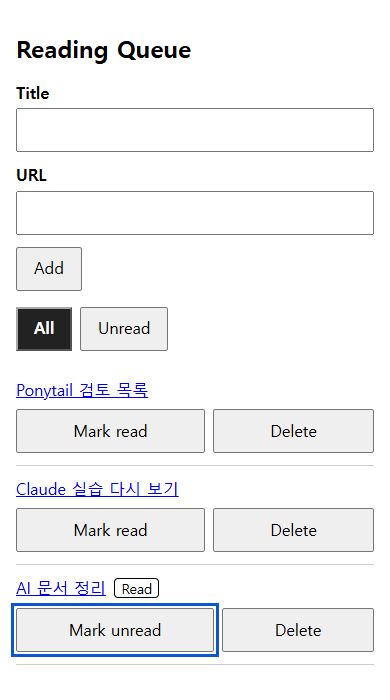
- Fill Title and URL, then activate Add.
For example use a practice title and https://example.com/notes . Verify the new entry is at the top.
- Activate Mark read under one entry.
A Read badge appears and the control becomes Mark unread. Activate it again to reverse the state.
- Refresh and check that entry again.
Use the same browser and address. A state remaining on screen and a state restoring after refresh are separate checks.
3. Check Unread and deletion separately
Unread hides read entries; it does not delete them. All brings them back. If every entry is read, Unread shows No unread items.
Delete removes that local sample entry immediately, without a trash or undo feature. Use fictional data. We also refreshed after deletion to confirm the deleted item did not return.
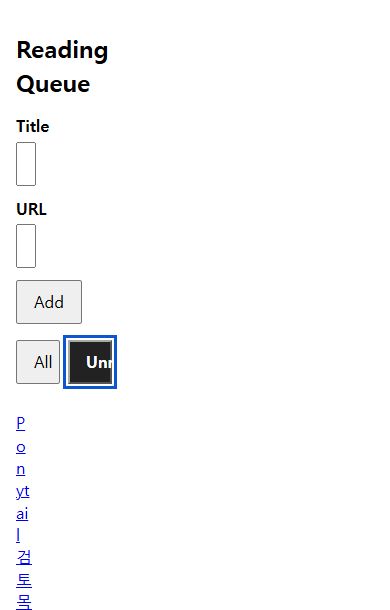
- Activate Unread.
Check that the read entry disappears, then use All to confirm it remains stored.
- Delete a disposable practice entry.
Check that only that entry disappears and refresh to verify the result.
What was handed to Superpowers?
The session explicitly loaded executing-plans and read the copied approved-brief.md, design.md and plan.md. It wrote queue.mjs, app.mjs, HTML/CSS and test/queue.test.mjs.
The earlier plan incorrectly put filter handling under list event delegation, although filter buttons are outside the list. We corrected that requirement in the implementation request. A plan still needs to be checked against the actual interface.
Read approved-brief.md, design.md and plan.md. Use superpowers:executing-plans to implement the reading list. Record conflicts in the plan. Include only add, read toggling, All/Unread, delete and localStorage. Bind filter buttons directly because they are outside the list. Do not add search, accounts or external packages. Distinguish work actually run from checks not yet performed.39 passing checks are different from browser proof
No command tool was available to the model. The editor later ran the generated test suite:39 passed and0 failed. This was not an observed tests-first RED/GREEN sequence.
Separate browser exercises covered whitespace, state/filter/delete/refresh, blank titles, non-http URLs, literal HTML-like titles and320px layout. The editor refined focus after list re-rendering in app.mjs; the original generated file is included as text for comparison.
| Check | Observed |
|---|---|
| Generated pure-state tests | 39 passed / 0 failed |
| Read status after refresh | Entries and Read restored |
| Last unread item marked read | Empty state; focus returns to filter |
| Storage damage/blocking | Messages and in-memory behavior in QA fixtures |
node --test test/queue.test.mjsUnderstand where the list lives
localStorage belongs to a browser origin. A different browser, profile or port is not the same storage location. Clearing site data can remove the list. Without sync or export backup, this sample should not be the only copy of important links.
Saved data is unreadable… means saved data could not be parsed. Could not save changes… means current changes may disappear on refresh. Preserve needed links separately before replacing unreadable storage. Stop the local server with Ctrl+C when finished.
Extend one requirement at a time
First verify add → mark read → filter → refresh yourself. Then choose one additional need. If that need is search, decide its matching rules before requesting implementation.
The useful outcome here is the connection between a plan, files, executable checks and browser behavior. This one fictional success is not evidence of a general reduction in errors.
Sources & verification
Tested on 19 October 2026 with Windows, Node 24.20.0, Claude Code 2.1.301 and recorded model claude-sonnet-5-5. Pinned Superpowers 7.0.0 was loaded per session and executing-plans called explicitly; hooks and automatic memory were disabled. The model wrote files without command/browser tools. The editor ran 39 generated tests and browser exercises, then refined keyboard focus in app.mjs. Storage errors used explicit QA-only fault fixtures. Full TDD, Git, independent review, other browsers, hardware mobile, 200% zoom, a comprehensive accessibility audit and performance comparisons were not tested.
- Superpowers · executing-plans
- Superpowers · verification-before-completion
- MDN · localStorage
- MDN · JavaScript modules
Sources checked: 2026.10.19