- Ponytail packages coding instructions; it is not another language model.
- Distinguish adding a marketplace,installing,loading and actually invoking a skill.
- Smaller changes must retain validation,data-loss protection,security and accessibility.
We loaded the original plugin for individual sessions and explicitly invoked its skill. Permanent installation below is documented,not an observed installer test;hooks and band were not tested.
Files for this exercise
AIHotple example files and prompts. Try the exercise before substituting real work data.
Does a date field really need another package?
You ask for a visit-date selector and get a calendar library,configuration and new components. The feature may work,but the maintenance bill has grown. Ponytail asks the assistant to inspect the affected code,look for existing components and consider platform features before adding dependencies.
The current skill also requires complete changes and small checks for risky logic. This series examines an initial invocation,a native date input and a quantity-calculation review separately. It is not a benchmark against an assistant without the skill.
Start with local Claude Code and a working account
You need an authenticated Claude Code installation that can open a practice project. This is not an instruction to paste terminal commands into ordinary Claude web chat. The project also requires Node.js on the PATH used by its lifecycle hooks; an interactive terminal and a non-interactive hook may have different paths.
The repository licence does not grant AI usage or credits. Local plugins also do not automatically carry into the browser-based Claude Code cloud environment. Start with an isolated folder rather than a production project.
1. Add the original marketplace
Confirm the owner DietrichGebert and repository ponytail. Read the README,INSTALL.md and manifest before installation. A screenshot’s star count is an attention signal,not proof of reliability or savings.
Open Claude Code inside your practice folder and send the following in its conversation input. The project says to submit the two installation commands as separate prompts.
/plugin marketplace add DietrichGebert/ponytail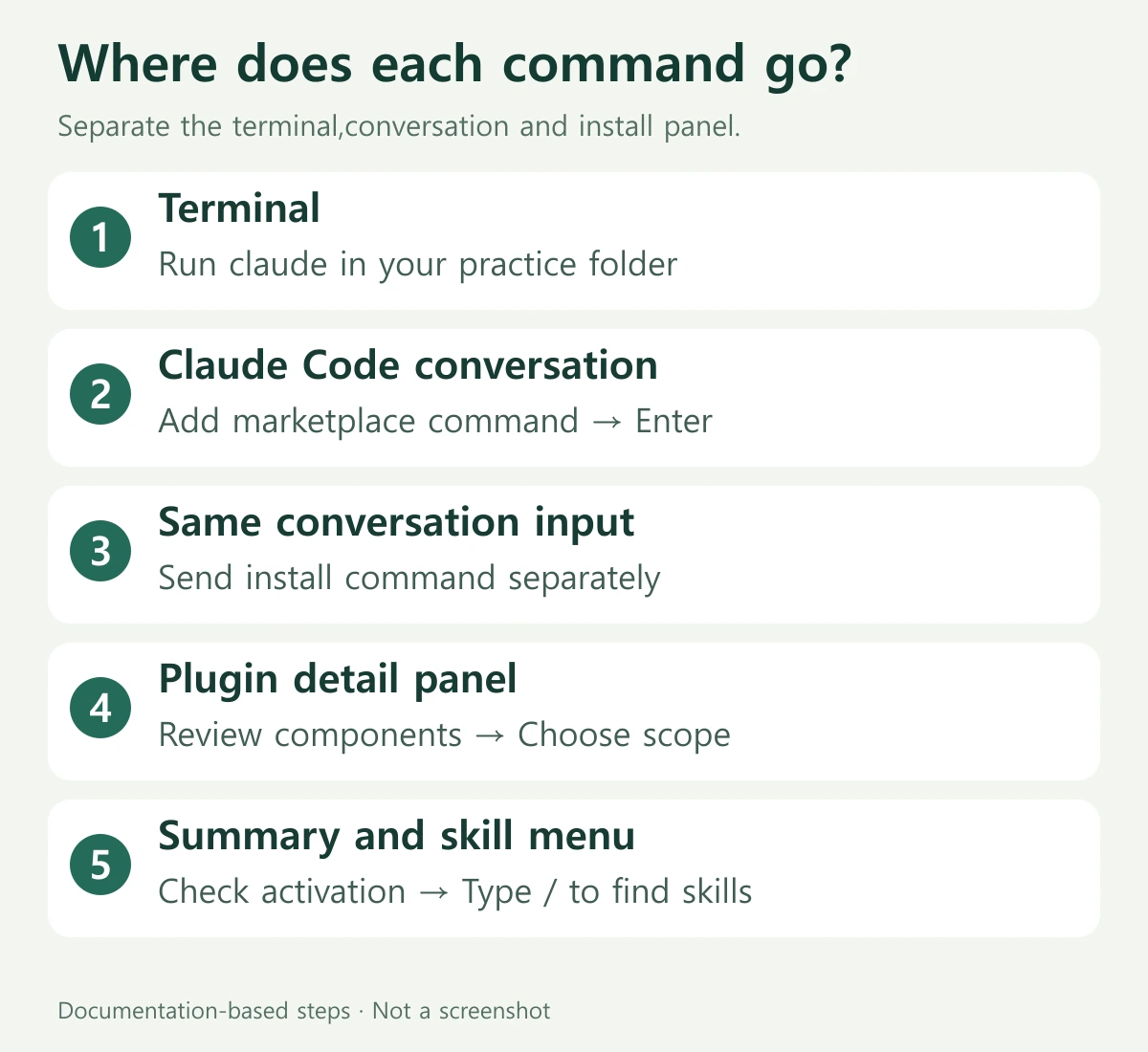
- Open Claude Code from the practice folder.
Confirm your terminal is in the intended project, then run claude. Wait for its conversation input before sending the plugin command.
- Paste the first command into the conversation and press Enter.
Use this section’s copy button for /plugin marketplace add DietrichGebert/ponytail. Paste into Claude Code’s conversation, not the PowerShell command line.
- Send the install command separately after the response.
Adding the marketplace is not installation. Do not paste both commands as one prompt.
2. Review the plugin and select an installation scope
Send the second command after the marketplace step finishes. Current Claude Code documentation explains that /plugin install inside a session opens the plugin detail panel so you can review components and choose a scope; typing the command is not the complete installation.
Choose user,project or local scope deliberately. For a private experiment,local-only availability may be enough. Read the installation summary for activation,reload or loading errors. This is the documented permanent-installation path,not an installer we operated in this experiment.
/plugin install ponytail@ponytail- Open the plugin details with the install command.
Send /plugin install ponytail@ponytail and inspect the name and components in the resulting panel.
- Choose the intended scope.
The documentation distinguishes user-wide, project-wide and local-only installation. For your own test in this folder, identify the local-only choice. In the terminal menu, use arrow keys and Enter.
- Read the activation summary.
Look for Plugin is now active. or reload instructions. Follow the message, then continue to discovery in the current or a fresh session. These panel steps are documentation-based.
3. Invoke a discovered skill rather than trusting a badge
Type / and inspect the namespaced skills. Although the project advertises short commands,our observed skill list used ponytail:ponytail and related names. Claude Code documentation uses /plugin:skill when explaining discovery.
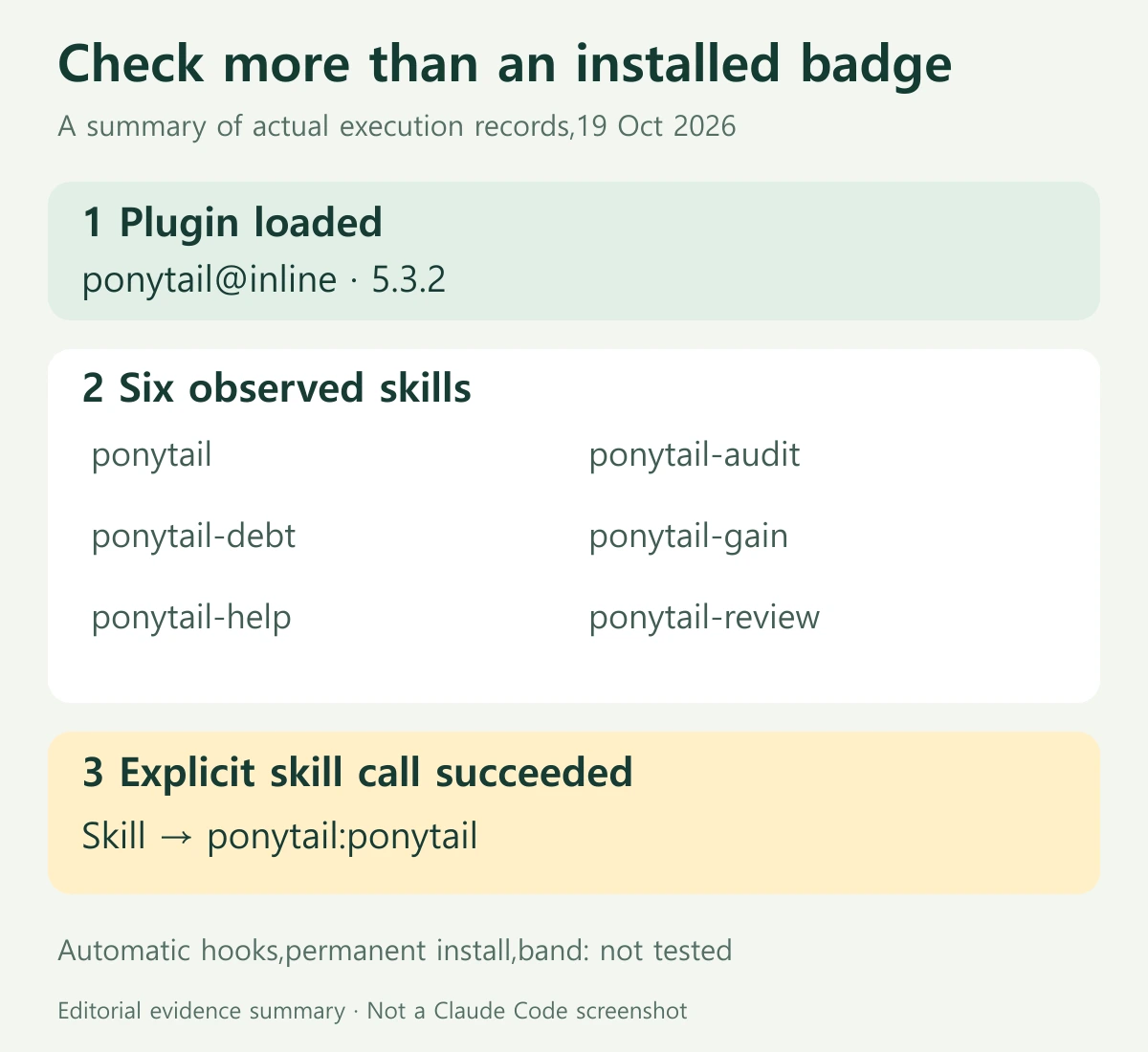
Our separate test loaded the original checkout with --plugin-dir and disableAllHooks=true. It discovered six Ponytail skills and explicitly called the Skill tool. That does not establish automatic activation,persisted levels or a working band.
| Check | Observed |
|---|---|
| Plugin | ponytail@inline · 5.3.2 |
| Ponytail skills | 6 discovered |
| Invocation | Skill → ponytail:ponytail |
| Reply | Korean explanation of scope,reuse and safeguards |
| Hooks / band / permanent install | Not tested |
- Type / in the conversation to open the command list.
Find entries under ponytail. If absent, inspect Installed and Errors in /plugin.
- Select ponytail: ponytail or send the prompt below.
Ask it to explain the full-level checks without editing. Discovery and receiving an actual response are separate observations.
- Compare the response with the intended checks.
Look for code inspection, reuse and retained safeguards. Our evidence is a session-only load and explicit call, not an automatic-hook or band test.
/ponytail:ponytail full
Before changing anything, explain how you would check existing code and native platform features for a date selector. Name the validation and accessibility that must stay. Do not edit files.
Choose a level for the task
The official full level seeks the smallest complete change. Lite builds the request and names a smaller option. Ultra also challenges requirements whose need is unclear. We invoked full;we did not compare implementations across levels.
If your project already carries Karpathy rules or a Superpowers workflow,inspect overlapping instructions before adding another package. More instructions alone do not establish better work.
Use the practice archive and keep rollback explicit
The ZIP contains our request,actual Korean reply,observed list and a session-only settings example. It contains no upstream plugin code or authentication data. Its README points to the pinned official source and explains session loading with hooks disabled.
For a permanent install,use the Installed panel to disable or remove it. Read the project’s removal section for state files and optional status-line settings that can remain outside the plugin folder. Do not replace your existing CLAUDE.md or AGENTS.md,or delete unrelated configuration. We did not perform permanent installation or state import.
Judge the next result by the files and checks
A successful skill call proves loading and invocation. It does not prove cost savings or fewer bugs. Continue with the date input to inspect a one-attribute change and with the review to see concrete rejected inputs and independent test results.
Sources & verification
On19October2026 we loaded official Ponytail5.3.2 commit09c434ab73ca43761c5d8b0c5d341926c2fba710 using --plugin-dir on Windows,Node.js24.20.0 and Claude Code2.1.301; the recorded model was claude-sonnet-5-5. We explicitly called the Skill tool with disableAllHooks=true and automatic memory disabled. We did not test permanent installation,automatic hooks,persisted modes,band,board,webhooks,Codex,another OS or comparative cost/performance. No additional payment or global configuration change was made. The first session used one Skill call and no file tools. Its actual reply was Korean. English article text and alternative prompts are editorial translations.
- Ponytail · reviewed README
- Ponytail · installation and removal
- Ponytail · actual skill
- Ponytail · plugin manifest
- Claude Code · install and manage plugins
- Claude Code · CLI reference
Sources checked: 2026.10.19