
- Choose a small error you can reproduce rather than asking for a whole service.
- Start Claude Code in the exercise folder and state the intended behavior and edit scope.
- Check tests and the running screen separately after a change.
Tested on 16 October 2026 with Windows, Node.js 24.20.0 and Claude Code CLI 2.1.301. Claude edited app.mjs; the editor independently ran three tests and checked the browser. Installation was an isolated npm-package test; the normal installer command below is documented, not separately executed. English prompts are adaptations.
Files for this exercise
AIHotple example files and prompts. Try the exercise before substituting real work data.
Begin with a number you can check
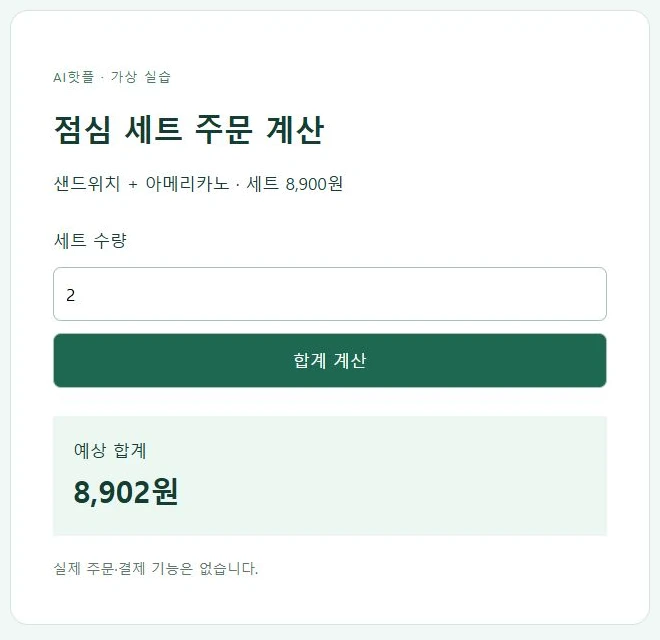
Two KRW 8,900 lunch sets should cost KRW 17,800. The starter deliberately returns 8,902. We asked Claude Code to inspect and fix only the calculation. This exercise teaches opening a folder, reading files, making a small edit and verifying it. The ZIP includes the broken starter and a separate fixed reference.
1. Prepare Claude Code and Node.js
In Windows PowerShell, the following is the documented normal installer. Open a new terminal after installation and check the version; skip installation if Claude Code already works. Sign in with a supported subscription or API account. A free web login alone does not establish Code access. Node.js is also needed to run this exercise, independently of how you install Claude Code. We tested an isolated npm installation of Code; we did not run the normal installer below.
Official installation and account requirements ↗
irm https://claude.ai/install.ps1 | iex

# In a new terminal after installation
claude --version
node --version
2. Start in the extracted first-project directory
Unzip the pack and open first-project. It should contain app.mjs, index.html and package.json. Replace the example path below with your actual extraction location. No dependency installation is needed for this calculator. Run claude here and complete its first-use login flow.
| File | Purpose |
|---|---|
| app.mjs | Calculation and form behavior |
| app.test.mjs | Expected totals for 1, 2 and 0 sets |
| index.html / style.css | Practice screen |
| server.mjs / package.json | Local server and commands |
cd "C:/aihotple-practice/first-project"
Get-Location
Get-ChildItem
claude
3. Reproduce the problem before editing
Run npm start in a separate terminal and open http://127.0.0.1:5599/. Submit quantity 2: the starter displays 8,902원. Run npm test in another terminal in the same folder. The broken starter fails all three tests. Keep their expected values intact. Stop your practice server with Ctrl+C. If 5599 is busy, set $env:PORT=5601 in PowerShell before npm start.
npm start

# In a separate terminal in the same directory
npm test
4. Describe the failure and the allowed change
Our Korean request specified the wrong total, the correct total and the only calculation allowed to change. The test session exposed file-reading and editing tools, so Claude did not run tests and correctly described its values as predictions. It changed one line from addition to multiplication. File comparison confirmed that tests, HTML, CSS and all other exercise files remained unchanged.
// Before
return price + quantity;

// After
return price * quantity;Read app.mjs and app.test.mjs in this fictional exercise. Two sets should total KRW 17,800, but the screen shows 8,902. Fix only calculateTotal in app.mjs. Do not change tests, HTML, CSS or other files. Do not search externally or read other directories. This session has no execution tool, so report the edit and checks still needed without claiming tests were run.5. Check the tests and the actual browser
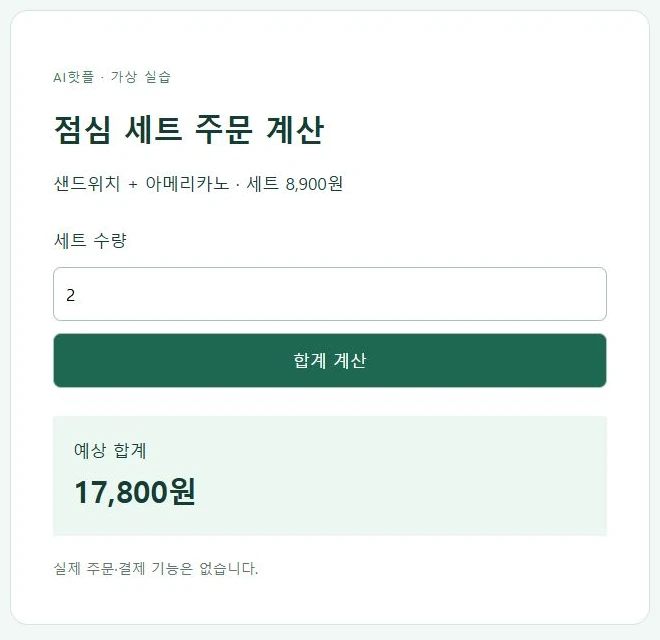
The editor independently reran the tests: three passed and none failed. After refreshing the page, we submitted 0, 1 and 2 in the form. These checks cover three integer quantities, not fractional units, negative values, rounding or real payments.
| Quantity | Expected | Observed browser |
|---|---|---|
| 0 | KRW 0 | 0원 |
| 1 | KRW 8,900 | 8,900원 |
| 2 | KRW 17,800 | 17,800원 |
Send a reproducible follow-up if it still fails
Include the command, exact error, expected output and actual output. If claude is unrecognized, check the installation and a newly opened terminal. If the page is unavailable, check whether npm start is running. If the amount is unchanged, refresh and inspect whether app.mjs was actually saved.
Sources & verification
Tested on 16 October 2026 with Windows, Node.js 24.20.0 and Claude Code CLI 2.1.301. Claude edited app.mjs; the editor independently ran three tests and checked the browser. Installation was an isolated npm-package test; the normal installer command below is documented, not separately executed. English prompts are adaptations.
Sources checked: 2026.10.16