- Check required information before acting on urgency.
- Use real variable bindings and fixed notification destinations.
- Treat native Test run as an action, not a harmless preview.
Keep required-field checks, priority decisions and notification destinations explicit. Rehearse seven fictional requests locally, then use the documented setup plan only if your Workspace Studio account supports it.
Files for this exercise
AIHotple example files and prompts. Try the exercise before substituting real work data.
First check whether your account can use Studio
Workspace Studio can connect an event, a sequence of steps and data passed between those steps. A useful example is a new service request that needs a review queue, rather than another email containing an unstructured paragraph.
Access is not guaranteed for every Gmail user. Google’s current help lists eligible work and school editions, including Business Starter, Standard and Plus; Enterprise Standard and Plus; and specified education editions or add-ons. Personal accounts require Workspace Experiments access. Organizational Gemini settings, app access, age restrictions and approval policies can also affect the available steps.
Our personal-account visit reached the Experiments signup page instead of the editor. We stopped there. We did not infer a Workspace plan from having a Google account or ask the user to upgrade. This guide therefore gives a documented native setup plan plus a working local rehearsal. It does not claim that the native automation ran.
1. Make the intake fields do part of the work
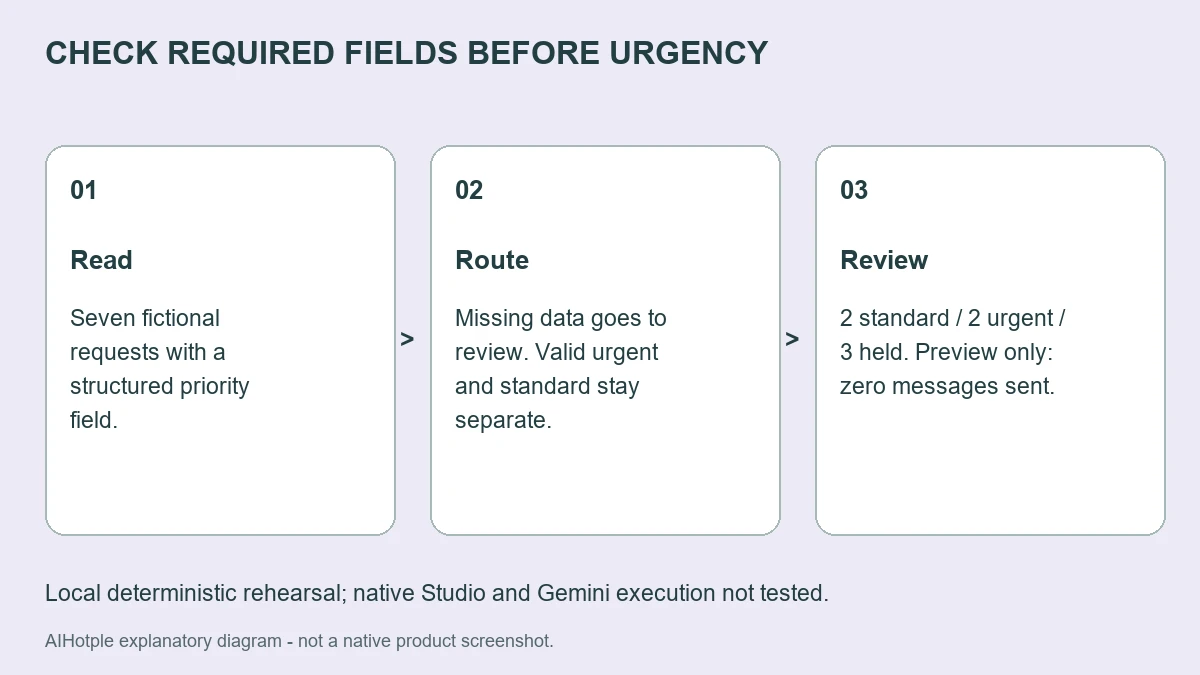
Each fictional request has six fields: a stable request ID, name, contact email, service, structured priority and request details. The ID serves as its review key. Seven example records exercise different routes. Priority is either standard or urgent, not a sentence the reader must interpret.
For your own private practice form, make the essential fields required and use controlled choices for service and priority. Keep the contact email separate from the notification destination. A requester should not be able to choose who receives internal information by writing an address inside the description.
Our route contract has an explicit precedence: missing or unsupported required information goes to Review desk. Only a complete, supported record can become urgent or standard. This means an urgent request with no contact details remains held. It does not silently disappear, and it does not become a complete urgent case simply because the word urgent appears.
| Request | Important detail | Expected local route |
|---|---|---|
| R201 | Valid, standard Home refresh | STANDARD → Service coordinator |
| R202 | Valid, urgent Deep clean | URGENT → Duty coordinator |
| R203 | Urgent but missing email | HELD → Review desk |
| R204 | Text says “Not urgent”; structured priority is standard | STANDARD → Service coordinator |
| R205 | Untrusted instructions inside details | URGENT; fixed owner, no instruction-following |
| R206 | Unsupported priority value | HELD → Review desk |
| R207 | Incomplete email format | HELD → Review desk |
2. Build the documented native skeleton
In an eligible account, open studio.workspace.google.com and choose New flow or the create-from-scratch entry. Select the starter When a form response comes in, then choose a private practice form. The current starter reference supports form responses and an option to run again when a response is edited. Leave that edit option off for the first controlled trial.
Add the next step and insert the starter’s actual fields through the variable picker. A variable chip carries the current response value. Typing the words Request ID into a message without selecting a variable is not equivalent. Check that you selected the intended form rather than a similarly named real one.
Name the draft clearly, keep it off, and inspect each generated step. A flow assembled from a natural-language request is still a proposal. It may need supported condition operators, explicit field mappings or a different upstream validation design before it matches your contract.
- Select the private practice starter
Choose When a form response comes in and the intended fictional form.
- Bind the current response
Use the variable picker for ID, service, priority and other fields.
- Inspect the draft while it is off
Review starter, field mappings, conditions and destinations before any native Test run.
Create a DRAFT flow for a private fictional service-request form. Start on a new response. Use actual variable chips. Hold missing or unsupported required data before urgency routing. Route valid urgent and standard records through mutually exclusive flat conditions. Use only self-notification during rehearsal, labelled TEST / FICTIONAL. Do not turn it on, send to other people, connect third-party apps or create a public form. Identify unsupported conditions instead of claiming the draft is complete.3. Keep deterministic routing separate from an AI summary
Use Check if for values you can compare directly, such as a supported priority choice. Decide asks Gemini to judge a condition and is useful for subjective criteria; it is not necessary to rediscover a priority the form already captured. Keep the authoritative route understandable to the person reviewing it.
The supplied plan uses three flat, mutually exclusive routes: held, valid urgent and valid standard. Google’s current conditional help and its broader step catalog differ about nested-condition support. This exercise avoids depending on nesting. If the editor cannot express your complete validation, enforce it upstream or hold the request rather than assuming the JavaScript from our simulator can be pasted into a condition card.
An optional Ask Gemini step can prepare a short summary from explicitly inserted request fields. Put any summary needed by multiple routes at the main-flow level before those routes. The conditional help warns about reusing substep variables outside their branch. Restrict the sources the AI step can use to what the exercise needs; do not casually include an entire connected workspace.
Our local simulator does not call Gemini. Its request containing “Not urgent” stays standard because the structured choice is standard. Its fictional injection case cannot change the owner mapping or recipient. That is a result of this narrow deterministic implementation, not proof that an arbitrary AI workflow resists every malicious request.
4. Rehearse seven cases without a Google connection
Extract the download, open a terminal in that folder and run node serve.mjs 5716. Open http://127.0.0.1:5716/ and choose Rehearse seven requests. The result table contains seven local rows: two standard, two urgent and three held. The displayed notification is only text on that page.
Next choose Replay R202. The same ID and payload return DUPLICATE_SKIPPED without creating another preview. Choose Try changed R202. The conflicting content under that ID returns CONFLICT_HELD and Review desk. It should not reuse the original urgent assignment as if the modified record were already approved.
Reset session clears the rehearsal ledger, as does reloading the page. The guard is in memory in one browser tab; it is not durable storage, a concurrency control or a native Studio deduplication feature. A real integration needs a separately designed record key, revision policy and delivery history.
The independent checker verifies the seven expected routes, exact replay, changed payload, missing ID, unsupported service and untrusted text that tries to choose a different recipient. The browser check confirmed the working controls and no document-wide overflow at 320 and 390 pixels. The wide results table scrolls inside its own container.
node serve.mjs 5716
# Open http://127.0.0.1:5716/
# In another terminal in this folder:
node check.mjs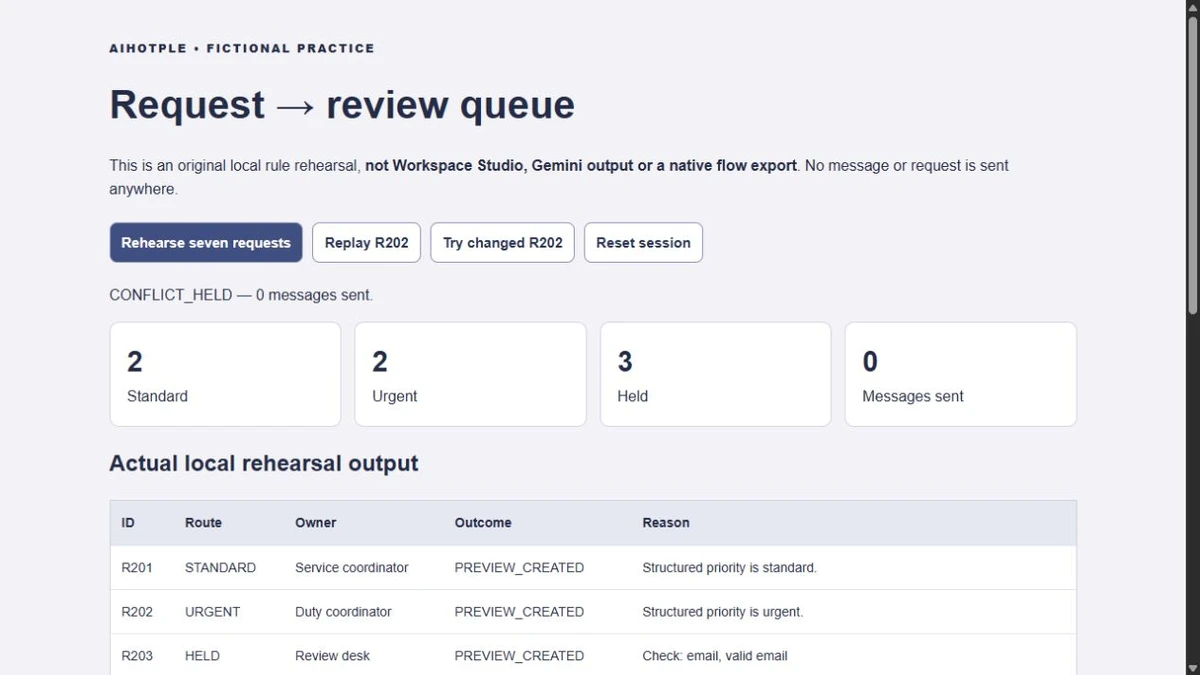
5. Configure the notification as a separate decision
The intended production roles are Service coordinator, Duty coordinator and Review desk. These are fictional roles, not email addresses that our exercise can resolve. A route becoming urgent does not establish that the right person has been notified.
For a first native trial, the plan uses Notify me in Chat to the signed-in owner only. Put TEST / FICTIONAL, the request ID, route and intended owner role in the message. Use a fixed destination, not a recipient taken from request text. Keep the full personal details in an appropriately restricted source record rather than broadcasting them.
Only after the self-only trial works should an authorized operator map those roles to approved actual recipients. Review each configured destination before allowing the flow to take actions. This article did not send even a self-notification; it tested only the local previews.
6. Test the native flow only when you understand its actions
Google explicitly says that Test run takes real actions: it can send messages or change files. In an eligible account, select private fictional starting data, inspect the notification step and then deliberately use Test run. Keep the flow off while investigating a failure. An attractive draft or local simulation is not a Run Completed result.
Inspect Activity for the selected run and its individual steps. Confirm the exact starting response, evaluated condition and actual notification destination. Then check the received self-notification. A planned owner, a generated message body and verified delivery are three different states.
Before enabling a real flow, decide how edited responses and repeated submissions will be reviewed. Our duplicate experiment does not prove Studio will suppress repeat alerts. Check current usage limits, administrator policies and errors in the actual account. No uptime, unlimited-run allowance or unattended delivery guarantee is established here.
The useful outcome of this exercise is a precise routing contract, tested fictional cases and a native setup plan you can review. Native Studio access and execution remain unverified for our account. Stop the local server with Ctrl+C when finished.
Test retries and duplicate results in a native n8n exercise →
Sources & verification
Checked on 26 October 2026. Opening Workspace Studio with the existing signed-in personal Google account redirected to Workspace Experiments signup; we did not enroll or reach the native editor. No live Google Form, Gemini classification, Studio test run, message, active flow or paid upgrade was created. Native click paths below come from current Google documentation. The supplied JavaScript simulator is our original deterministic local rehearsal, not Workspace Studio output or an importable flow. Seven fictional requests produced 2 standard, 2 urgent and 3 held routes; exact replay and changed-payload handling were checked locally.
- Google · Workspace Studio requirements
- Google · Create your first flow
- Google · Starters and steps reference
- Google · Conditional steps
- Google · Use variables to pass data
- Google · Test run a flow
- Google · Troubleshoot flow issues
- Google · Tips for AI steps
Sources checked: 2026.10.26