- A failed response does not prove that the destination saved nothing.
- Keep the same job ID across retries and inspect the destination’s result.
- Verify both the main workflow and its automatic error handler.
Retry temporary failures with a stable job ID. Check the destination before repeating a write, and test the error handler with an automatic execution—not only the editor’s Execute button.
Files for this exercise
AIHotple example files and prompts. Try the exercise before substituting real work data.
Start with the failure you need to survive
A useful automation should tell you what happened after something goes wrong. For this exercise, imagine a request has to create one delivery record. The workflow receives a stable job ID and calls a small local service. Sometimes the service is unavailable; sometimes it saves the record but fails to return a successful response.
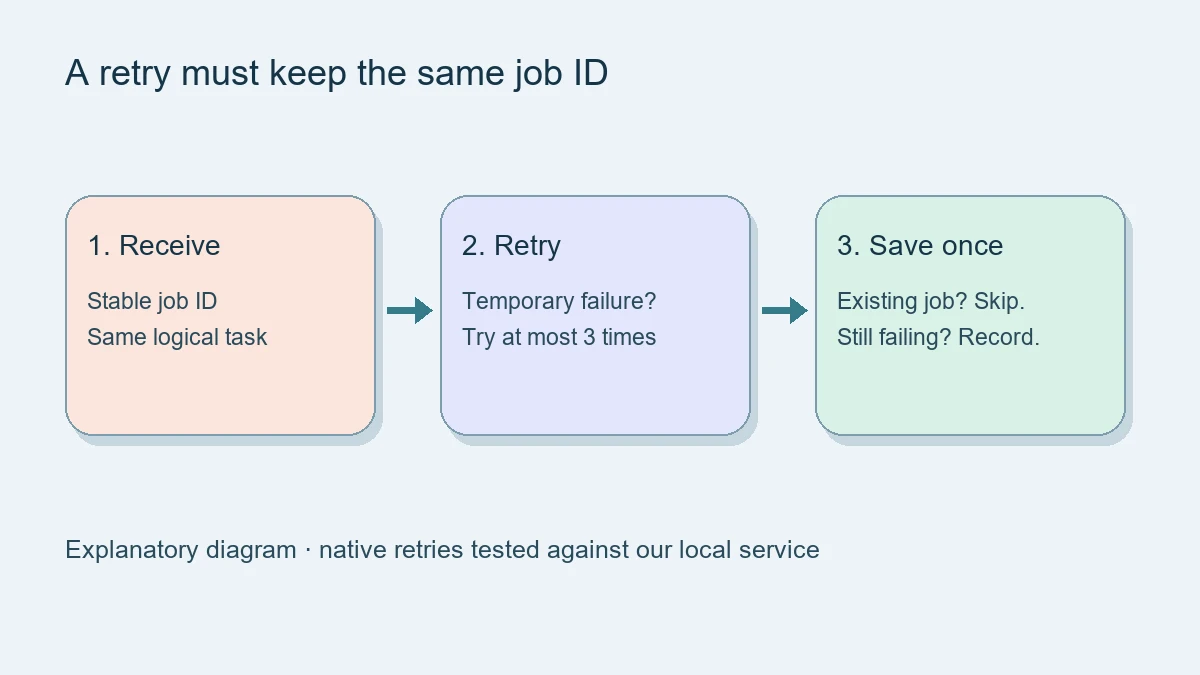
The goal is one saved record for one logical job. Retrying with a new ID changes the problem: the service sees a new job and may create another record. Keep the ID, the attempt count and the saved result separate. A green workflow alone is less useful than evidence that the intended work exists once.
Download the lab and read README.md. It contains our original service and two importable workflows, with no account credentials. The helper listens only on your computer at port 5701. These addresses are for a local n8n installation; a Cloud or container instance needs its own reachable, secured service address.
1. Import the main workflow and the error handler
Start the helper with the command below. In n8n, open the workflow menu and choose Import from File. Import error-handler.json first, then recovery-workflow.json. Open the main workflow’s Settings and select the imported failure-record workflow in Error workflow. Save the selection; imported workflow IDs may be remapped by another instance.
Our main workflow has only two nodes: Receive job and Deliver with a stable job ID. Open the HTTP Request node and inspect its POST body. It passes the webhook body through to the helper rather than inventing a new identifier. Keep the endpoint local while learning.
node practice-server.mjs- Import both JSON files
Use the workflow menu → Import from File. Open and inspect each node before enabling anything.
- Link the error workflow
In the main workflow, open Settings → Error workflow, select the imported handler and save.
- Check the service address
The HTTP Request nodes point to 127.0.0.1:5701. This works only when that address reaches the helper from your n8n runtime.
2. Retry a temporary failure with a bounded policy
Open Deliver with a stable job ID, then its Settings tab. In the supplied workflow, Retry On Fail is enabled, Max Tries is 3 and Wait Between Tries is 1000 milliseconds. The helper’s transient mode returns a simulated 503 twice and succeeds on the third attempt.
Those values are deliberately small for a local lesson. A real service may give a Retry-After value or have stricter rate limits. Authentication errors, invalid input and a rejected business rule usually need a correction rather than repeated identical requests. Avoid turning every error into a long retry loop.
Publish the main workflow and send a request to its production webhook. The native response says that the workflow started; it is not proof that the delivery succeeded. Check the execution and the helper’s result before marking the task complete.
- Use your actual n8n port; our editorial instance used 5700, while the example command uses the common local port 5678.
- The helper’s /state endpoint shows attempts and unique deliveries.
- Do not use the editor’s test-webhook URL as if it were an always-on production endpoint.
Invoke-RestMethod -Method Post -Uri 'http://127.0.0.1:5678/webhook/aihotple-recovery-practice' -ContentType 'application/json' -Body '{"jobId":"job-transient","mode":"transient"}'3. Test the dangerous case: saved work with a failed response
Send a job with mode lost-response. On its first attempt, our service saves the record and then deliberately returns 503. The second request uses the same job ID. The service finds the existing record and returns duplicate_skipped instead of creating another one.
This is a property of the destination we built, not a promise that n8n makes every write idempotent. Sending the same email again, appending another spreadsheet row or uploading another file can still create duplicates. Use a service’s supported idempotency key, an upsert with a unique business key, or a transactional record that claims the job before writing.
The tutorial helper is sequential and keeps its recovery ledger in memory during the running process. It does not prove crash recovery, atomic writes or behavior under simultaneous workers. A production implementation must address the gap between “write completed” and “completion recorded”.
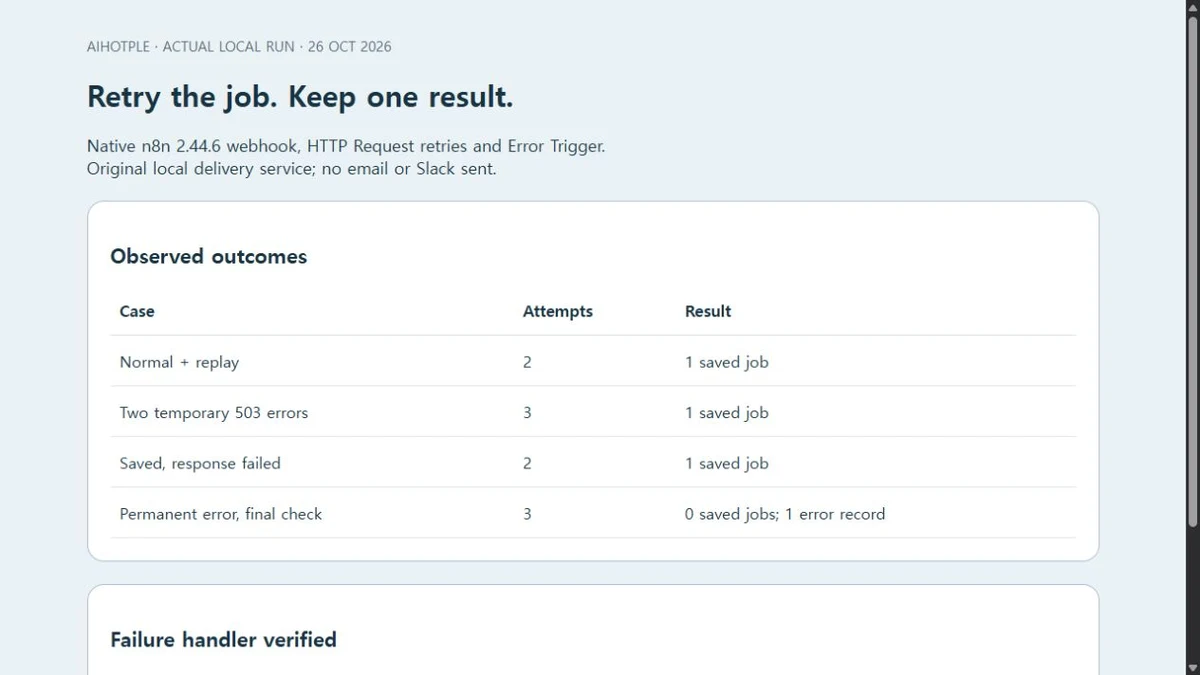
| Observed case | Attempts | Destination result |
|---|---|---|
| Normal job, then repeat the same ID | 2 total | 1 saved job |
| Two simulated temporary failures | 3 | 1 saved job |
| Saved record, first response failed | 2 | 1 saved job |
| Permanent failure after handler fix | 3 | 0 saved jobs; 1 error record |
4. Make the error handler prove it ran
The handler begins with Error Trigger and posts a compact failure record to the helper. Test it by sending mode permanent to the published main webhook. Its delivery node keeps failing, reaches its attempt limit and hands the failure to the linked workflow.
Our first attempt exposed a setup problem: this n8n 2.44.6 installation refused to execute the unpublished handler. The current Error Trigger documentation says that publishing an error workflow is not required. In our installed version, publishing the handler and repeating the automatic failure produced the expected record. Check your actual execution log when those instructions and your version differ.
Keep the failed workflow name, failed node, execution identifier and concise error. Avoid copying complete message bodies or credentials into an alert. An alert is another delivery operation: if you later replace the local sink with email or Slack, test its authentication and a failed-notification path separately.
5. Re-run a failed execution without guessing what will repeat
In Overview → Executions, filter the workflow and failed status, then open the relevant run. Inspect the node input and the destination before choosing Retry execution. n8n distinguishes retrying with the original workflow from retrying with the currently saved workflow.
The current execution documentation explains that a retry resumes from saved state, retaining completed node results, while the failed node may process its items again. If that node already handled some items, check those items before retrying it. A retry count is operational evidence, not a guarantee that every external side effect happened once.
Before enabling this pattern for real work, identify who reviews permanent failures, how long error records are retained and how the job key survives a restart. Use the downloadable request list to replay the four cases after changing the workflow.
Add a review step before an AI workflow saves a draft →
Include maintenance and recovery work in your hosting decision →
Sources & verification
Checked on 26 October 2026 with local n8n 2.44.6 and Node 24.20.0. A published native webhook ran HTTP Request retries against our original delivery fixture. Three unique jobs were saved; the lost-response replay did not add a second result. An initial unpublished error handler did not run in this installation; after publishing it, a repeated permanent failure produced one native Error Trigger record. The delivery service and error-record sink are local examples. No real customer record, email or Slack notification was created. Sequential in-memory duplicate checks are not a production transaction or load test.
- n8n · Handle errors gracefully
- n8n · Error Trigger
- n8n · HTTP Request
- n8n · View and retry executions
- n8n · Import and export workflows
Sources checked: 2026.10.26