- Put reusable writing and commercial rules in the saved skill.
- Confirm the skill’s name appears in the submitted request.
- Use a second customer with missing fields to check carryover and invented scope.
The final saved skill produced proposals for Harbor Books and Alder Bakery. Both followed the five requested sections. The first kept $900 pending approval and December 7 proposed. The second left price and date To confirm and carried over none of those customer-specific details.
Files for this exercise
AIHotple example files and prompts. Try the exercise before substituting real work data.
Give the skill a narrow job
A proposal needs a consistent voice, but its commercial meaning matters just as much. The fictional Cedar Studio rule file asks for calm English and five sections. It also says an unapproved budget is not a quote, a proposed date stays proposed and missing details must be marked To confirm.
The reference file contains R1–R7, and the briefs contain P and Q source IDs. Those labels make it easy to ask which statement supports a sentence. Keep the skill about drafting proposals from the current brief. Include actual approved style examples later if you have permission to upload them.
| Reusable rule | Customer-specific input |
|---|---|
| Writing style, five headings and source-check instructions | Client name, deliverables and exclusions |
| How to label missing price and approval | Budget ceiling and approval status |
| How to distinguish proposed and accepted dates | The actual proposed date and prerequisites |
Create the skill and attach the rule file
Google’s help lists skills for signed-in adults and documents use across chats. In our Korean web interface, Customize opened the Skills tab. We chose manual creation and uploaded proposal-rules.txt as the reference.
- Open Customize → Skills → Create → Create manually
Choose a name such as cedar-proposal-check. Add a description that says when to use it, for example “Draft concise English proposals from a client brief using Cedar Studio commercial rules.”
- Paste the instructions and attach proposal-rules.txt
Use the final saved instructions below. Select Add files, choose the local rules file and confirm Upload. Check that its name appears under Files in the skill.
- Save and reopen the entry
Select Create or Save. Return to the Skills list and reopen cedar-proposal-check. Read back its name, instructions and reference file so you know what a later chat will use.
Follow the supplied fictional Cedar Studio rules when asked to draft a client proposal. Use the attached proposal-rules.txt as the writing and commercial policy. Use only the current brief and these rules. Do not carry data from other customers into the current proposal. If a price, approval or date is missing, mark it To confirm. Format with Scope, Deliverables, Commercial terms, Timeline, Open questions and a short next-step question. Draft in chat only. Do not search or access connected apps. Never send or schedule anything.

Before returning the proposal, check every sentence against the current brief and R1–R7. Use exactly the five headings Scope, Deliverables, Commercial terms, Timeline, Open questions. Keep unknown values as the exact phrase To confirm. Do not add shooting, color correction, audio leveling, social-platform goals, caption file formats, extra versions, brand-asset requirements or other deliverables unless the current brief names them. Keep source IDs beside open questions. End with exactly one concise next-step question. This check is required even in a fresh chat with a different customer.
Select the skill before running each customer brief
The shortcut in our account was @. Typing / displayed a notice that the shortcut had changed. Google currently documents / or @ depending on the interface. Type the character to open the chooser, select your saved skill and then add the brief.
During setup, replacing all text in the message box removed the selected skill reference. The resulting Alder Bakery draft added color correction, audio leveling and caption formats that the customer had never requested. That draft cannot be used as evidence that the saved skill failed. Check the submitted message for the skill name and the response for the Skills label.
TEST A — COMPLETE SCOPE, UNAPPROVED BUDGET
P1. Customer is Harbor Books. Request two English staff-training clips, each up to 30 seconds, with editable captions.
P2. Buyer mentions a $900 ceiling. Approval and a quote are both pending.
P3. December 7 is a proposed launch. No delivery commitment was accepted.
P4. Hosting and translation are excluded. Customer will supply approved script text and product photos. Neither has arrived.
P5. Use the Cedar proposal rules. Prepare a proposal.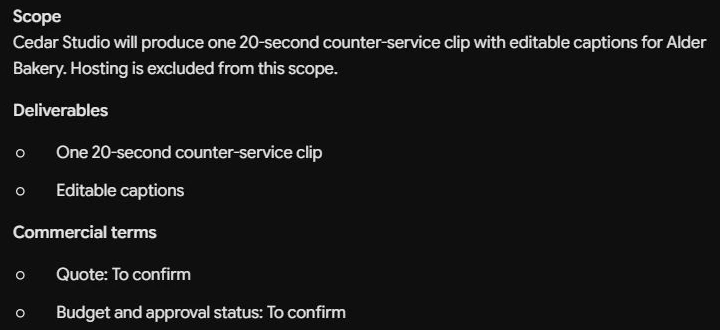
- Test Harbor Books in a fresh chat
Select the saved skill, paste Test A from the download and send. Confirm the submitted message includes the skill reference. The proposal should keep the $900 ceiling pending and December 7 proposed.
- Test Alder Bakery in another fresh chat
Select the same saved skill again, then paste Test B. Its brief has no budget or target date. The response should leave both To confirm and use the Alder Bakery scope.
- Compare the outputs with the reference file
Check all five headings, included and excluded work, missing prerequisites and the source IDs on open questions. Ask for corrections before adapting the text for a customer.
What the two final proposals got right
We strengthened the saved instructions to require an explicit sentence-by-sentence scope check and the exact unknown-value wording. Then we selected the skill correctly and reran both briefs in fresh chats. Both final outputs retained the commercial distinctions below.
The final drafts still need a human decision on price and dates. Use the open questions to get those answers. If you later add a deliverable or agree a date, update the customer brief and rerun the draft so the source remains clear.
| Review item | Harbor Books | Alder Bakery |
|---|---|---|
| Scope | Two English training clips, each up to 30 seconds, with editable captions | One 20-second counter-service clip with editable captions |
| Budget and quote | $900 ceiling remains unapproved. Quote To confirm. | Quote and budget approval To confirm |
| Dates | December 7 remains proposed. Confirmed date To confirm. | Target date To confirm |
| Prerequisites | Approved script and product photos pending | Script text pending |
| Carryover | Uses Harbor Books facts | Contains no Harbor Books, $900 or December 7 carryover |
See the separate Gems-to-Skills transition and regression test →
Continue with a separate proposal revision and PDF workflow →
Sources & verification
We manually created cedar-proposal-check in signed-in Gemini web on November 19, 2026, attached an original rules TXT, revised the instructions, read back the saved revision and explicitly selected the skill in two fresh chats. During setup, replacing the whole input removed the selected skill reference, and the resulting ordinary draft added work that was outside the brief. We corrected the invocation and strengthened the saved instructions before the final runs. This test cannot separate the contribution of those two changes. No connected-app work, client communication, PDF export or automatic Gem migration was tested.
- Google Help for creating, saving, attaching files to and invoking skills
- Google’s reusable Skills announcement
- Google’s Gems to Skills transition instructions
Sources checked: 2026.11.19