- Choose the official plugin and confirm Sales is selected before sending.
- Treat a buyer budget, a possible date and an agreed action as different facts.
- Check every owner and due date before using the action table.
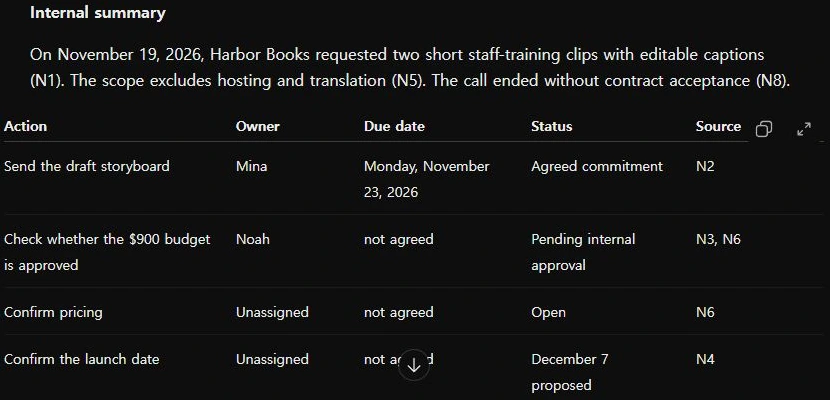
The final Sales-selected Work request returned a concise email and a five-row action table. It kept $900 pending approval, left December 7 proposed and marked three unresolved owners Unassigned. An earlier draft had assigned both attendees to those tasks, which shows why the owner rule needs a specific check.
Files for this exercise
AIHotple example files and prompts. Try the exercise before substituting real work data.
What the Sales plugin adds to this exercise
OpenAI’s Sales plugin includes workflows for account preparation and post-call follow-up. OpenAI lists it for all ChatGPT plans, including Free. Partner tools have their own plan, regional, workspace and account requirements. This example uses pasted fictional notes, so a reader can learn the drafting workflow before adding a CRM.
The call is between Mina at Cedar Studio and Noah at Harbor Books. Mina has agreed to send a storyboard by November 23. Noah will check budget approval. Everything else needs careful wording. A polished email that accidentally treats the budget as a quote or a proposed launch as a promise could create work the call never agreed.
| From the notes | What the draft should say |
|---|---|
| N2 · Mina will send the storyboard by November 23 | An agreed seller commitment |
| N3 and N6 · Buyer mentioned $900 and approval is pending | A buyer budget awaiting approval, with no agreed price |
| N4 · December 7 was discussed | A possible launch requiring confirmation |
| N7 · A follow-up meeting was suggested | An unscheduled meeting with no agreed owner or date |
Install Sales and start a focused draft
Check the publisher before installing. Our listing showed OpenAI, version 1.1.6 and the Follow Up After Call skill. The Work sample opened with Sales selected in the message box. Keep that selection while replacing or adding the fictional notes.
Open the official Sales plugin listing in ChatGPT ↗
- Open the listing and check OpenAI as the publisher
In ChatGPT, open Plugins and search Sales, or use the official link above. Select Install plugin if it is available. Check that the installed state appears before starting a chat.
- Choose the follow-up workflow
Use the listing’s chat or Work entry. In our test, the Work example placed a Sales reference in the composer. Add the full notes and request below, and confirm the Sales reference remains visible before sending.
- Keep the request in focused-draft mode
Ask for the email and action table, with owners based only on explicit assignments. This stops a suggested next step from quietly becoming someone’s assigned job. Wait for the final reply.
- Review the email and the table as separate outputs
The email must preserve the commercial terms. The table must preserve who committed to what and when. Compare each row to its source ID before copying it into a work system.
Use Follow Up After Call in focused-draft mode. FICTIONAL SALES CALL — SOURCE NOTES
Date: 19 November 2026. This is a test, with no real recipients.
Seller: Mina at Cedar Studio. Buyer: Noah at Harbor Books.
N1. Noah requests two short staff-training clips and editable captions.
N2. Mina will send the draft storyboard by Monday, 23 November 2026.
N3. Noah will check internally whether the $900 budget is approved. No deadline was agreed for this check.
N4. December 7 was discussed as a possible launch. It was not committed.
N5. Hosting and translation are excluded from the discussed scope.
N6. No price was agreed. The $900 figure is the buyer's unapproved budget.
N7. A follow-up meeting was suggested, but no date or time was agreed.
N8. No one accepted a contract or authorized sending any email or updating a CRM.


Use only the fictional source notes above. Draft an English follow-up email of at most 140 words and a separate internal action table with columns Action, Owner, Due date, Status, Source ID. Keep agreed commitments, proposed dates and pending decisions distinct. Use "not agreed" for missing deadlines. Do not invent a price or an accepted launch date. Do not use email, calendar, CRM, web research, memory or other connected data. Do not send, save or schedule anything. Return drafts in this conversation only.

For each assigned owner, use only explicit ownership in the notes.
The first thing to inspect is the Owner column
The final Work output put Mina on the storyboard and Noah on budget approval. Pricing, launch confirmation and arranging a meeting all remained Unassigned, with no agreed deadline. Its email also kept the $900 approval open and described December 7 as a possible launch.
An earlier Sales-named Chat draft put Mina / Noah against unresolved pricing, launch and meeting actions. Those were plausible collaborators, but the notes had assigned neither person. The regular Chat baseline left two such owners unassigned. After adding the explicit-owner rule, the revised Chat and selected-plugin Work outputs left those owners open. These individual results support checking ownership carefully. They do not establish that one mode is generally better.
Turn the draft into a usable follow-up
Read the email as the customer would. Check that it says who will send the storyboard, that pricing is still open and that hosting and translation are excluded. Then read the internal table as a manager would. “Unassigned” is an unresolved handoff to discuss, not an instruction to assume the seller owns it.
If an owner was invented, request a correction that names the source rule. For example, “Only N2 assigns Mina and N3 assigns Noah. Leave the other action owners Unassigned.” If you want someone to own those tasks, make that business decision explicitly and record it separately from the call recap.
Review the Owner and Due date columns against N1–N8. Only use a named owner when the notes explicitly assign that action. Otherwise use Unassigned. For an unagreed deadline, use not agreed. Keep the agreed storyboard date, the pending buyer budget and the proposed launch unchanged.Apply a source check to a broader meeting action list →
Use the same commercial distinctions in a reusable proposal skill →
Sources & verification
Tested on November 19, 2026 in signed-in ChatGPT web. We installed the official OpenAI Sales plugin and used its Work entry with Sales visibly selected in the composer. The final request named Follow Up After Call and restricted the output to a chat draft. We also ran the original notes in regular Chat and inspected earlier Sales-named Chat drafts. The final Work request included an extra explicit-owner instruction, so this is a workflow review across individual runs. It does not isolate a model or plugin performance effect. No CRM integration or email delivery was tested.
- OpenAI Sales plugin listing and included skills
- OpenAI Sales setup, availability and partner connections
- OpenAI’s ChatGPT for Sales announcement
Sources checked: 2026.11.19