- Specify the date, transport and minimum time before asking for recommendations.
- Free admission, booking requirements and guaranteed entry are different conditions.
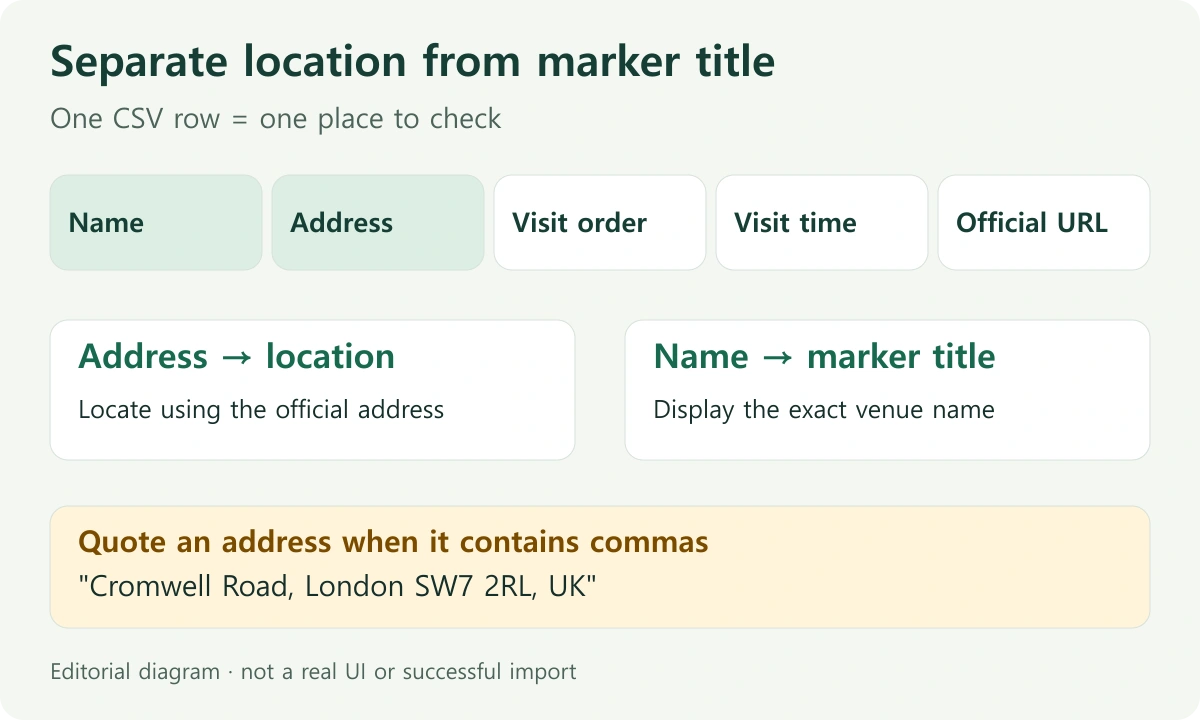
- Use Address to locate CSV rows and Name to label their markers.
Actual Korean Gemini run, map display and corrected CSV. My Maps was checked through the file picker; a completed import was not verified.
Files for this exercise
AIHotple example files and prompts. Try the exercise before substituting real work data.
A good itinerary does not have to fit every candidate
Our fictional trip starts at South Kensington station at 10:00 on Wednesday 4 November 2026 and ends by 17:00. Two adults walk, allow a 60-minute lunch and want at least 90 minutes in each of two museums. The candidates are the Natural History Museum, V&A South Kensington and Science Museum.
Gemini selected the Natural History Museum and V&A. That is a choice for this brief, not a quality ranking. If science is your priority, change the selected museums before regenerating the plan.
| Actual draft time | Activity | Interpretation |
|---|---|---|
| 10:00–10:05 | Walk from the station | Estimated; no queue or security allowance |
| 10:05–11:45 | Natural History Museum | 100 planned minutes, not guaranteed entry |
| 11:45–12:50 | Walk and lunch | 5 estimated walking minutes + 60 lunch minutes |
| 12:50–14:30 | V&A | 100 planned minutes |
| After 14:30 | Return and spare time | No need to fill every remaining minute |
1. Start a new chat with the constraints
Open Gemini and start a new chat. Include your date, exact starting point, end time, group, transport and minimum visit length. Specify the exact branch of each venue.
The tested account used Gemini Auto mode and returned place cards and a map. Availability and UI can vary by account, region, device and settings. A map panel is useful but is not required to prepare an address-based CSV.
- Start a new chat
Keep a previous trip’s dates and preferences out of the new request.
- Enter the trip constraints
Give a date and a daily visit limit rather than simply asking for attractions.
- Open the sources
A place card’s current open/closed badge is not the operating status for your future travel date.
Plan a fictional London day on [date], starting at South Kensington station at 10:00 and finishing by 17:00. Two adults, walking, 60-minute lunch, two museums with at least 90 minutes each. Candidates: Natural History Museum London, V&A South Kensington, Science Museum London. Check official hours, last entry, general-admission booking conditions, addresses and sources. Mark unknowns and walking estimates. Choose two, explain the exclusion and do not book or pay.2. Check admission wording before trusting the table
The first answer labelled Natural History Museum booking mandatory. Its visit page distinguishes free galleries, possible queues and tickets that guarantee entry. The answer also treated V&A’s gallery-clearing period as a last-entry time. We supplied the official pages and corrected both interpretations.
Science Museum separately asks visitors to pre-book a free ticket. Free general admission does not mean identical booking arrangements, and paid exhibitions are a different category.
| Checked 20 October 2026 | Hours / entry | General admission |
|---|---|---|
| Natural History Museum | 10:00–17:50 / last entry 17:30 | Free; ticket booking offered to guarantee entry |
| V&A South Kensington | Wednesday 10:00–17:45 / general last entry unconfirmed | Free, no general-admission booking; gallery clearing starts 30 minutes before closing |
| Science Museum | 10:00–18:00 / last entry 17:15 | Pre-book a free ticket |
Recheck the admission and last-entry statements against the official visit pages. Do not turn a recommendation for guaranteed entry into mandatory booking, or gallery clearing into last entry. Separate corrected facts from remaining unknowns.3. Use the map to check places, not to certify travel times
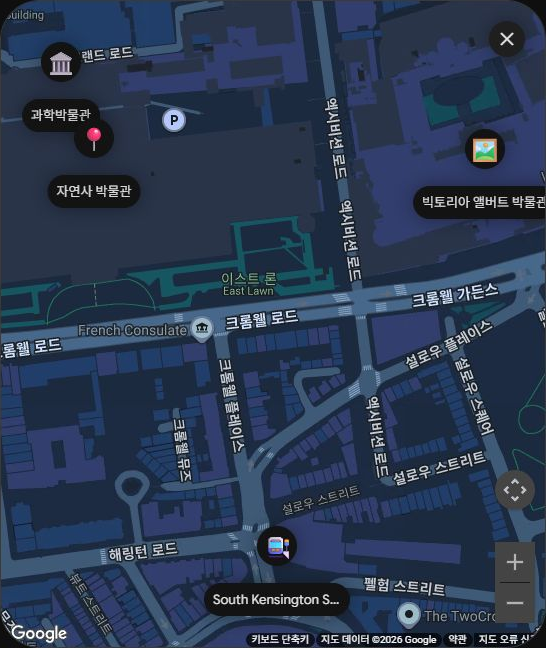
This is the map panel actually shown in Gemini. It includes an excluded candidate and the starting station as well as selected places. A pin confirms neither a feasible entrance nor admission at a particular time.
The five-minute walking legs were estimates, not live route measurements. Check the exact entrances and walking route yourself and allow for queues. Check accessibility separately if needed.
4. Ask for a CSV with addresses
Keep five columns: Name, Address, Visit order, Visit time and Official URL. If you do not have verified coordinates, use official addresses rather than asking the model to invent latitude and longitude.
The first CSV left commas inside addresses unquoted. The corrected response quoted those fields and passed an independent two-row, five-column parsing check. The download retains the actual corrected output, with a UTF-8 BOM added for file handling. Its original headers are Korean.
Return only the two selected museums as a CSV. Columns: Name,Address,Visit order,Visit time,Official URL. Use exact English venue names and official addresses. Quote fields containing commas and keep exactly five columns per row. Do not invent coordinates. Keep explanatory text outside the CSV.5. Choose Address for location and Name for labels
On a computer, create a map in Google My Maps. We reached the new private map and its import file picker. The environment could not operate that picker, so we did not verify an uploaded file or generated markers. The remaining instructions below follow Google’s official import procedure.
Select the address column to position places, then the name column to label them. A successful import should show the intended rows and locations; open each marker and check the branch and address. Imported points do not automatically validate a walking itinerary.
- Create a new map
Give it a practice title. My Maps stores the map and associated metadata in Google Drive.
- Import beneath a layer
Extract london-museums-corrected.csv from the download ZIP and select that CSV, not the ZIP.
- Select Address, then Name
In the supplied Korean-header CSV, choose 주소 for position and 이름 for the marker label.
- Check each resulting place
Look for the wrong branch, missing address or duplicates before sharing the map.
6. Recheck dated notices before travelling
Regular hours do not guarantee admission on your chosen date. At the check, Science Museum listed an all-day closure for 11 November 2026, and V&A listed gallery redevelopment notices. Reopen the visit pages if the date or desired gallery changes.
The draft leaves spare time after 14:30. Decide whether that is for queues, rest or longer visits instead of automatically adding attractions. The useful output is a manageable sequence, not a full grid.
Sources & verification
On 20 October 2026 we sent two Korean requests in Gemini web Auto mode, inspected place cards and the map, and independently checked museum visit pages. We corrected admission wording and quoted CSV addresses. A new private My Maps practice map and its import picker were opened, but the automation environment could not operate that picker. Upload completion and imported markers were not verified. No public sharing, booking, purchase, journey, date-specific admission guarantee or separate English model run occurred.
- Google · Gemini connected apps
- Google My Maps · import places from a file
- Natural History Museum · London visit
- V&A South Kensington · visit
- Science Museum · visit
Sources checked: 2026.10.20