- Ask for an editable document artifact.
- Specify both the paragraph to change and the facts to preserve.
- Separate sharing access from downloading a copy and inspect the exported text.
Actual Korean Docs creation, revision and Markdown export. No public sharing, Word/PDF export or collaborative edit test.
Files for this exercise
AIHotple example files and prompts. Try the exercise before substituting real work data.
Keep the document while changing one section
The fictional event has a confirmed date and capacity but unresolved venue, price and registration. Claude Docs opens a document beside the conversation so you can revise the same draft.
Our second request replaced only the registration paragraph. Its old capacity sentence disappeared with that paragraph, while capacity remained 12 in the introduction and information table. Check facts across their other occurrences after a bounded edit.
1. Provide facts and document structure
In a new chat, specify a Claude Docs document artifact rather than an HTML application or a Markdown code block. The tested account opened a document panel with editing controls and saved state.
Anthropic also documents /docs, Output → Docs and document templates under Artifacts. Interface labels can vary; describing the intended document is a useful starting point.
| Fictional detail | State |
|---|---|
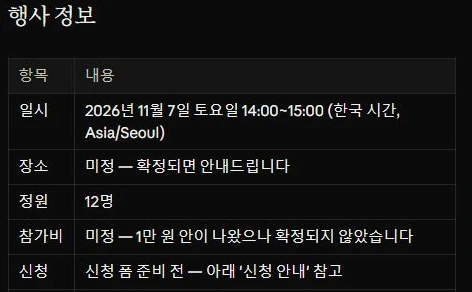
| 7 Nov 2026, Saturday, 14:00–15:00 | Confirmed · Asia/Seoul |
| Capacity 12; bring a book and pen | Confirmed |
| Venue, fee and registration | Unknown; KRW 10,000 is only a proposal |
| Cancellation contact by previous day 18:00 | Deadline given; contact channel unknown |
| Later refund conditions | Undecided |
Use only the fictional brief below to create an editable Claude Docs event notice. Include title, introduction, information table, materials, registration and three FAQs. Preserve unknowns, do not invent a registration URL, put an internal checklist separately at the end and do not share.
[Paste the fictional event brief]
2. Check the table before polishing prose
The actual document retained Saturday, capacity 12 and undecided fee, without inventing a registration link. It included the requested structure and an internal checklist.
It is still a draft: venue, registration and contact details remain unresolved. A fluent document is not automatically a publishable customer notice.
3. Name the section to edit and facts to preserve
We replaced registration with two sentences saying it is still being prepared and instructions will be added when it opens. The date, time, capacity, fee state and internal checklist remained visible.
A specific edit request gives you a clear comparison to perform afterwards. Re-read the document instead of relying only on Claude’s completion message.
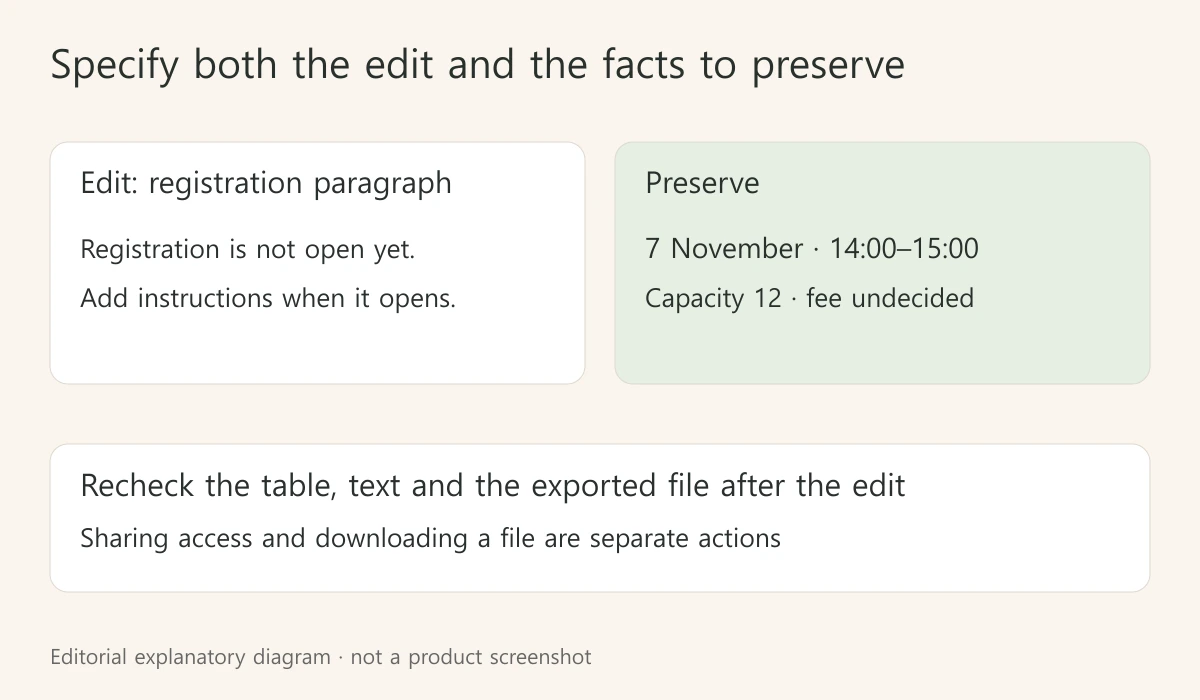
In the same document, replace only the customer-facing Registration paragraph with: “Registration is still being prepared. We will add instructions to this notice when it opens.” Do not change other customer text, date, capacity, fee, cancellation rule or internal checklist. Keep the document private.4. Exporting a document is separate from installing the app
The tested workflow runs on the web; installing a desktop app is optional. The hub’s App installation link opens Claude’s official page so you can choose a device. It does not directly download an installer.
For the document, open its title/options menu and choose Export. The actual menu offered Word, PDF and Markdown; we downloaded Markdown. Word/PDF layout and pagination were not tested.
Open Claude’s official app installation page ↗
- Open document options
Use the title menu in the document panel.
- Choose Export
Distinguish file export from sharing-access controls.
- Choose Markdown
Open the downloaded file and check the revision and original facts.
5. Check the copy and sharing scope
The downloaded Markdown retained the revised paragraph, date, capacity and unknowns. The practice copy removes only the automatic account-attribution line. We did not create a public link; the original stayed private.
Before publishing a real notice, separate the internal checklist and resolve venue, contact and registration. Downloading a copy and granting access to the original document are different actions.
Sources & verification
Two Korean requests in Claude web, displaying Sonnet 5.5 and High, created and revised a fictional notice on 20 October 2026. We checked private scope, key facts and downloaded Markdown. No real event, external sharing, comment instruction, collaboration, Word/PDF or separate English model test. One automatic account-attribution line was removed from the practice copy.
Sources checked: 2026.10.20