
- Define data rules before asking for a summary.
- Request a downloadable XLSX and formulas explicitly.
- Check excluded, held and return rows as well as the total and input range.
Includes the actual generated workbook. We checked saved values and formulas; native Excel recalculation and automatic row expansion were not tested.
Files for this exercise
AIHotple example files and prompts. Try the exercise before substituting real work data.
Understand how the total was formed
The eight-row fictional input contains one exact duplicate T02, one blank product T04 and one negative-quantity return T03. Their treatment is supplied as a business rule, not left for Claude to guess.
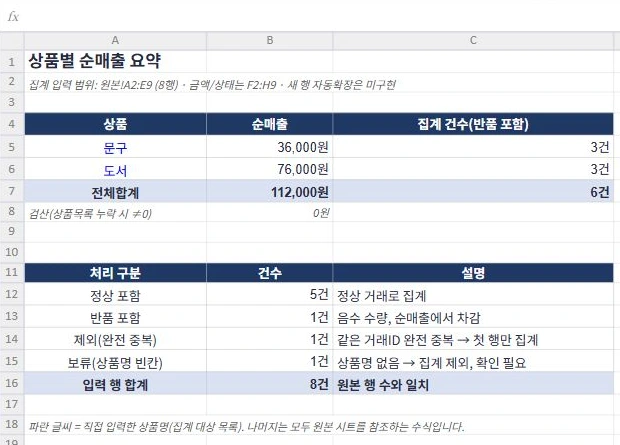
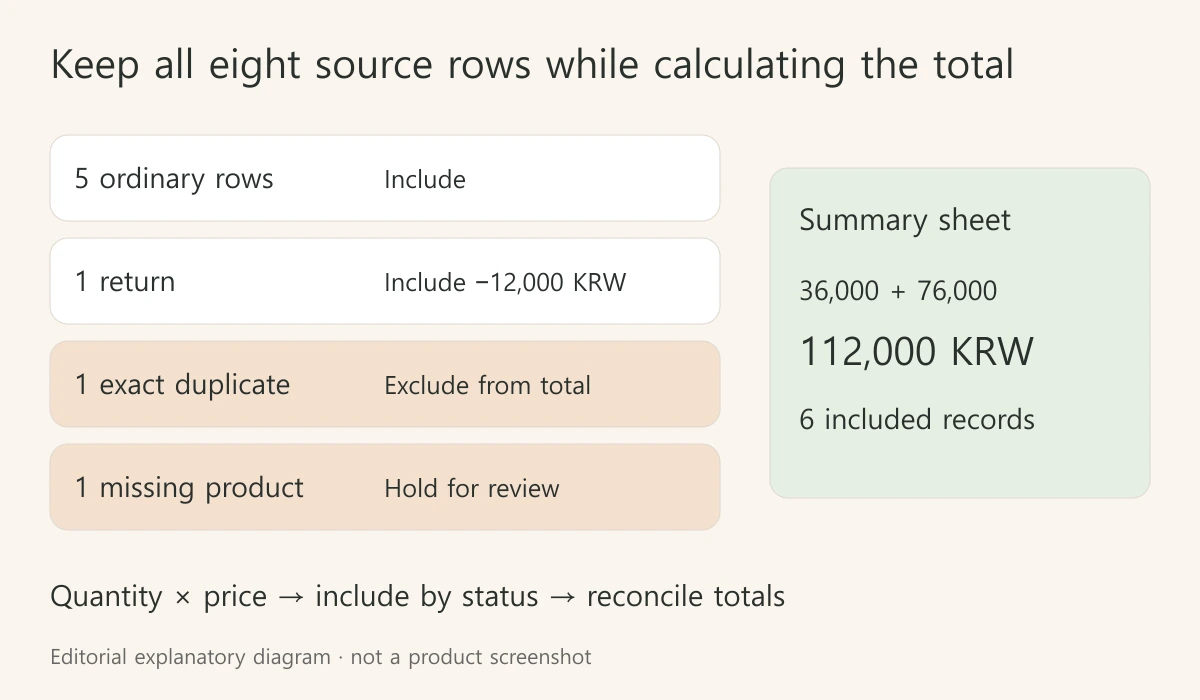
Summing every raw amount gives KRW 140,000. Excluding the duplicate KRW 18,000 and held KRW 10,000, while retaining the negative return, yields stationery KRW 36,000 and books KRW 76,000: KRW 112,000 total.
| Treatment | Rows | Rule |
|---|---|---|
| Ordinary included | 5 | Quantity × price |
| Return included | 1 | Keep the negative amount |
| Exact duplicate excluded | 1 | Keep first T02 only |
| Missing product held | 1 | Retain T04 but exclude from total |
1. Review the eight sales rows in your browser
Open the sales example below. The CSV review tool starts with the eight rows from this exercise, with English column and product names. Prices are in Korean won. Select Inspect CSV.
Under Duplicate keys, select all five columns so only an exact repeat qualifies. Under Required fields, select product. Set both rules before choosing exclusions. In the review table, record 4 repeats record 3 in every column. Select Exclude duplicate candidates to keep the first T02.
Select Exclude on record 6 (T04) to hold the blank product out of the total. Keep record 5 (T03): its quantity of −1 is a return. The counters should now show 8 source records, 6 kept and 2 excluded. The cleaned CSV contains only the six selected rows. Use the original eight in the next step so the workbook can explain both exclusions.
2. Paste the original rows into Claude and request an Excel file
Start a new Claude chat, copy the prompt below and send it. The original rows are included. Keeping all eight makes it possible for someone else to trace the difference between raw and net sales.
In our original test we pasted the Korean version of these rows into Claude web. The prompt here uses English labels. If file creation is unavailable in your account, use the reference workbook in the next step to check your decisions.
Create a downloadable .xlsx file from these fictional sales. Put Summary first and Source second. Keep all eight rows in Source and add status, reason and a quantity × unit price formula for each. Count the first instance of an exact repeat only. Hold blank product names out of sales. Keep negative quantities as returns. In Summary, use formulas linked to Source for net sales by product, net sales overall, and excluded and held counts. Label amounts in KRW and show the covered row range.

transaction_id,date,product,unit_price_krw,quantity
T01,2026-10-01,Stationery,12000,2
T02,2026-10-02,Books,18000,1
T02,2026-10-02,Books,18000,1
T03,2026-10-03,Stationery,12000,-1
T04,2026-10-04,,5000,2
T05,2026-10-05,Books,20000,2
T06,2026-10-06,Stationery,8000,3
T07,2026-10-07,Books,18000,1
3. Compare your workbook with the verified result
Open the reference XLSX below. Its first tab, 요약 (Summary), shows stationery at 36,000 in B5, books at 76,000 in B6 and net sales of 112,000 in B7. Its second tab, 원본 (Source), keeps all eight inputs in A2:E9. Match rows by transaction ID even if your workbook uses English sheet names.
If you get 130,000, check whether the second T02 was counted. A total of 122,000 points to T04 being included. A total of 124,000 with the original quantities can mean the negative return was dropped. Click the total and trace its formula before changing an input.
Open the original Claude workbook (.xlsx, Korean sheet labels) ↗
4. Do not confuse raw amounts with included amounts
The amount column keeps quantity × price even for excluded and held rows. Seeing 18,000 for the duplicate does not mean the summary includes it. Inspect the status criteria in the summary formula.
The supplied workbook has a fixed row range and two manually listed product categories. Extending rows or adding products requires extending both formulas and the summary list.
5. Test one input change in a copy
Changing T01 quantity from two to three should add KRW 12,000, producing KRW 124,000 when everything else remains the same. This is an independent expected result, not a native Excel test we performed.
Confirm formulas, automatic calculation and the covered range in your spreadsheet application before relying on a recurring report.
Continue this workflow
Next: repair two formula defects inside native Excel and test recalculation →
Sources & verification
One Korean request in Claude web, displaying Sonnet 5.5 and High, produced an XLSX on 20 October 2026. We independently inspected sheets, all eight inputs, formulas and cached totals. No file-upload, real-business-data, native Excel/Sheets recalculation, automatic expansion or separate English model test.
Sources checked: 2026.10.20