- Protect cue IDs and timecode lines independently of the translated text.
- Check negations, amounts and policy limits as well as grammar.
- Fixed timings can produce dense captions; shorten only the affected wording and recheck the whole file.
Lock cue IDs and timestamp lines, then inspect wording and reading density separately. Keep the first AI result, request targeted changes and label any editorial refinement in the final subtitle file.
Files for this exercise
AIHotple example files and prompts. Try the exercise before substituting real work data.
Start with an SRT, not a video link
You already have timed English captions and need another language version. The job is to translate the caption text while preserving the timing structure. Pasting a video URL and asking for a translation is a different task that may also require accessible audio or a transcript.
This exercise uses eight original fictional training captions lasting 23 seconds. The source contains a product name, 350 ml, £24.50, a 14-day review window and a warning not to claim leakproofness. Those details give us specific checks beyond “the Spanish looks fluent.”
Each SRT block has a cue number, a start/end timestamp line and caption text. A blank line separates blocks. You can change text line breaks without changing the timecode line, but a changed number, missing cue or shifted timestamp should stop the handoff.
1. Paste a bounded translation request
Open a new ChatGPT conversation with Chat selected. Paste the complete request below, including the SRT. This run used plain text; it did not require a media upload, extension, video player or connected editing account.
For a longer permitted file, first check that its text can be read, keep a copy of the original and work in clearly labelled cue ranges. Do not let a partial response silently replace the complete subtitle track. The eight-cue example is intentionally small enough to compare in full.
Ask for one SRT code block only. Copy its contents into a UTF-8 .srt file, leaving out Markdown fences and language labels. A displayed code block saved by an editor is different from a native downloadable export; our files are labelled accordingly.
- Lock the structure
Name cue numbers, order and exact timestamp lines as protected fields.
- Name the meaning that must survive
Keep the four literals, negation, receipt condition and review-window meaning.
- Save the first draft separately
Compare every cue before asking for a correction.
Translate this original fictional training SRT from English into neutral Spanish. Translate only caption text. Keep cue numbers, order, start times and end times byte-for-byte unchanged, including commas and milliseconds. Keep HarborDesk, 350 ml, £24.50 and 14 exactly as written. Preserve negations, conditions and the difference between reviewing a return request and promising a refund. Do not add a cue or a new product claim. Use no more than two text lines per cue, aiming for 42 characters per line; break at word boundaries. Return only one srt code block. Do not transcribe audio, play media, connect an account or create an external document.

1
00:00:00,000 --> 00:00:02,000
Welcome to HarborDesk.

2
00:00:02,500 --> 00:00:05,000
Keep the lid off while filling.

3
00:00:05,500 --> 00:00:08,000
Do not claim that this mug is leakproof.

4
00:00:08,500 --> 00:00:11,000
Its capacity is 350 ml.

5
00:00:11,500 --> 00:00:14,000
The example price is £24.50.

6
00:00:14,500 --> 00:00:17,000
Return requests are reviewed within 14 days.

7
00:00:17,500 --> 00:00:20,000
Ask for a receipt before approving a refund.

8
00:00:20,500 --> 00:00:23,000
Review every caption before publishing.
2. Check the first result in two passes
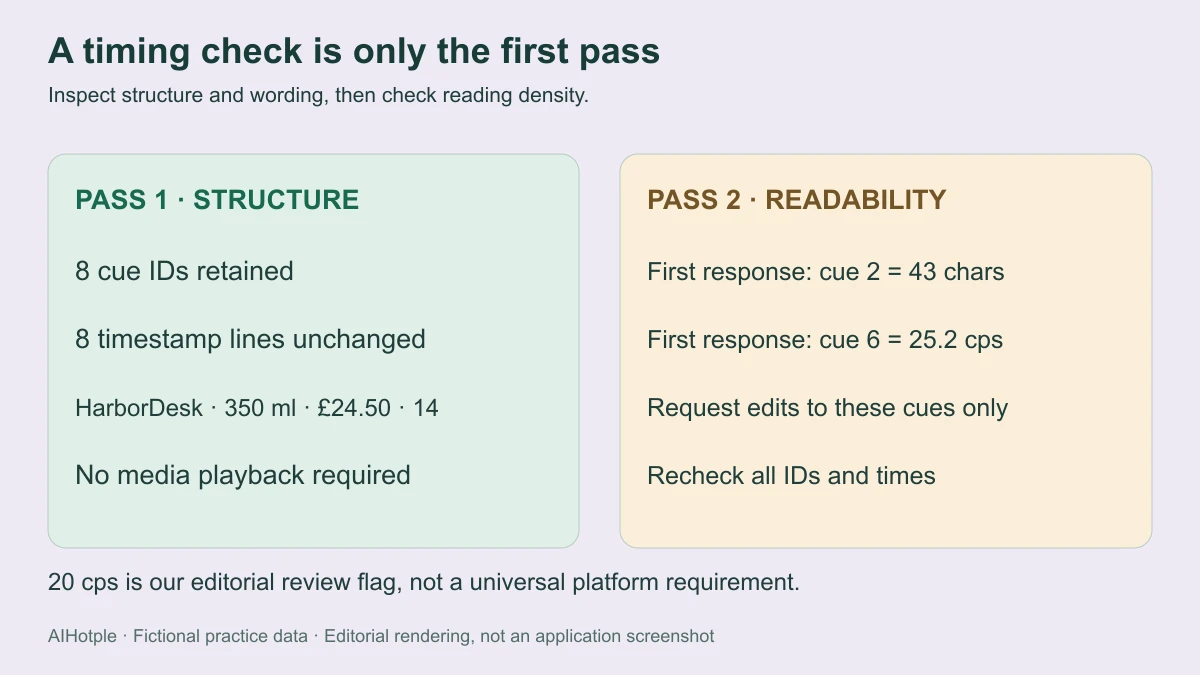
The first Spanish result retained all eight IDs and timestamp lines. HarborDesk, 350 ml, £24.50 and 14 also remained. Cue 3 kept the negative leakproof claim; cue 7 retained the receipt condition before refund approval.
It still needed a readability pass. Cue 2 had 43 characters on one line, above the requested 42-character aim. Cue 6 contained 63 text characters across two lines in 2.5 seconds: 25.2 characters per second by our calculation, excluding the line break.
We use 20 characters per second as an editorial flag for this exercise, not a universal caption standard. Reading comfort also depends on language, audience, screen size and the footage. Passing a numeric threshold does not establish that every viewer can read the caption comfortably.
3. Revise only the affected cues, then review the meaning
We asked ChatGPT to wrap cue 2 and shorten cue 6, while leaving all IDs/times and the text of the other six cues unchanged. The second response did that structurally: cue 2 split at a word boundary and cue 6 became shorter.
However, cue 6 now ended “en 14 días.” That is less explicit about an upper bound than the original “within 14 days.” We made one editorial refinement: “Solicitud de devolución: / revisión en hasta 14 días.” The singular generic caption still describes review of a return request, with an explicit upper bound and no promise of a refund.
The kit keeps the first result, the actual targeted revision and the editorial final as separate files. The final is not presented as untouched ChatGPT output. A specialist translator or policy owner should approve real customer-facing language, especially when small wording changes affect a promise.
| Cue | Problem found | Final treatment |
|---|---|---|
| 2 | 43 characters on one line | Model revision wraps the same words over two lines |
| 6 | 25.2 characters/second; shortened wording then weakened the explicit bound | Editorial final: 50 characters over two lines, 20.0 characters/second |
| 1, 3, 4, 5, 7, 8 | Protected from unrelated rewriting | Text unchanged through the targeted revision and editorial final |
6
00:00:14,500 --> 00:00:17,000
Solicitud de devolución:
revisión en hasta 14 días.
4. Recheck the complete final file
The final file has the original eight cue IDs in order and byte-identical timestamp lines. It retains the four required literals, uses at most two text lines per cue and stays within 42 characters on each line. No final cue exceeds our 20-character/second review flag.
The downloadable cue-audit.csv shows every cue’s duration, maximum line length and density. It is a structural and quantitative check, with separate editorial meaning spot checks. It cannot establish speech synchronization, pronunciation, tone or whether a subtitle obscures an important on-screen object.
If timings are contractually fixed, do not secretly stretch a cue to fit a longer translation. Shorten approved wording or raise the conflict for review. If timing changes are allowed, they require a separate comparison against the actual footage; that was outside this text-only run.
Inspect the SRT or VTT in the subtitle workbench without a video ↗
5. Hand off the right format with the review notes
Use reviewed-es.srt for a basic SRT handoff. YouTube’s supported-format guidance describes basic SRT in plain UTF-8 and does not treat SRT styling as supported. We did not upload this fixture to YouTube or another production service.
The reviewed-es.vtt download is a mechanical conversion of the same editorial final: WEBVTT header, preserved cue IDs, decimal-point time separators and unchanged caption wording. WebVTT is a distinct timed-text format; simply renaming .srt to .vtt does not convert it.
Give an editor the source, final, audit and a clear note that no footage was played. For real publication, a permitted media review still needs to confirm when speech occurs and how the captions read on screen. Keep account uploads and publication as separate, deliberate actions.
Create and check the original timed SRT with Descript →
Continue from reviewed captions to a short-video editing workflow →
Continue this workflow
Need a translated voice too? Prepare an English-to-Spanish dubbing test →
Sources & verification
Tested on 30 October 2026 in signed-in ChatGPT web Chat mode with Medium displayed; GPT-6 was selected in the same account’s selector, which also showed a usage-limit notice. Backend routing was not independently verified. We pasted an original fictional eight-cue English SRT, requested neutral Spanish and retained the actual first output. All IDs/timestamp lines and four required literals remained, but cue 2 had a 43-character line and cue 6 had 25.2 text characters/second. One targeted model revision wrapped cue 2 and shortened cue 6, but made “within 14 days” less explicit. AIHotple then refined only cue 6 to “Solicitud de devolución: / revisión en hasta 14 días.” The final SRT keeps all eight original IDs/times, at most two lines per cue, at most 42 characters per line and at most 20 text characters/second under our stated calculation. The VTT is an editorial format conversion. No audio/video was uploaded or played, no transcription or speech-sync test was performed, and native platform import or certified translation quality was not verified.
- OpenAI · image and file work in ChatGPT
- YouTube · supported subtitle and closed-caption files
- W3C · WebVTT candidate recommendation draft
Sources checked: 2026.10.30