- A dated, explicit source is more useful than a vague request for training slides.
- Separate order processing, dispatch and delivery promises.
- Review generated diagrams and export files before giving them to a new team member.
Start with one current handbook, request an outline with source-section IDs, and review facts before generating training media. Check the finished visuals as well as the text: a correct sentence can still sit inside a misleading diagram.
Files for this exercise
AIHotple example files and prompts. Try the exercise before substituting real work data.
Choose a training outcome you can check
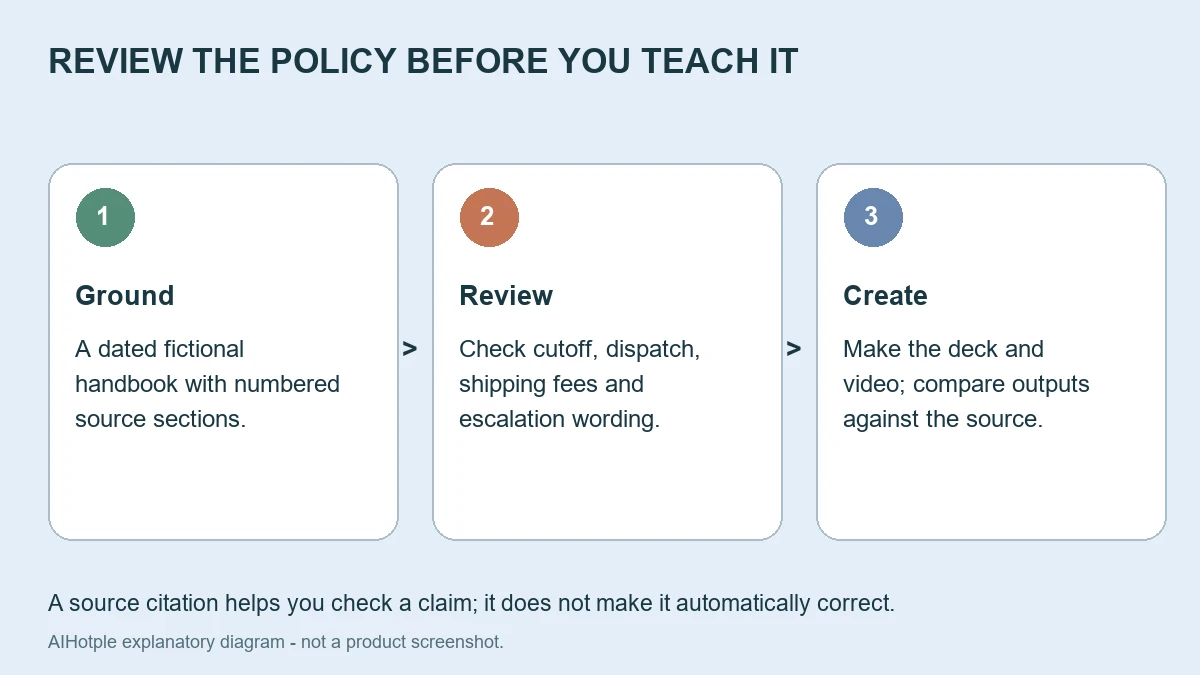
The task is not simply to make a presentation about a company. A new support assistant needs to know which questions they may answer, which facts they can quote and when to ask the policy owner. Our fictional handbook makes those boundaries explicit and includes four practice cases.
NotebookLM was renamed Gemini Notebook in July 2026. The familiar source-based workflow remains the useful starting point: add a document, ask questions tied to it, then create an output. This exercise uses the standalone Notebook product, rather than treating every Gemini chat as the same interface.
Use the downloadable Cedar handbook first. It is short, written in English and divided into S1–S7 so each slide can point back to a policy section. It contains no personal records. Before using your own material, confirm that you are allowed to upload it and that the source is the current approved version.
1. Add the handbook and establish the facts
Open Gemini Notebook and create a notebook. In the Sources area, choose Add source, then Copied text, paste cedar-handbook.txt and insert it. File upload is another option; we used copied text. Wait until the source appears and is selected before asking the notebook to create anything.
Give the notebook a descriptive name, such as Cedar onboarding practice, and explicitly ask for English output if the interface uses another language. Our initial automatic notebook summary was Korean, while the requested outline and generated slides were English. Interface language is not proof of the language in every generated artifact.
The critical facts are a weekday 14:00 Europe/London processing cutoff, dispatch within two business days after processing, GBP 4.50 standard shipping below GBP 50, free standard shipping at GBP 50 or more, a 30-calendar-day unused-standard-item return request window, and owner review for damage or personalized items. Five business days after dispatch is a missing-parcel escalation threshold, not a guaranteed arrival time.
- Check the source
Open the added handbook and confirm its version, section labels and exact numbers.
- Set the intended audience and language
Ask for a new support assistant’s English training material, using only the selected handbook.
- Ask for missing information to remain missing
The handbook gives no working hours or phone number. The output should say not specified instead of inventing them.
2. Review an outline before asking for finished media
Our first request asked for six slides and source-section IDs, with no generation until the outline was reviewed. The response proposed role boundaries, processing and dispatch, shipping examples, returns and damage, missing parcels, and a first-week roadmap. That gives the reviewer a small, inspectable intermediate result.
One phrase needed care: the outline said to escalate a missing parcel “only” after five business days. The source gives that threshold for the missing-parcel case; it does not establish a universal ban on earlier review of every urgent issue. We requested the narrower source wording before generating the deck.
Google’s October announcement describes co-creation review controls. The current Slide Deck help page separately labels co-creation as an AI Ultra feature. Treat the actual account controls and current help page as eligibility evidence. In our run, requesting Review in chat led to a generated deck without a separately observed approval gate. We therefore describe the chat-outline review we actually performed, not a successful test of that native gate.
Use English. Propose a six-slide onboarding outline using only the selected fictional handbook. Put the S1-S7 source IDs beside each slide. Do not generate slides or video until I review it. Keep processing cutoff, dispatch window, shipping charges, return-request window and escalation threshold distinct. Do not invent working hours or delivery guarantees.3. Generate the deck, then inspect the pictures as policy
After approving the outline with the wording correction, ask for a concise English presenter deck and a simple visual style. You can also use Studio → Slide Deck to choose the output language, format and length. If your account offers Review outline notes, turn it on, inspect the outline in Studio and use Proceed only after your corrections are included.
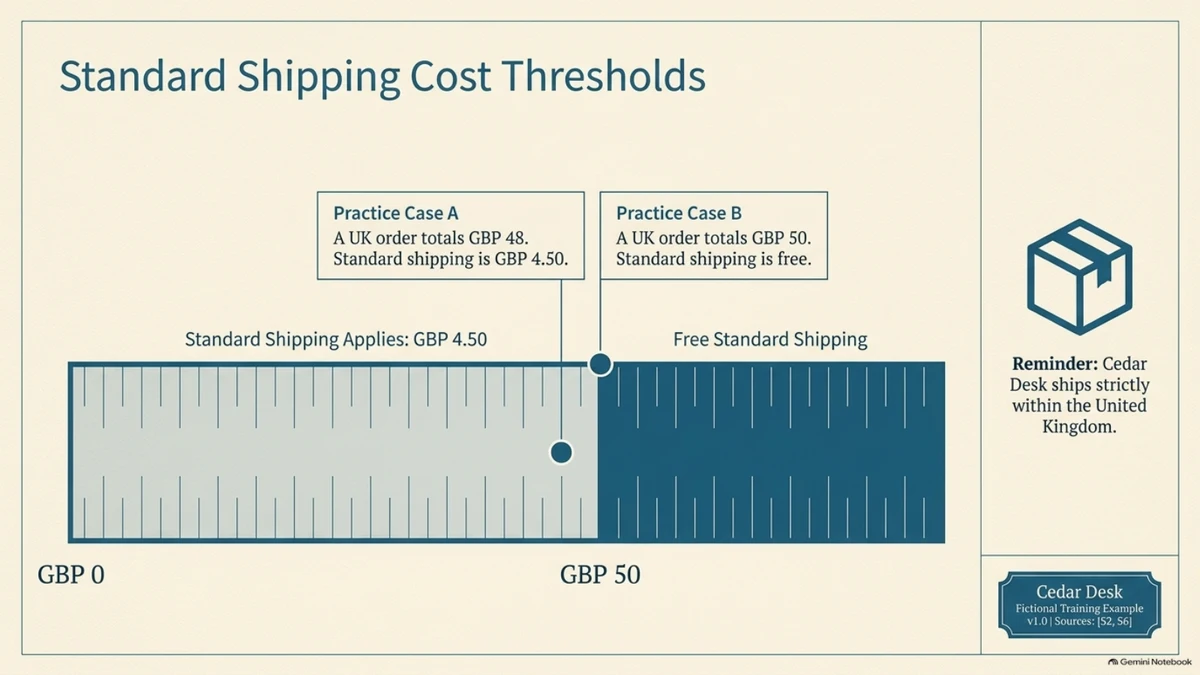
Our native PDF contained six pages. The shipping slide preserved the GBP 48 versus GBP 50 examples: GBP 4.50 shipping for the first and free shipping for the second. That is a useful small test of whether the threshold survived the conversion from prose to visual material.
Another page repeated the dispatch statement in three boxes. Its text said two business days, but the three-box timeline could suggest a three-day process. The missing-parcel page also used “Wait” as a step heading and included editing commentary. These are reasons to inspect every page, not simply accept a generation-success message.
4. Revise the specific slides and keep a review worksheet
Open the generated deck in Studio and choose Revise, shown as a pencil in our account. Select the affected slide thumbnail and describe the visual correction. We requested one dispatch callout instead of three repeated boxes, and a “Check threshold” heading instead of an instruction to wait. Group the changes before generating a revised deck.
The current help page notes that sources are not taken into account during slide revisions. Include the exact approved wording in your revision request, then compare the returned page to the handbook again. A revision is not an automatic factual recheck.
The revised native PDF replaced the three repeated dispatch boxes with one clear two-business-day callout. It changed the missing-parcel heading to “Check threshold” and removed the editing commentary. The other four rasterized pages were byte-identical to the original renders. Both PDFs are included, with the review instructions, so you can inspect the exact before and after. Keep a worksheet linking each concern to its source; this remains a fictional training example rather than an approved policy for a real shop.
| Check | Expected from the fictional source | What to reject |
|---|---|---|
| Order cutoff | 14:00 Europe/London on weekdays | A same-day dispatch promise |
| Dispatch | Within two business days after processing | A three-day diagram |
| Shipping threshold | GBP 48: 4.50; GBP 50: free | A fee on the threshold order |
| Missing parcel | Check after five business days from dispatch | A guaranteed five-day arrival |
| Authority | Morgan reviews refunds and exceptions | Assistant automatically approves a refund |
5. Build the video from the same reviewed rules
For a Video Overview, start with the same source and a concise English brief. Specify the audience, language and the exact distinctions that must survive narration. We requested the Brief format with a simple blue-and-cream style and asked for producer-note review if available. We did not choose a paid cinematic upgrade.
Do not assume the video repeats the deck exactly. Its narration and illustrations can introduce their own omissions. Before real use, compare the script or transcript to the source and check difficult statements at the corresponding time. A generated file or a few still frames cannot establish that every spoken claim is accurate.
The native video download is an 85.75-second portrait H.264 MP4 at 720×1280 and 30 fps, with an audio track. We checked its metadata and still frames extracted at 10, 35 and 65 seconds without opening a player. The narration was not listened to or transcribed, so the supplied video is an unapproved draft, not a fully fact-checked staff lesson. A decorative invoice illustration at the sampled 65-second point is generated imagery, not a customer record or policy evidence. Use the source-check worksheet for a complete narration review before distributing the video. If generation or review controls are unavailable, keep the outline and finish the material in an editor you can use.
Create an English Brief Video Overview for a new support assistant using only the selected fictional handbook. Keep the processing cutoff, two-business-day dispatch window, shipping fees and escalation threshold distinct. Morgan alone approves refunds. Label it fictional training. Show producer notes for review if available; do not add a delivery guarantee.6. Export a file you can reopen and check
In the deck’s three-dot menu, choose Download PDF Document. Our account also displayed a PowerPoint download option, but we verified the PDF path. Do not describe an untested PPTX as a fully editable slide deck just because a download option exists.
Reopen the actual export and check page count, language, policy numbers and visual clarity. Our PDF consists of raster slide pages; a plain text-extraction pass returned no text, so the review used rendered pages. The practice kit also keeps the original handbook and readable outline so the source can be inspected without relying on the images.
When the handbook changes, identify affected sections and regenerate or revise the corresponding outputs. The purpose is a maintainable training draft tied to a source version, not an attractive PDF detached from the policy it is supposed to teach.
Continue this workflow
Create a short downloadable audio brief from one source document →
Sources & verification
On 26 October 2026, we added our original English fictional Cedar Desk handbook to a signed-in Gemini Notebook account, reviewed an English six-slide outline, generated a six-page deck and downloaded native original/revised PDFs. All six pages were visually inspected; two native slide revisions were verified and the other four rendered pages stayed identical. A native 85.75-second H.264 video draft was downloaded: 720×1280, 30 fps, with an audio track. Only metadata and three extracted stills were checked; narration was not listened to or transcribed. A chat request for Review did not expose a separately verified pre-render approval gate; the account’s exact tier was not established. No real employee/customer data, new subscription or video playback was involved. The fictional shop policy is not legal advice or a model policy for a real business.
- Google · NotebookLM is now Gemini Notebook
- Google · Shape your slides and videos
- Google · Generate and revise Slide Decks
Sources checked: 2026.10.26