- Use the Excel export inside the live Claude Sheets artifact.
- Recalculate after changing both a cost and a status.
- Claude’s file kept the status choices in a hidden worksheet. It dropped the dropdown colors and left the invalid-entry alert off.
If you build a budget in Claude and hand it off as an Excel workbook, check a formula and change a real input before you send it. Then check dropdown enforcement. Having a menu of valid choices and blocking invalid values are two separate settings.
Files for this exercise
AIHotple example files and prompts. Try the exercise before substituting real work data.
Create a native workbook in Claude Sheets
Open Claude and start a new chat. Send the prompt below. You can also start in Artifacts and choose Sheets, if the tile is available. Look for an editable grid and the Budget and Summary tabs beside the conversation. Claude Sheets is a paid-plan beta, and some organization accounts require an administrator to enable it.
The four test rows have a planned total of $1,200 and an actual total of $1,120. The $80 gap comes from subtracting actual from planned. The paid-only total is $745 because only Venue and Print start as Paid. Those expected numbers give you a simple way to check the export.
Create a native Claude Sheets artifact named Field Kit Budget. Use the live editable Sheets artifact, with no code-generated file as a substitute. Create exactly two tabs named Budget and Summary. Budget header row: Item, Planned, Actual, Status. Rows: Venue | 650 | 600 | Paid; Print | 120 | 145 | Paid; Kits | 350 | 310 | Pending; Transit | 80 | 65 | Pending. Add single-select validation to Budget!D2:D5 with options Paid, Pending, Hold, keeping those values. In Summary put headers Metric and Amount in A1:B1. A2 Planned total, B2 =SUM(Budget!B2:B5). A3 Actual total, B3 =SUM(Budget!C2:C5). A4 Remaining, B4 =B2-B3. A5 Paid actual, B5 =SUMIF(Budget!D2:D5,"Paid",Budget!C2:C5). Format currency in USD. Do not share the sheet.Export Excel and read the compatibility note
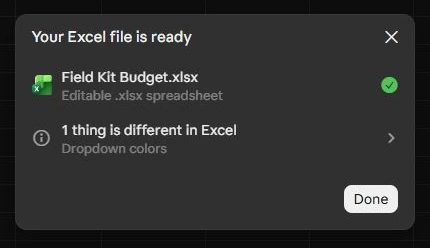
Open the Field Kit Budget name menu at the top of the artifact. Choose Export, then Excel. In our run, Claude saved Field Kit Budget.xlsx and displayed a notice that dropdown colors would differ. We used the downloaded file for the rest of the test.
Open the XLSX in Excel. Check that Budget and Summary are both visible. On Summary, select B2 through B5 one at a time and inspect the formula bar. We verified two cross-tab SUM formulas, the remaining-budget subtraction, and a SUMIF across the Budget sheet. The exported package contained all four formulas and their cached results.
Change one amount and one status in Excel
Use a throwaway copy or close it without saving after the check. In Budget!C4, change Kits from 310 to 350. In Budget!D4, change Pending to Paid. Check Summary again. If Excel is set to manual calculation, open Formulas and choose Calculate Now.
Desktop Excel recalculated the actual total from $1,120 to $1,160 and the remaining budget from $80 to $40. Paid actual went from $745 to $1,095 because the newly paid $350 Kits line joined the two original Paid rows. The planned total stayed at $1,200.
| Summary cell | Original export | After the edits |
|---|---|---|
| B2 · Planned total | $1,200 | $1,200 |
| B3 · Actual total | $1,120 | $1,160 |
| B4 · Remaining | $80 | $40 |
| B5 · Paid actual | $745 | $1,095 |
Check what the dropdown enforces before sharing
Select Budget!D4. Open Data → Data Validation. The rule in our export covered D2:D5, and Excel showed a list with an in-cell dropdown. The source pointed to a hidden Dropdown options worksheet, whose entries were Paid, Pending and Hold. Keep that hidden sheet with the workbook so the list stays available.
Open the Error Alert tab in the same dialog. In our export the alert was off. If the sheet needs to reject invalid values typed into those cells, select D2:D5, enable the error alert and choose the Stop style, then try a value such as Unknown in a copy. An unexpected status can quietly disappear from a SUMIF total. Run the amount-and-status test once more after making any changes to the validation rule.
Sources & verification
One fictional four-row project budget, exported from a native Claude Sheets artifact on November 16, 2026 and checked in desktop Excel for Windows (16.0, build 19127). The download is the original export. The Excel test changes were discarded. Other workbook features were outside the test.
Sources checked: 2026.11.16