- Inspect the files, decide inclusion rules, then request the workbook.
- Included totals are KRW 176,000 for September and KRW 190,000 for October.
- Trace differences through source rows and inclusion status.
On 16 October 2026 we attached two fictional CSVs in signed-in ChatGPT Work on the web and generated a workbook in Korean. We independently checked its 11 source rows, formulas, stored values and chart reference. We did not change inputs and recalculate in native Excel. The existing editorial reference is a separate file.
Files for this exercise
AIHotple example files and prompts. Try the exercise before substituting real work data.
What you will have at the end
Monthly CSVs can contain returns, duplicates and incomplete rows. Asking for a polished report immediately can leave you unsure which records contributed to the result. This exercise produces a monthly summary and explains how to trace a differing total.
Download sales-2026-09.csv and sales-2026-10.csv above. They contain four and seven data rows. These are original fictional transactions, not a real cafe’s results or guaranteed complete monthly coverage.
| File | Contains | Use |
|---|---|---|
| September CSV | 4 transactions | Quantity × unit price |
| October CSV | 7 transactions | Resolve duplicate, return and missing product |
| Reference workbook | Summary and Transactions | Compare your generated result |
| New practice ZIP | Prompts, rules and error worksheet | Troubleshoot a specific step |
What happened in the actual run
We uploaded both CSVs in signed-in Work and requested the workbook with the duplicate, hold and return rules. ChatGPT reported September KRW 176,000, October KRW 190,000 and 7.95% growth, then provided an .xlsx with Summary and Transactions. We downloaded it and matched all 11 original rows.
In this generated file, Summary!B7/B8 hold monthly totals and C8 holds growth. Transactions!H14 stores the KRW -4,000 return; J15/J16 record the duplicate exclusion and hold. Product totals also add to KRW 190,000. These addresses differ from the existing reference workbook discussed later.
One chart references the monthly summary cells and has a zero minimum on its value axis. We inspected formulas, stored values and chart structure; we did not change inputs, recalculate and reopen in native Excel. The response also disclosed a font limitation in its Korean preview check. This was one Korean-language run rather than an English-output benchmark.
| Item | Independent check |
|---|---|
| Source values | 11 CSV rows retained |
| Rules | 1 duplicate, 1 held record, negative return retained |
| Totals | 176,000 / 190,000; October product total agrees |
| Structure | Formulas and monthly chart reference exist |
| Boundary | One Korean run; no native Excel recalculation trial |
1. Attach the files and check what was read
The observed web interface offered Chat and Work; we entered Work for file production. File attachments were under Add files → Upload from computer. Inspect the actual options and limits available to your account, and check filenames and upload completion before sending.
Use the first prompt to inspect the inputs. Data-row counts exclude the header. A preview’s data row 1 can correspond to CSV line 2 when the header is counted; state which numbering scheme you mean.
The fields are order_id, month, product, quantity and unit_price_krw. Explain that the month values refer to 2026 and unit prices are Korean won. A month number by itself is not a complete date.
Read both attached September and October CSVs. Report data-row counts, headers, units, identical rows, empty products and negative quantities. Do not modify the originals or fill missing values. month refers to a month in 2026 and unit_price_krw is a Korean-won unit price. List the inclusion decisions needed before calculating.2. Decide which rows to exclude and which return to retain
The two O1002 rows are identical across all fields. In this fixture, exclude only the second copy. A repeated order identifier can be legitimate for a multi-item order, so this is not a universal rule for deleting matching IDs.
O1005 is a return of one Americano: -1 × 4,000 = KRW -4,000. Retain it. O1006 has no product name; hold it without guessing a product and keep its KRW 12,000 out of this total. October therefore excludes an unresolved record.
| October CSV line, including header | Issue | Rule |
|---|---|---|
| 7: second O1002 | Identical copy | Exclude this copy |
| 6: O1005 | Quantity -1 return | Retain KRW -4,000 |
| 8: O1006 | Missing product | Hold KRW 12,000 outside totals |
3. Request formulas and a traceable transaction sheet
After deciding inclusion rules, request the workbook below. Summary presents the results; Transactions shows what contributed. Save a new output instead of replacing source files.
Net sales in this exercise means the sum of included quantity × unit price. No cost, tax or payment-fee fields exist, so the result does not establish profit or a complete accounting metric. Add those inputs and definitions if your reporting task needs them.
Preserve the originals. Exclude only the second O1002 copy identical across all fields. Hold O1006 for its missing product and exclude it from totals. Retain O1005 quantity -1 as a return. Row amount = quantity × unit_price_krw. Do not invent tax, fees or profit. Create an .xlsx with Summary and Transactions, using formulas for monthly/product totals and growth. Retain inclusion status, reason, source file and row. Start the monthly bar chart at zero. Reconcile totals with the sources and report the formulas checked. Label the data as fictional practice material.4. Inspect B7 in the reference workbook
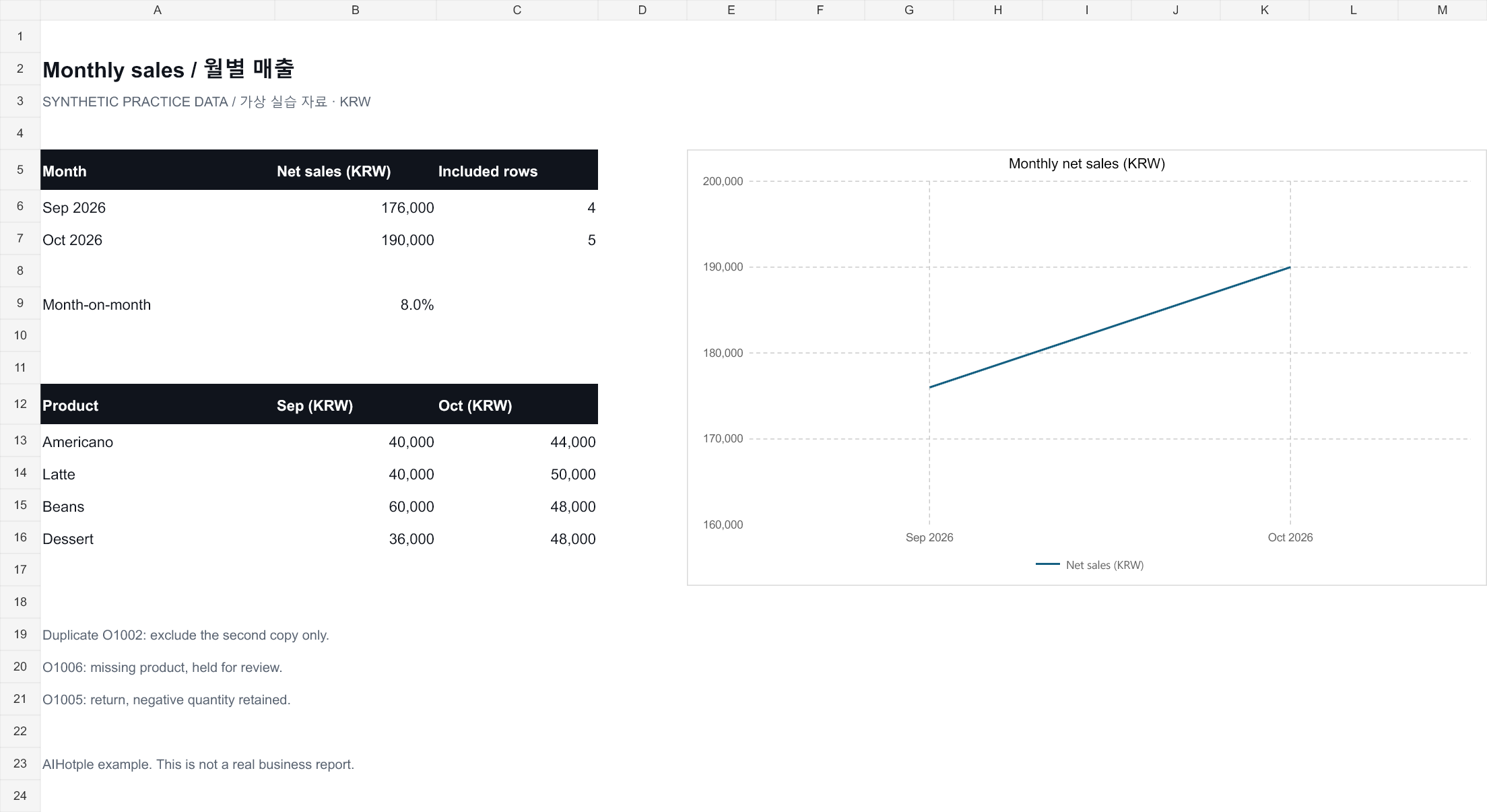
In AIHotple’s supplied workbook, Summary!B6 stores September KRW 176,000 and B7 stores October KRW 190,000. B9 is 190,000 / 176,000 - 1, about 7.95%, or 8.0% at one decimal place. A rounding difference is not a different underlying result.
The actual reference B7 formula below sums Transactions column G only where the month in B is 10 and status in F is include. The return is included as a negative amount. Held or excluded amounts can exist in G without contributing to this SUMIFS result.
October product totals are Americano 44,000, Latte 50,000, Beans 48,000 and Dessert 48,000. Their sum must be 190,000. These cell addresses describe the reference workbook; a newly generated workbook may use another layout.
| Check | Expected |
|---|---|
| Source / included / duplicate / held | 11 / 9 / 1 / 1 rows |
| September | 4 included rows; KRW 176,000 |
| October | 5 included rows; KRW 190,000 |
| Product total | 44,000 + 50,000 + 48,000 + 48,000 |
| Growth | 7.95%, or about 8.0% |
=SUMIFS(Transactions!$G$5:$G$15,Transactions!$B$5:$B$15,10,Transactions!$F$5:$F$15,"include")5. Ask for the cause of a difference
Do not simply ask the assistant to replace a total with the expected number. Request source rows and inclusion states. The amounts below are independently calculated clues for individual mistakes, not definitive diagnoses of an unknown workbook.
Download the file and inspect formulas as well as values. In a copy, change an input and check recalculation in your spreadsheet app. The reference ranges cover its 11 supplied rows; appending records requires reviewing those ranges.
| If October is | Inspect first |
|---|---|
| KRW 240,000 | Duplicate KRW 50,000 included |
| KRW 202,000 | Held KRW 12,000 included |
| KRW 194,000 | Negative KRW 4,000 return omitted |
| KRW 252,000 | Both duplicate and held row included |
List the included September and October rows with quantity × unit_price_krw. Reconcile monthly totals against product totals. If October differs from KRW 190,000, inspect the second O1002 copy, the O1006 hold and the O1005 return first. Do not overwrite the total to force a match; identify the differing rows and formulas.Move to slides only after checking the figures
Keep unresolved orders, return rules and period coverage with the final report. A higher October sample total does not explain a real business’s growth or its cause. If a missing product is resolved, document the changed inclusion rule and revised result.
When moving these figures into a presentation, reconcile the slide labels with the workbook again. The next article turns the same source material into six slides for a shop owner.
Continue this workflow
File will not attach? Separate upload rate, storage and source-file checks →
Sources & verification
On 16 October 2026 we attached two fictional CSVs in signed-in ChatGPT Work on the web and generated a workbook in Korean. We independently checked its 11 source rows, formulas, stored values and chart reference. We did not change inputs and recalculate in native Excel. The existing editorial reference is a separate file.
Sources checked: 2026.10.16