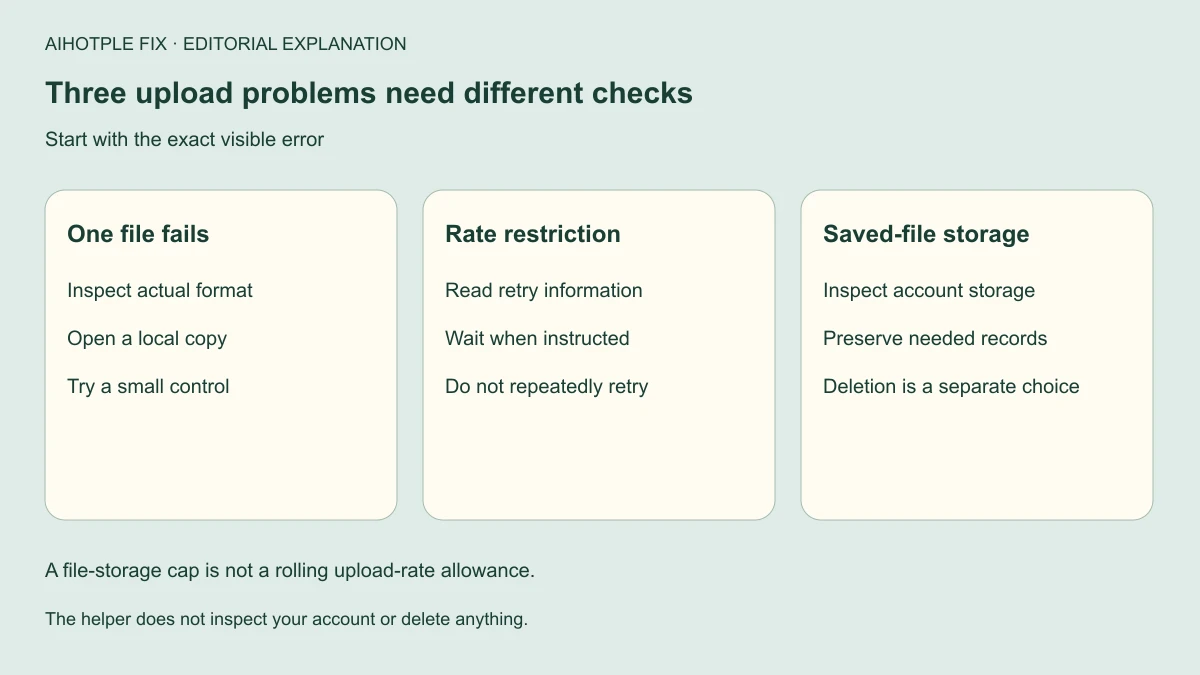
- Record the error, file properties and account route first.
- Respect a displayed retry restriction before running a control.
- Treat saved-file storage and rolling upload limits separately.
- Verify known facts after the attachment succeeds.
Start with the visible error. A rolling upload restriction, saved-file storage cap and one unreadable document need different checks. Use our small fictional TXT only when your account is not asking you to wait, then verify that ChatGPT can read known facts from it. A successful upload indicator is not enough to establish correct reading.
Files for this exercise
AIHotple example files and prompts. Try the exercise before substituting real work data.
Copy the exact error before choosing a fix
Write down the file extension, actual byte size, account/workspace, app or browser and time. “Upload failed” is a symptom, not a diagnosis. A screenshot can help you remember the message, but redact names, documents and private links before sharing it.
If the interface gives a retry time, follow that instruction before another control test. Repeated failed attempts are not cost-free evidence: the current upload guidance says they can count toward the rate limit. Keep storage and upload frequency in separate rows in your notes.
Choose your situation in AIHotple Fix ↗
Check the account route and source file
Confirm that you are in the intended account and workspace. A file selected from your device, a saved Library or Space item, a project file and a custom GPT knowledge attachment can follow different routes. Record the route instead of assuming that one failed path proves every path is broken.
Open the file locally. A .gdoc shortcut is not the document’s full contents; export a permitted PDF or DOCX copy first. Renaming an extension does not convert the underlying format. For a spreadsheet, preserve the original and make a small copy containing only the relevant rows.
Try one small control when the account allows another attempt
Download upload-control.txt from the kit and read it in a text editor. It is deliberately simple UTF-8 text, with a visible marker and no private customer data. Use the attachment control in the conversation to select that file, wait for it to attach, then submit the reading request below.
If this control works while one original file fails, you have narrowed the problem. You have not proved that the original is unsupported or corrupt. Its size, structure, permissions or extracted length could still be relevant. Compare a smaller authorized copy next, changing only one property.
- Check the test input.
The marker is CONTROL-042. The total is GBP 258, and tax treatment and dispatch date are explicitly not stated.
- Attach the real file.
Use the available + / attachment control. Pasting its filename into the prompt does not attach its contents.
- Inspect the answer against the source.
Confirm the marker and at least one amount plus an unknown field. Keep any access failure visible rather than supplying the answer in the request.
Read only the attached fictional upload-control.txt. Return control ID, subtotal, delivery, total, tax treatment and dispatch date. Preserve GBP. Quote one short source phrase for each field. If the file cannot be read, say that; do not infer the facts from this request. Do not browse or connect apps.Our actual small attachment test
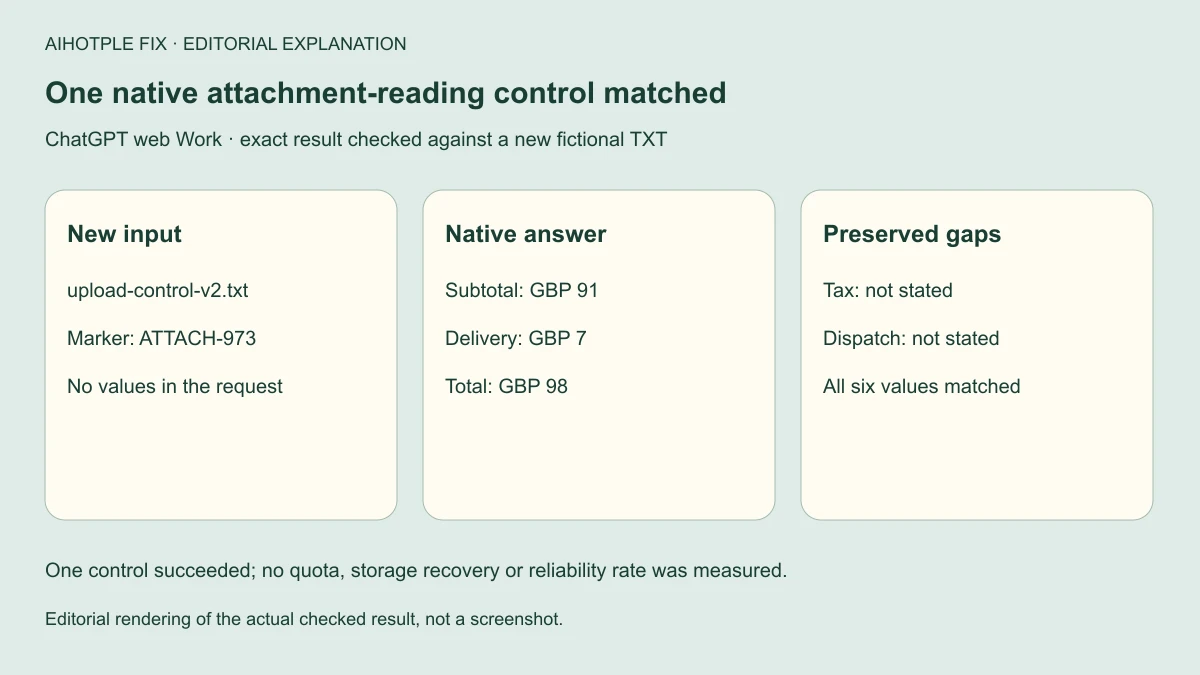
Our actual attachment test used a second file, upload-control-v2.txt, so that the new marker and amounts were not already supplied in the conversation. ChatGPT web Work returned ATTACH-973, subtotal GBP 91, delivery GBP 7, total GBP 98, and not-stated tax and dispatch fields. All six values matched the attachment.
The kit contains that exact file, actual request and native result table. The reusable CONTROL-042 exercise above is a separate shared control. This single positive reading test does not reproduce or fix an upload-rate failure, and it does not prove every file will be readable.
Separate a storage cap from a rolling restriction
The current official guidance provides Settings → Storage for saved-file usage and explains that rolling upload-rate allowance is not the same measurement. A reset time shown by the interface is more useful than guessing from how many uploads you remember.
Do not delete records simply to “reset” an upload rate. A file saved separately in Library or Space can have a lifecycle different from its chat. Review the official retention guidance and preserve what you need before making any deletion. This walkthrough and AIHotple Fix do not delete files or identify disposable records.
When every small file fails
Check the official status page and keep the timestamp with your notes. Compare another approved client if appropriate. Use the same harmless control so you can distinguish a client-specific problem from a failure that follows the account.
If the error persists, use the private error-report template from the kit. Describe only what you actually tried. “Both clients failed with this TXT at these times” is a more useful report than “uploads never work”. Do not include confidential source text in a public screenshot.
After access works, verify the reading path
A completed attachment is only the start. Ask about the exact source rather than a filename mentioned elsewhere in a long conversation. Check that the answer retains currency, conditions and missing information.
For PDFs, the same visible page can contain selectable text, an image of text, or both. A small control succeeding does not resolve that document-reading question. Continue with the PDF source check when the upload succeeds but the facts are wrong.
Diagnose source-reading and claim errors after a PDF uploads →
Check the separate path from generated attachment to saved file →
Sources & verification
Official upload and error documentation checked on 6 November 2026. The supplied UTF-8 control and local fact checks are actual AIHotple artifacts. A native web Work upload of upload-control-v2.txt returned ATTACH-973, GBP 91 subtotal, GBP 7 delivery, GBP 98 total and both not-stated fields correctly, with source phrases. The marker and amounts were not supplied in that request; they differ from the earlier text in the conversation. This was one successful attachment-reading control on a Pro account; the model selector was not independently recorded. No rate quota was deliberately exhausted, no reader storage was inspected or deleted, and no managed-device security setting was changed. Account/model/client availability remains account-specific.
Sources checked: 2026.11.06