
- Compare the same plan, currency, seats and billing term.
- Keep failed retrievals and changed billing terms in a review queue.
- Accept a new baseline after reviewing the evidence.
A price page now says $16 a month. Last week it said $20. Before reporting a price cut, check whether the new amount is an annual-plan equivalent. This exercise turns that common trap into a five-case check you can run before handing an agent an ongoing job.
Files for this exercise
AIHotple example files and prompts. Try the exercise before substituting real work data.
Check access before planning a recurring job
Perplexity describes Teammates as agents inside Computer that retain project context and coordinate ongoing work. At launch, access is for Max subscribers on the web, with iOS described as coming soon. Our account showed Free and no Teammates entry.
If the entry is available in your account, Perplexity’s documented setup starts at Teammates in the left navigation. Name the teammate, follow setup, describe the job and give it an initial project task. For this pilot, prepare the comparison first. A reliable-looking recurring summary can still repeat a bad price comparison.
Capture the same thing on both dates
Download and open the practice ZIP. baseline.json and current.json describe five fictional services, with stable IDs A1 to E1. They include capture dates and evidence labels. Those labels identify supplied text, not real websites. In a real pilot, add the exact URL, capture time with timezone and saved excerpt for each observation.
Keep plan name, region, currency, billing term, seat allowance, discount conditions and tax treatment beside the amount. An annual equivalent and a month-to-month charge answer different buying questions. A plan with fewer included seats may also require review even when the headline amount stays the same.
Set the starting baseline by reading each captured page yourself. Record which observation you accepted. Otherwise the next run can compare a current page with an unverified summary of an older page.
Run the five-case exercise once in ordinary chat
Our observed route was the regular Perplexity question box. We turned the Search checkbox off, kept Computer off, pasted the complete prompt and used Submit. We supplied all ten observations. That checks how the assistant reads the comparison rules without introducing a separate page-retrieval problem.
The prompt below is the comparison brief. Use prompt.txt from the ZIP for the exact version we submitted, which also contains both full snapshots. Keep the first response before making corrections.
Use only the supplied fictional snapshots. Do not browse, schedule, connect tools, or send messages. Return an English table with ID, status, exact old and new evidence, numeric delta when comparable, and action. Match by ID. Status must be changed, wording_only, unchanged, or needs_review. Currency or billing-basis differences require review. An unavailable page does not establish a removed plan. Report only A1 in the numeric price-change alert. Keep B1 as a wording note, suppress C1, and queue D1/E1 for review. Do not infer why a price changed. Paste baseline.json and current.json after this brief.Check the response against the five cases
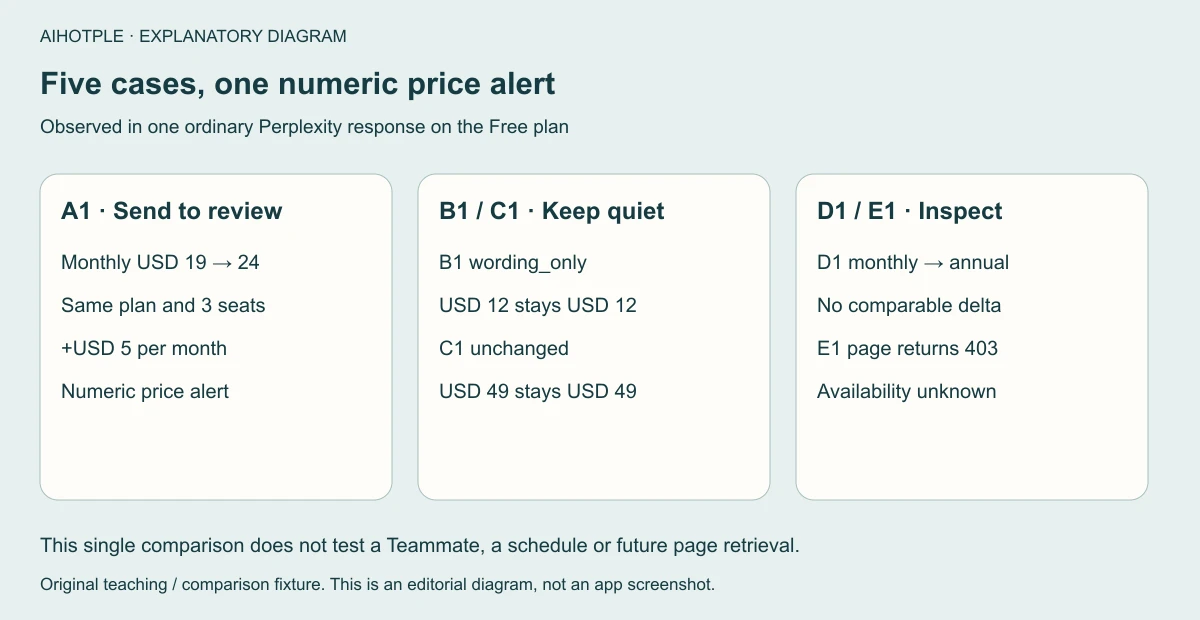
A1 changed from USD 19 to USD 24 per month, both billed monthly with three seats. The response reported +USD 5 per month. B1 kept USD 12 and changed “Unlimited projects” to “Projects without a limit.” The response marked wording_only. C1 kept USD 49 and ten seats, and was marked unchanged.
D1 changed from monthly billing at USD 20 to an annual total of USD 192, displayed as a USD 16 monthly equivalent. The response placed it in needs_review and withheld a comparable delta. E1 supplied only an HTTP 403 result for the current observation. The response also marked needs_review, rather than claiming removal or repricing.
All five status labels matched the exercise key. The prompt specified the intended routing by ID, so this checks instruction following on supplied records. It does not test independent discovery of changes. There is a smaller imperfection: B1 used “Not comparable” for its numeric delta, even though both amounts are USD 12. For a machine-readable workflow, require and validate a separate price field.
The ZIP preserves the first table and its accompanying alert, wording note and review queue. It also includes result.json, a normalized transcription of the five observed status decisions. Run node check-results.mjs inside the extracted folder to check those decisions and the A1 arithmetic against the fixture. The program reads local files and makes no model call.
Give an eligible Teammate a bounded monitoring brief
If you have Max access, use the prepared baseline as your first project material. The launch documentation asks you to specify the work, deliverable and when the agent should act. Add only the tools the job requires. Our pilot brief uses public pricing pages and a report for review.
Replace the placeholder URLs and timezone before using the brief. Start with an on-demand run and inspect its captured evidence. Set a recurring cadence only after seeing that run in your account. The brief below is an editorial template, and no schedule was activated in our test.
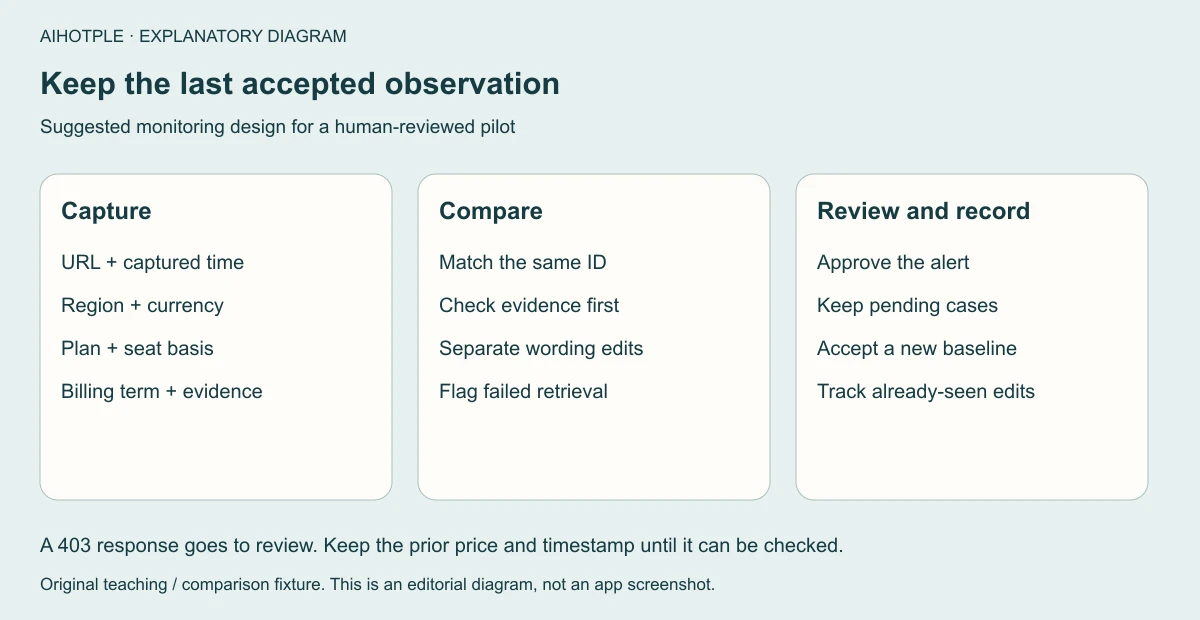
Own a review-only watch of these approved public pricing URLs: [URLs]. Use the attached accepted baseline. First run on demand. For each page, save capture time, URL, exact price wording, currency, region, billing term and included seats. Compare matching plan IDs. Draft a price alert only when the terms are comparable and the numeric price changes. Keep wording edits separate. Put failed retrieval, currency change, billing change, missing conditions or uncertain plan identity in a review queue. Retain the last accepted price for unresolved pages. Show old and new evidence. Report here for my review. Ask before enabling a recurring cadence, connecting another service, contacting anyone or changing a site.Keep errors from becoming tomorrow’s baseline
Suppose E1 fails again tomorrow. Keep its last accepted USD 9 observation and original capture date, while recording the later failed attempts separately. Replacing the price with an empty value could cause a false “new price” alert when access returns.
Record an alert key using the plan ID, old accepted observation, new evidence and billing basis. Once an editor accepts that observation, retain the review decision with the updated baseline. Repeating the same captured change should produce an already-reviewed entry. Check that behavior in a later run before relying on it.
For a real project, inspect at least one verified change, one unchanged page and one retrieval failure over separate runs. Keep any cost or latency notes tied to those runs. Our single chat exercise establishes only the five supplied classifications and the stated arithmetic. It leaves retrieval, repeated state and Teammates behavior for an account-level pilot.
Sources & verification
We turned Search off and supplied fictional snapshots in the normal chat. No competitor website was retrieved. The test checks one comparison response, not independent discovery, Teammates execution, scheduling or repeated-run reliability. The downloadable checker validates the fixed exercise.
Sources checked: 2026.11.07