
- Store reusable facts as files and response rules as instructions.
- A fresh session used v2 and left the approval owner and deadline undecided.
- After changing material, ask which source version is now being applied.
On 16 October 2026 a Free account created a private Project, saved instructions, uploaded three files and ran two Search sessions. We checked current-file selection and unknown fields. Connector refresh, collaboration and a v1/v2 conflict run were not tested. Actual model answers were Korean.
Files for this exercise
AIHotple example files and prompts. Try the exercise before substituting real work data.
When you keep attaching the same material
A comparison may lead to a checklist and then another question about your review rules. Repeated attachment and explanation can mix current policy with obsolete material.
Our fictional editorial project uses one current policy and two public-source notes. It contains no personal or workplace documents. The practical goal is to retrieve the same current basis in a fresh conversation.
1. Extract only the three starting files
Use current/review-rule-v2-en.txt and the two TXT files in sources. The Korean run used review-rule-v2-ko.txt. Instructions are separate text to paste into the settings field.
Keep archived v1 locally for the first run. It made review dates optional; v2 requires a source URL and review date and leaves the approval owner and deadline undecided. Read those facts before testing the answer.
current/review-rule-v2-en.txt → current policy
sources/obsidian-note.txt    → source note
sources/notion-note.txt      → source note
instructions-en.txt          → paste into instructions
archive/                     → exclude from first upload
2. Create a Project, then add instructions and files separately
Open Projects → New project and enter a recognizable name. We skipped invitations and kept the exercise private.
Our screen used Settings → Context → Instructions, followed by Save. Files → New → Upload files added the three TXT inputs. The documented newer layout may place instructions under General and files under Sources.
Check all three names in the file list. Our upload opened the first file automatically; returning through the Files breadcrumb revealed the complete three-file list.
Official settings and file instructions ↗
This is a fictional editorial source project.
Use current/review-rule-v2-en.txt as the current internal policy. Do not apply archived v1.
Internal rules come from current files; product capabilities come from source-note URLs. Keep these distinct.
Return [requested output / evidence file or URL / remaining checks]. Do not invent successful installation, sync behavior, automatic refresh or time savings. Explain conflicts rather than silently resolving them.
3. Ask from inside the Project
Return to Overview and use its session composer. We selected Search because Computer was initially selected. A new homepage conversation and a session started within a Project are distinct starting points.
Ask for a checklist that separates internal policy from product capabilities. Restricting the request to the files reduces ambiguity, but a prompt alone does not audit every execution path. We inspected the resulting file references and content.
Use only the stored current policy and the Obsidian and Notion notes to make a capture checklist. Separate internal rules from product capabilities, name the evidence file for each row, and leave unknown owners and deadlines undecided. Do not use external search, connected apps or personal memory.4. Check the answer again in a fresh session
The first Korean answer contained four policy rows and five product rows, naming the files and leaving owners and deadlines undecided. It did not present our source notes as successful installation tests.
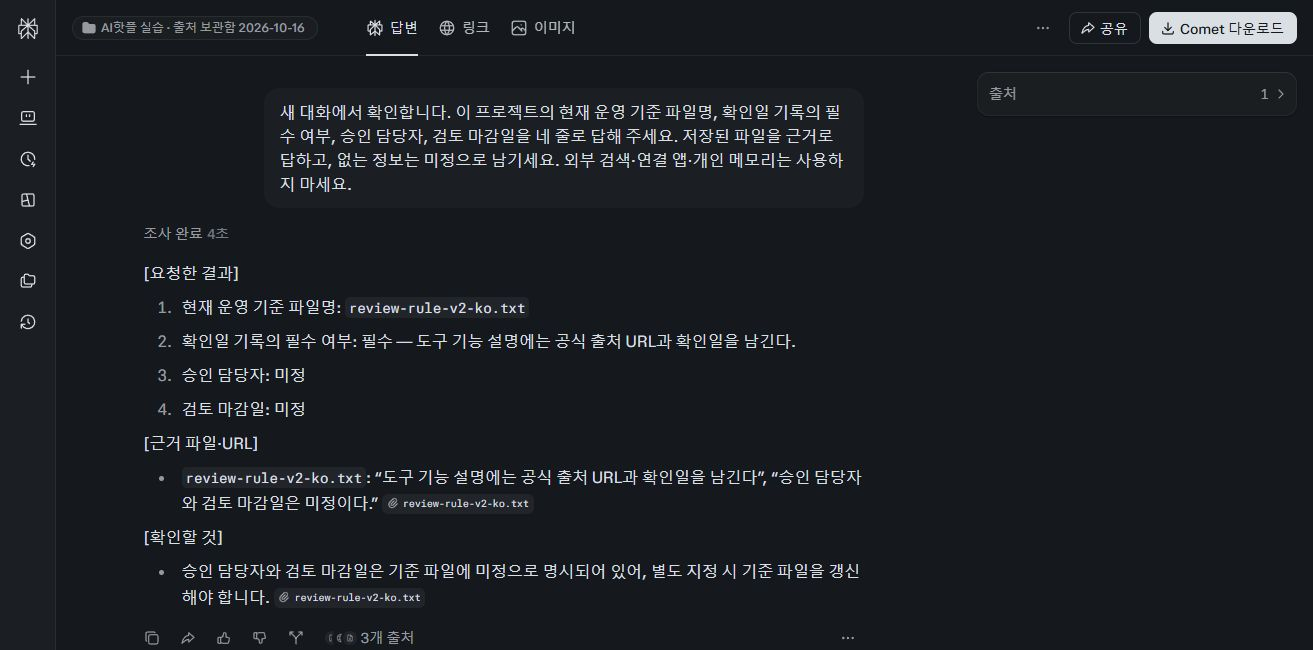
We returned to the Project and started another session without reattaching files. Asking for the current policy, review-date requirement, approval owner and deadline produced the four results below. These were checked against the source, not treated as a guarantee for every future question.
| Question | Observed Korean answer | Source check |
|---|---|---|
| Current policy | review-rule-v2-ko.txt | Matches current v2 |
| Review date | Required | Matches rule 1 |
| Approval owner | Undecided | Explicitly undecided |
| Review deadline | Undecided | Explicitly undecided |
5. When sources change, ask which file applies
When introducing a revised policy, update the current/archive status and the instruction’s source filename. Archived v1 is supplied as a reader exercise; we did not run a simultaneous-version conflict test.
The official Project guide describes connected-source files as one-time copies. Updating the original does not automatically update that copy; fetch or add current content when needed. Our experiment used local uploads and did not test a connector.
After a change, ask for the currently applicable file and the differences from previous answers. An older answer should not replace the current source document.
Name the currently applicable policy file first. Explain changes from earlier answers using evidence files, and leave owners and deadlines undecided where current sources do not specify them.Keep the project small enough to understand
Our verified scope is files, instructions and two Search sessions in a private Project. No collaboration, invitation or app connection was performed. Start with the material required by one subject.
The ZIP includes KO/EN instructions and policy, an archive, source notes, questions and the actual Korean fresh-session answer. Internal policy is fictional; product notes summarize linked official sources. Keep those evidence roles distinct.
Sources & verification
On 16 October 2026 a Free account created a private Project, saved instructions, uploaded three files and ran two Search sessions. We checked current-file selection and unknown fields. Connector refresh, collaboration and a v1/v2 conflict run were not tested. Actual model answers were Korean.
Sources checked: 2026.10.16