- Check which type of credits and promotional access your account actually has.
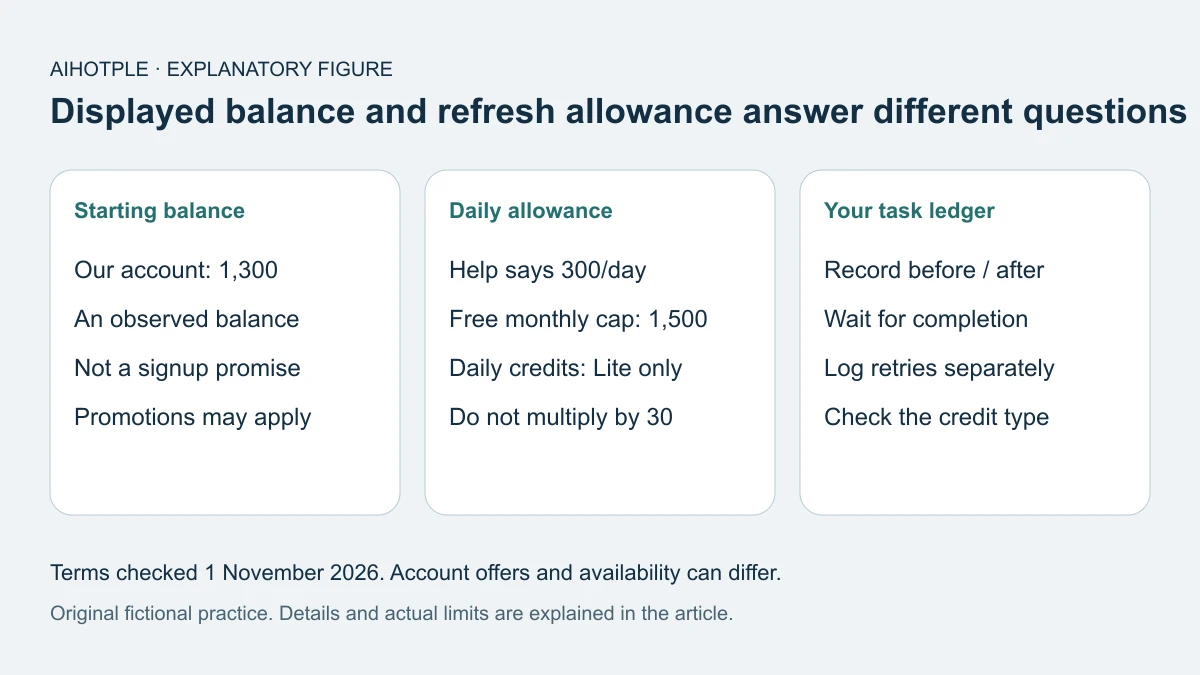
- Daily refresh credits have a documented Free monthly cap; 300 a day does not imply 9,000 usable credits a month.
- Keep output scope and revision costs in the same ledger.
Record the starting balance, plan, model and requested outputs, then log the balance after each completed task. Our account began with 1,300 credits and showed promotional allowances. These observations explain a budgeting method; they do not predict your task price.
Files for this exercise
AIHotple example files and prompts. Try the exercise before substituting real work data.
What does “free” cover?
A Free account and an available credit balance are different facts. Free describes a plan; the balance tells you what the account currently displays. A feature can also be temporarily available through a trial or promotion. Treat each of those as a separate entry before starting a large task.
Our account displayed 1,300 credits at the beginning. We did not establish how that balance was composed, and we do not present it as the amount every new user receives. The three companion tasks used original fictional studio material, not private client files.
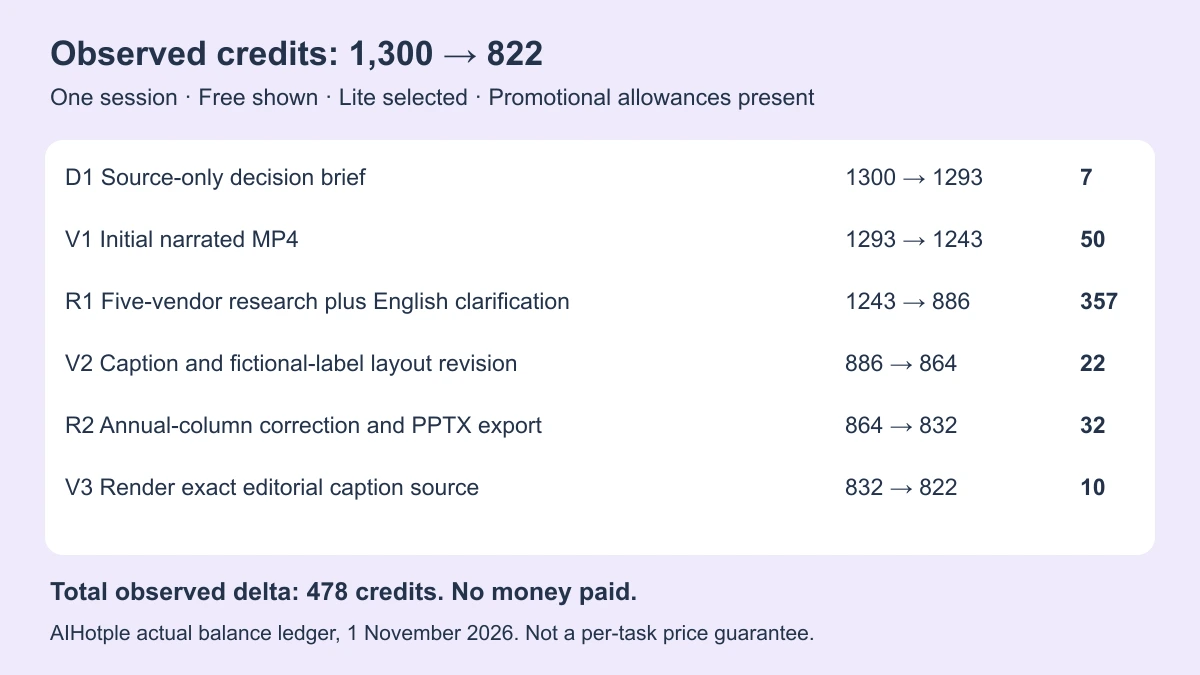
For a first trial, ask for one small output with a clear limit. Our document request returned a 146-word decision brief and three review questions using only the supplied source. It explicitly said that vendor prices had not yet been checked. The balance moved from 1,300 to 1,293.
Using only the fictional brief below, write a concise English decision brief of 120-150 words with a heading and three review questions. Do not research, use media tools, create a website, send messages or buy anything. State that vendor prices have not yet been checked. Return the brief in chat; do not make files.
AIHotple original fictional Northline Studio brief.
A five-person design studio needs to compare project-management software for a client presentation. It wants clear seat costs, billing cadence, guest rules and export options. The team is collecting evidence only: do not buy, sign up, contact vendors or decide a contract. Unknown features stay unknown. A low monthly-looking number is not the same as a low upfront annual payment.
1. Read the allowance and the monthly cap together
The official membership help lists Free at $0 with 300 daily-refresh credits, one concurrent task and two scheduled automations. It lists paid Pro starting at $20/month with 4,000 monthly credits, and a $40/month option with 8,000. Team starts at $20 per seat/month. Annual-payment discounts and any trial are separate offers; confirm the current account pricing before committing.
The credit-rules page adds a crucial condition: Free accounts have a 1,500-credit monthly consumption cap for daily-refresh credits, and those daily credits apply to Manus 2.0 Lite. Do not turn the 300 daily figure into a 9,000-credit monthly promise. Event, daily, subscription and other balances can have different rules.
Our examples did not test a month of refreshes. We also did not establish a dollar value for each consumed credit. A subscription price divided by an allowance is only a modeled ratio, not the cash cost of a particular task or a description of the free credits used here.
2. Keep a ledger that includes the work you actually requested
Before each task, note the plan, selected model and displayed balance. Wait for completion and record the next balance before another task begins. Keep the request and output state beside the number: a short chat response and a researched deck are not interchangeable units.
The downloadable CSV contains our actual sequence: document 7, initial video 50, research plus English-language clarification 357, first video-layout revision 22, research-header correction/PPTX export 32, and final caption render 10 credits. The balance moved from 1,300 to 822, an observed total delta of 478. These are balance changes, not an official per-action breakdown.
The video task includes narrated scenes, captions, rendering and Manus’s own internal corrections. Its two later revisions add 32 credits, bringing the video sequence to 82. Research and its final file-review/export sequence add to 389. We did not subtract internal failures or corrections to make the numbers look cheaper, or claim a failed intermediate action was refunded.
3. Check feature access separately from the selected model
Our first response displayed a free Manus 2.0 trial even though the model selector showed Lite. The research task displayed a workflow agent-call budget with a one-time allowance. Those observations mean that a simple “Free/Lite can always do this” conclusion would be too broad.
The agent produced useful files in this account, but that does not verify that every Free account has the dedicated Wide Research feature or the new native PowerPoint mode. File generation through an agent, a product’s named mode and a promotional workflow entitlement need separate evidence.
If you see an upgrade screen, stop and narrow the task to the sources or outputs your account supports. Keep the source brief and ask for a table in chat if file creation is unavailable. Describe that as a text fallback, rather than calling it an exported workbook or presentation.
4. Reduce uncertainty before reducing words
Set the number of sources, expected rows, duration, output formats and completion criteria. Supply stable facts directly when the task does not need research. Ask the agent to leave unknown terms blank or marked unknown. That reduces the chance of spending credits on plausible but unusable output.
After a first result, request a specific change and name what must remain unchanged. Our video revision concerns caption layout and a fictional label, so it should reuse the existing narration and graphics. Recreating everything would make the cost and factual comparison harder to interpret.
Keep a stopping point in your brief: no purchase, upgrade or new account connection, and report a blocked feature. This is a working constraint, not a guarantee that a task cannot spend the remaining balance. Manus says credit accounting can lag an action and temporarily display a negative balance; monitor the account rather than treating the last visible number as a hard cost ceiling.
- Record your own baseline
Write the balance, credit types if visible, selected model and any trial message in usage-log-template.csv.
- Run one bounded task
Define the input and requested files. Avoid other concurrent work while measuring a delta.
- Record completion and revision separately
Save the output state and next balance. Include failed attempts and corrections in the total you report.
Use the task examples to decide what to try
The video example is suitable when you already know the facts and want a short explanation. The research example is suitable when you need dated official evidence plus a reviewable comparison. Read the real output and limitation sections before choosing either.
If the same workflow will run frequently, track a small set of your own representative jobs before comparing a paid plan with another tool. Our single-session observations cannot establish a monthly budget, a time-saving percentage or a cost winner.
Sources & verification
Checked on 1 November 2026. Our signed-in account showed Free and Manus 2.0 Lite. We observed the balance before and after sequential document, video, research and video-layout revision tasks, without a purchase. The first text task received a displayed free Manus 2.0 trial, and the research workflow exposed a one-time agent-call allowance. Selected UI labels do not independently establish backend routing. The ledger includes all observed work and separates the revision. It is not an itemized invoice, controlled cost benchmark, recurring allowance test or guarantee of access in another account. We did not test refunds, renewals, cancellation or paid tiers.
- Manus Help · membership pricing
- Manus Help · credit consumption and refresh rules
- Manus Help · optimize credit usage
- Manus · current pricing entry
Sources checked: 2026.11.01