- Create a one-scene studio draft with a built-in presenter.
- Spell out identifiers and bin codes the way staff should hear them.
- Check the exported file and whether its watermark is acceptable for the audience.
The Free account exported a 22.8-second watermarked 720p MP4 from a single stock-presenter scene. The editor had estimated 28.4 seconds. Use the exported duration when timing captions or fitting a training slot.
Files for this exercise
AIHotple example files and prompts. Try the exercise before substituting real work data.
Start a one-scene training project in AI Studio
HeyGen lists three watermarked videos per month, up to one minute each, with Avatar 6 access on Free. The model announcement describes broader model capabilities. The plan and the export screen determine what you can actually use in a particular account.
Welcome to Cedar Desk. Here is the three-step return check. First, confirm the order number ends in four two seven. Next, place the item in bin B twelve. Then open the returns log and record the condition. Flag missing accessories before you close the ticket. This short check helps the next shift pick up the return without repeating work or guessing. If you are unsure, pause and ask the floor lead.- Open AI Studio directly
From Apps, find AI Studio and select New video in landscape. In our account, creating a video from Home first suggested making a custom avatar. Explore apps took us to Studio without creating one.
- Keep the built-in presenter
Our blank project opened with Annie and the Annie Lifelike stock voice. Leave it on one landscape scene. Open the scene’s Mode menu and check the description beneath the selected mode. We saw Pro and Turbo described as Avatar 6 routes and Lip Sync offered separately.
- Paste the script and check the estimate
Use the Script panel. Before generating, confirm both “four two seven” and “B twelve” appear in the entered text. The finished script was estimated at 28.4 seconds in the editor.
- Generate with the available free option
Open Generate and review the dialog. Our dialog showed an upgrade offer for watermark removal and 1080p, alongside Submit. Choose Submit for the free exercise when available. Wait for the item under Projects to finish.
Check the result before putting it in onboarding
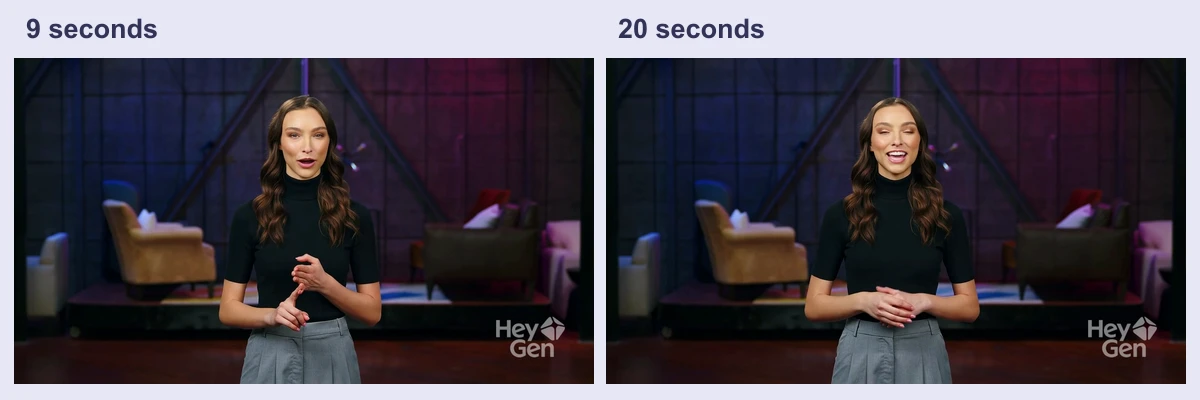
The downloaded MP4 measured 22.807 seconds at 1280 × 720 and 25 fps, with an AAC audio stream. The watermark is visible in the lower right. The hand position differed across the sampled frames. Use a full playback check to assess lip sync, cadence and gesture timing. The editor estimate was about six seconds longer than the actual file.
| Check | Expected in this example | How to verify |
|---|---|---|
| Identifier | Order number ends in four two seven | Check the spoken sequence and caption against the script. Subtitles should show 427 if that is how your team searches. |
| Bin code | B twelve | Confirm B and twelve are distinguishable. Add a visible label B12 if the spoken instruction alone could be misheard. |
| Order of work | Record condition and flag missing accessories before closing | Use one caption or on-screen instruction per action. Keep the stop-and-ask instruction through the final second. |
| Delivery | About 30 seconds, with free-plan branding | Inspect the downloaded file’s duration and image dimensions, and look at a frame for branding. |
Use a second pass only when the first one needs it
If staff cannot tell which return bin to use, add the written bin code and rerender the same scene. If a hand movement appears to point the wrong way, review the scene without using a directional instruction or put a label beside the relevant object. When sharing a staff procedure, keep the source script with the MP4 so a later policy change updates both.
Sources & verification
One signed-in HeyGen Free exercise using the built-in Annie presenter and a fictional returns script. We included no personal photo or cloned voice. The studio showed Pro Beta and marked it as Avatar 6-based. We checked the file metadata, audio stream and sampled frames. The editor did not provide a downloadable caption track for this render. Motion and final spoken delivery need a human playback review before training use.
- HeyGen Avatar 6 research announcement
- HeyGen Free plan pricing and limits
- HeyGen Studio first-video walkthrough
- HeyGen guidance about use and distribution of generated videos
Sources checked: 2026.11.18