- A registered server, an allowed connection and a completed tool call need separate evidence.
- Start with fictional read-only data before exposing a real workspace or database.
- Keep a failed assistant attempt separate from a working editorial reference solution.
Our Copilot CLI run did not establish an MCP connection or repair the sample dashboard. The server passed a separate editorial protocol test, and an explicitly editorial reference fix passed four code checks. This guide shows how to avoid mistaking those different results for Copilot success.
Files for this exercise
AIHotple example files and prompts. Try the exercise before substituting real work data.
What the new connectors change—and what they do not prove
GitHub added eight verified connectors in public preview on November 18, including Supabase, Box and Calendly. They can bring external context into a coding task: for example, a database schema can tell an assistant which field a dashboard should read. The announcement covers all Copilot plans, with additional policy and allowlist requirements for some managed accounts and service-side restrictions.
That is a reason to check access, not evidence that every account already has a working connection. Our signed-in customization link returned a 404, while the CLI accepted a local server configuration. We therefore tested a deliberately small local fixture rather than claiming a successful Supabase integration. Local STDIO configuration and a verified hosted connector are different setup paths.
Our earlier MCP file-read guide covers a general diagnostic sequence. This follow-up adds a Copilot-specific account and policy case, a two-tool schema fixture and a separately checked ticket aggregation repair. Use the earlier guide for file-source boundaries and this one for the distinction between Copilot configuration and execution.
Use a small problem with a known answer
The downloadable fixture is an original five-ticket dataset. Four tickets are active and one completed ticket is archived. The real field name in this fixture is workflow_state, while the buggy dashboard reads status. It also counts the archived ticket. A plausible-looking answer can conceal both mistakes.
No real database is involved. The server exposes only get_schema and list_tickets with empty arguments. Its read-only annotation describes the intended tools; it is not a general security guarantee for MCP servers. Read the supplied source before running the fixture.
| Item | Fictional source or expected result |
|---|---|
| Fields | id, workflow_state, is_archived |
| Rows | T-101 todo; T-102 doing; T-103 doing; T-104 done; T-105 done and archived |
| Active totals | total 4 · todo 1 · doing 2 · done 1 |
| Original dashboard | total 5 · todo 0 · doing 0 · done 0 |
| Required behavior | Read workflow_state and exclude archived rows before aggregating |
Register the fixture without treating registration as a connection test
If you already use Copilot CLI, extract the kit into its own folder. The official quickstart explains installation and sign-in for new users. Our installed version was 1.0.114; commands and interfaces can change. Never paste a device code, token or private configuration into a public bug report.
For a hosted service, the official interactive route is /mcp → Connectors → choose the service → Connect, followed by its authorization flow. For this local fixture, use the supplied session configuration instead. The two routes should not be presented as interchangeable authentication instructions.
copilot --additional-mcp-config @mcp-config.json- Open a terminal in the extracted fixture folder
Review mcp-server.mjs, mcp-config.json and task.txt. The folder contains fictional data only. Keep a real project, private configuration and credentials outside it.
- Start a session with the supplied configuration
Run copilot --additional-mcp-config @mcp-config.json from that folder. If the server path resolves incorrectly, replace the args entry with your own absolute path to mcp-server.mjs. This flag supplies session configuration; it does not grant tool access.
- Inspect the MCP dashboard and permissions
Enter /mcp and inspect aihotple-tickets. Check the advertised tools and any error. Review requests for the two fixture tools and the intended project file individually. An enabled listing alone is insufficient.
- Ask for the two reads before accepting a code change
Paste the request below. Look for actual get_schema and list_tickets calls and their returned data. If they are unavailable, stop the task and record the error. A model-generated explanation of the dataset does not substitute for a tool result.
This is an isolated AIHotple fictional MCP practice. Do not use personal repositories, websites, accounts, mail or live databases. Do not delegate to subagents.

1. Call aihotple-tickets/get_schema and aihotple-tickets/list_tickets. Report what the tools actually return, distinguishing the discovered schema from assumptions in the code.
2. Read dashboard.mjs. Fix summarizeTickets so it uses the actual schema and omits archived tickets from active totals. Preserve the exported function name and the return keys total, todo, doing, done. Modify dashboard.mjs only.
3. Do not read the MCP server implementation or other directories. Do not run shell commands, install packages, execute SQL or use network tools. The editor will run independent checks after your change. In the final response state the expected active totals from the five supplied rows, which file changed, and which tests you did not execute.
Our enabled settings did not lead to a successful tool call
The personal settings page showed both Copilot CLI and MCP servers in Copilot as Enabled. The configuration listing also showed aihotple-tickets enabled with source user. During execution, however, the CLI issued a third-party MCP policy warning. The fixture received no Copilot initialization or tool-call record, and the assistant could not use its tools.
The warning mentioned an organization policy, but that wording did not establish the cause for this personal account. We did not diagnose a particular organization restriction, product defect or entitlement issue. We also tried one constrained public README read through the built-in GitHub MCP server; the assistant reported that tool unavailable and stopped. No public README was actually read in that test.
| Evidence | Observed in our run | What it establishes |
|---|---|---|
| Settings | CLI Enabled; MCP Enabled | The displayed account options |
| Configuration listing | Fixture listed as enabled | Configuration was recognized |
| Copilot → fixture | No initialization or successful call recorded | Connection/use not established |
| Assistant file edit | No dashboard change applied | No Copilot repair to evaluate |
| Built-in GitHub MCP | Reported unavailable | The constrained public-file test did not run |

Test the server separately to isolate one layer
Run node protocol-check.mjs inside the extracted kit. Our independent Node client initialized the server, listed its two tools, called each one and verified the schema and five rows. An unsupported argument was rejected. This confirms that this limited fixture can answer those protocol requests locally; it does not confirm Copilot connectivity or production readiness.
That separation gives a useful troubleshooting result: a working fixture plus a failed Copilot call directs the next investigation toward the client, effective policy, tool registration or access. It does not justify disabling policy, granting every tool or repeatedly changing unrelated account permissions.
node protocol-check.mjs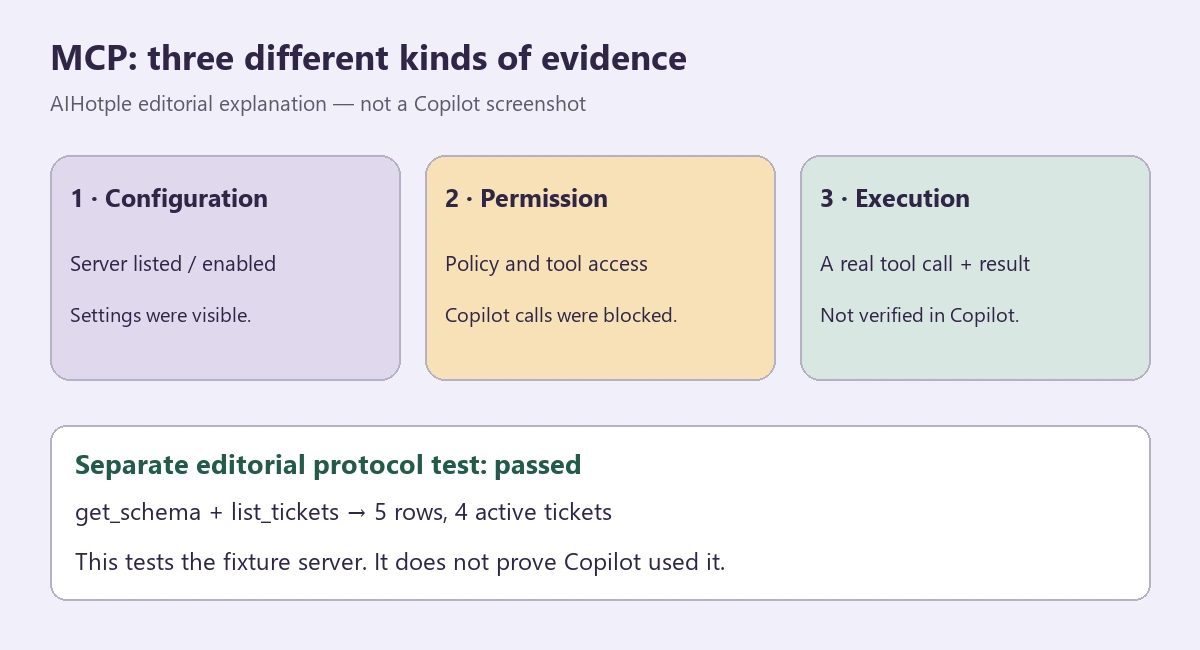
Keep a reference repair separate from the failed assistant run
The assistant saw the test file during its attempt, so its final expected numbers cannot be credited to MCP discovery. It did not apply a repair or run the checks. We retained the buggy dashboard and added dashboard-reference.mjs as an explicitly editorial solution.
The reference filters out archived tickets and then reads workflow_state. The original passed only the empty-list case; the reference passed all four cases below. These are checks of our reference implementation, not a benchmark of Copilot or a claim that a retry will succeed.
| Check | Editorial reference expectation | Observed reference result |
|---|---|---|
| Five-ticket source | 4 active: 1 todo, 2 doing, 1 done | Matched |
| Empty list | All counts zero | Matched |
| Archived-only list | All counts zero | Matched |
| T-101 changed to done | 4 active: 0 todo, 2 doing, 2 done | Matched |
node check.mjs
# Expected: 3 of 4 cases fail on the original file.

node check.mjs ./dashboard-reference.mjs
# Observed: all 4 cases passed on the editorial reference.
What to collect before asking for help
Record the CLI version, plan label, exact warning, server name and transport, whether the tool was listed, and whether the server received initialization and tools/call. Redact account identifiers, paths, credentials and any real tool data. For a managed subscription, ask its administrator about the effective registry and allowlist; for a personal account, do not assume an organization is responsible merely because a warning says so.
The completion criterion is a visible call with the intended source data and an independently checked result. Until then, keep the integration marked blocked. You can still use this kit to understand the data bug and distinguish a server problem from an unproven client connection.
Check file-read evidence and source boundaries in the general MCP diagnostic guide →
See a separate MCP workflow for understanding application storage →
Sources & verification
Checked November 20, 2026. We used official @github/copilot 1.0.114 on Windows with a signed-in Copilot Free account, a two-tool local fictional MCP fixture and an isolated project. Copilot Fusion reported selecting MAI Code 2 Flash. Account settings showed CLI and MCP Enabled, but the task could not use the fixture; a separate built-in GitHub MCP read also stopped as unavailable. No Supabase or other new service connector was connected, no live database or private repository was accessed, and no paid upgrade was purchased. The Node protocol client and dashboard reference repair below are AIHotple editorial work, not Copilot results. Account browser inspection used the ChatGPT in-app browser.
- GitHub: eight new verified Copilot connectors and preview availability
- GitHub: add and manage MCP servers in Copilot CLI
- GitHub: Copilot CLI quickstart and installation
- GitHub: CLI command reference and session configuration
- MCP specification: standard-input/output transport
- MCP specification: tool discovery, calls and annotations
Sources checked: 2026.11.20