- Specify the purpose, subject, layout and visual style separately.
- An edit request can preserve the main composition while changing an unintended prop.
- Download the original and revision and inspect corresponding areas before use.
Tested in a ChatGPT web Chat conversation on 16 October 2026: one Korean generation request and one revision. Both downloaded PNGs are 1672×941px. The web image model was not identified. Region selection, inserted text and transparency were not tested; English prompts are editorial adaptations.
Files for this exercise
AIHotple example files and prompts. Try the exercise before substituting real work data.
Can you revise the useful part of an image?
Sometimes the food placement works but the background color does not. We generated a fictional café image on mint, then asked the same conversation to change the background and table to peach. The color changed and the broad food placement survived, but a cloth disappeared. The actual pair below makes that limitation visible.
1. Start a Chat conversation and describe the image
Open ChatGPT web and begin a new Chat conversation with a request to generate an image. We supplied no reference photograph. Describe the intended use, objects, layout and style. Check image availability in your own account if the feature is absent. We reserved the left half for a later webpage headline and requested no text or logo; this was a composition test, not a text-rendering test.
Official image documentation ↗
| Element | Our request | Adapt to your work |
|---|---|---|
| Use and shape | Fictional café, horizontal 16:9 | Banner, cover or card |
| Subject | One sandwich and one iced Americano | Specific objects and quantities |
| Placement | Food on right, empty left half | Space for a later title or button |
| Style | Natural light, pastel mint | Your intended color and texture |
2. Generate the first image
This is an English adaptation of the executed Korean request. A repeated generation can produce a different scene.
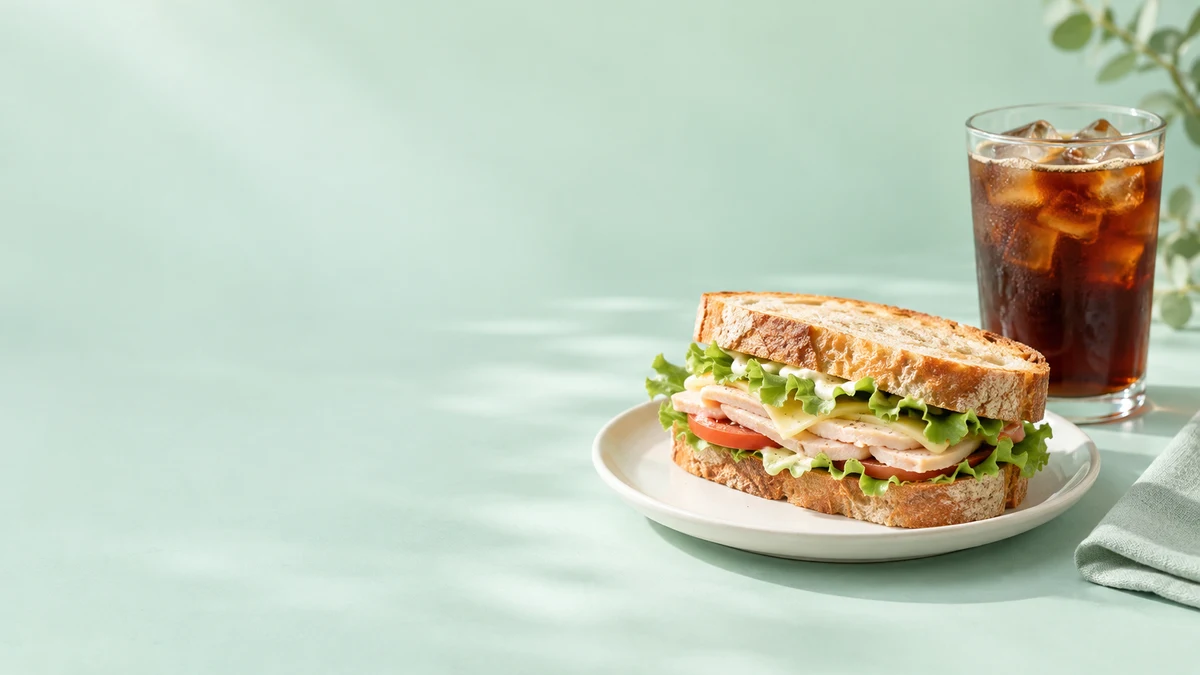
Generate a horizontal 16:9 image for a fictional café lunch set. Use a pastel product-photography style with bright natural light. Place one sandwich on a white plate and one iced Americano in a transparent glass in the right third. Use a pale mint background and table. Keep the left half empty for a webpage headline added later. No people, text, numbers, logos or watermarks. Generate the actual image.Review details you did not request
The food sat on the right and the left side was open. The generated scene also included a leafy plant at the upper right and a mint cloth at the lower right, neither specifically requested. Decide whether such additions should stay before editing. Do not assume that every object in the result came from an explicit instruction.
3. Ask for a specific edit in the same conversation
We continued in the original conversation. If you begin a separate conversation, attach the original and identify it as the reference. Specify both the change and the elements to preserve.
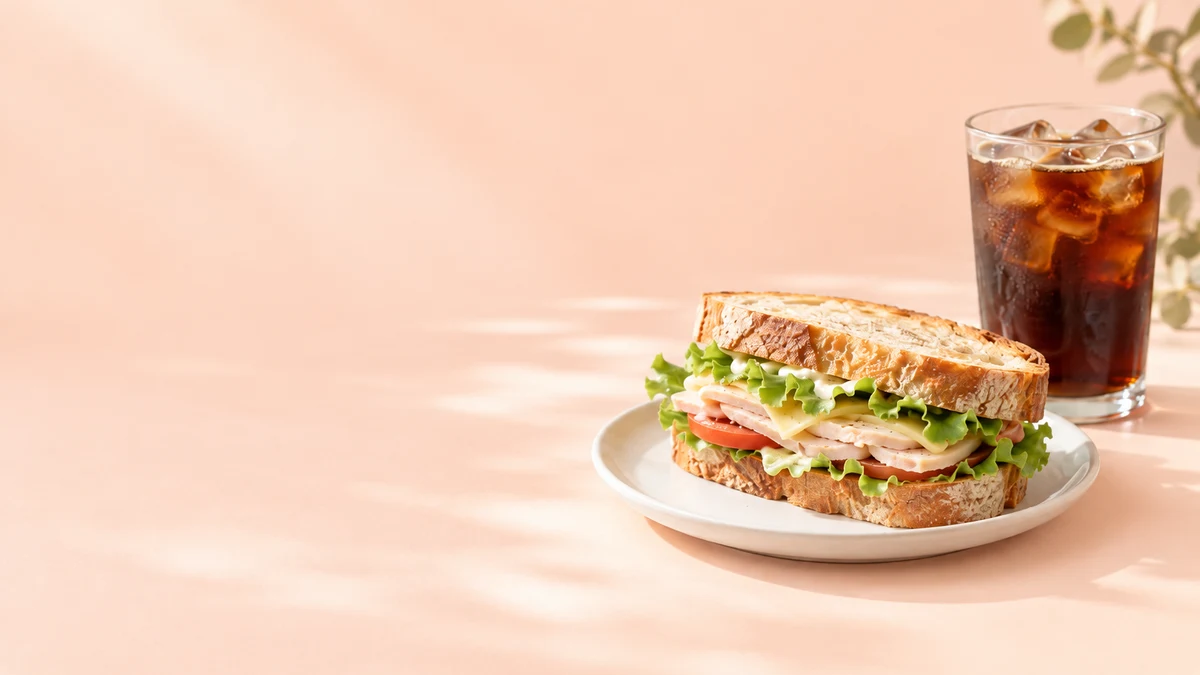
Edit the image you just generated. Change only the pale mint background and table to a soft peach color. Preserve the sandwich, white plate, transparent iced-Americano glass, camera angle, food and drink positions, empty left half and horizontal composition. Do not add objects, text, numbers or logos. Use the preceding image as the reference rather than inventing a new composition.4. Compare both versions
The background became peach and the large-scale composition remained similar. The mint cloth disappeared. We cannot claim that every object or pixel stayed identical. Compare any product detail, garment, logo or other essential feature against the original before treating the revision as approved.
| Area | Original | Edited |
|---|---|---|
| Background and table | Mint | Peach |
| Empty left area | Present | Broadly retained |
| Food, plate and glass | On the right | Main arrangement retained; details not guaranteed identical |
| Lower-right cloth | Present | Absent |
| Downloaded size | 1672×941px | 1672×941px |
Keep the peach background and food placement of the revision. Restore the mint cloth from the original in the lower-right position with similar folds. Do not add other props. Use both the original and edited images as references.5. Download both files
Open each generated image in its preview and use Download. We saved both 1672×941 PNG files. The body images are smaller WebP display copies; the download pack contains the actual PNG originals and prompts. Use descriptive filenames so a later edit targets the intended version. These are AI-generated samples for a fictional café, not photographs documenting a real product.
- Inspect object counts, props and cropped edges as well as the overall color.
- When an essential detail changes, provide the original and specify the exact region or object to restore.
- Keep the prompt, original and edited file together for future revisions.
Sources & verification
Tested in a ChatGPT web Chat conversation on 16 October 2026: one Korean generation request and one revision. Both downloaded PNGs are 1672×941px. The web image model was not identified. Region selection, inserted text and transparency were not tested; English prompts are editorial adaptations.
Sources checked: 2026.10.16