- Copy instructions and record graph dependencies before 17 November.
- Keep external files and assets separate from the graph backup.
- Retest business rules and approval controls in any replacement.
Google says Opal will turn off on 17 November 2026 and existing workflows will not migrate automatically. We created a small private example, copied its JSON and tested a read-only prompt extractor. The useful next step is an inventory of what must be rebuilt, not a promise that one saved instruction replaces an entire app.
Files for this exercise
AIHotple example files and prompts. Try the exercise before substituting real work data.
What stops on 17 November—and what remains
Google’s current FAQ says the experimental Opal service and Gems made by Labs will turn off on 17 November 2026. Interactive workflows will stop running. Existing workflow files remain in your personal Drive under My Drive → Opal; retaining a file is different from retaining a hosted app.
The same FAQ says workflows will not migrate automatically. It points to Skills in Gemini for reusable chat instructions and Google AI Studio for deeper prototyping. These are directions for rebuilding appropriate parts, not an import contract or a guarantee of equivalent tools, hosting, output rendering or approval behavior.
If you have several apps, start with the ones you use for real work. Record the app name, purpose, owner, inputs, important output examples and every dependency. You do not need to build a new production app in a retiring service to use the preservation checklist below.
1. Make a human-readable inventory before copying the file
Open Opal and select an existing app you own. In Editor, follow the graph from User Input through Generate to Output. Open each step and copy its instruction into a local note. Record any branch, model setting, tool, source document and output type alongside that instruction.
For our harmless example we chose Create New and asked for a three-step inquiry classifier. The generation step should mark urgency only when the inquiry explicitly says urgent, retain an explicit deadline, and draft a reply without inventing prices or policies. The exact build request is in the kit.
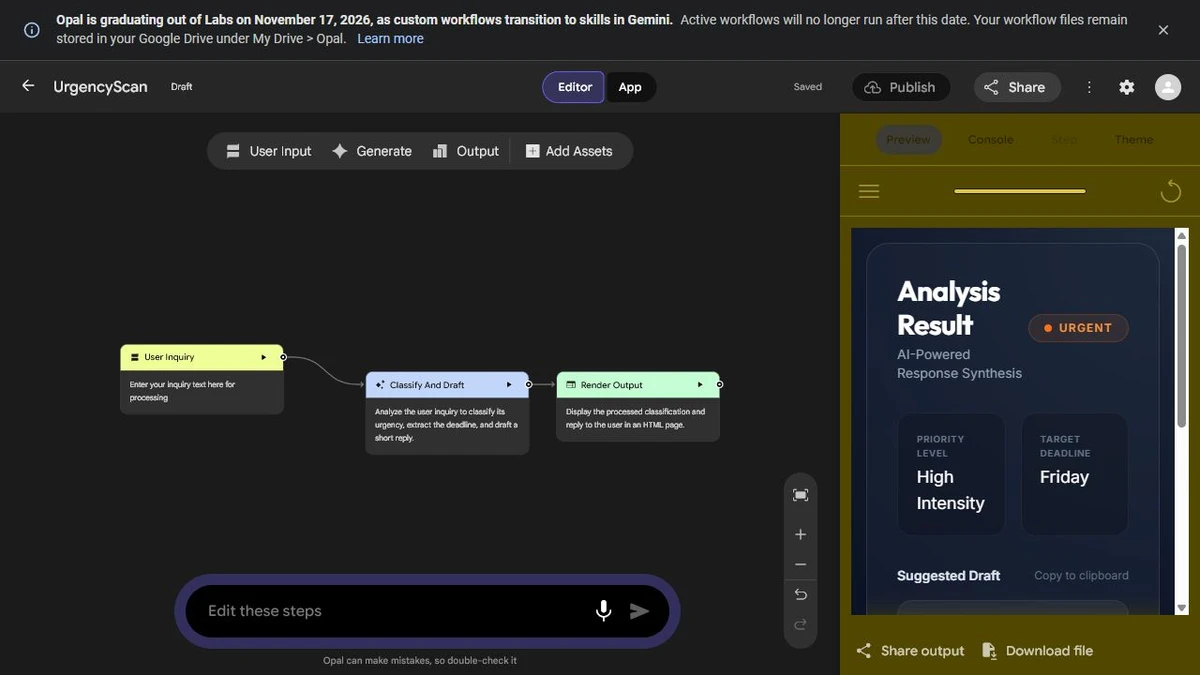
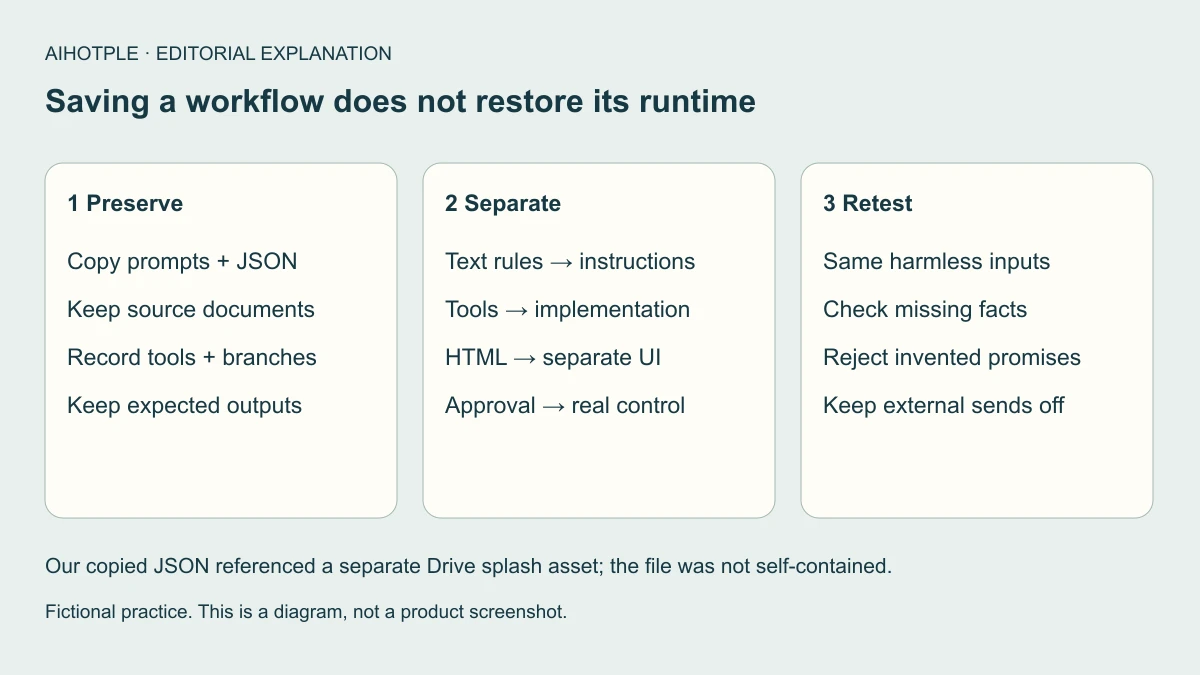
Opal named the result UrgencyScan. The graph contained User Inquiry → Classify And Draft → Render Output. Despite our request for plain text and no images, it selected HTML rendering and its copied metadata referenced a separate Drive splash image. This is a concrete reason to check the actual graph rather than assuming the initial request defines the whole implementation.
- Open your app in Editor
Identify the input, generation and output steps; take a readable inventory of their order.
- Record the dependencies
List source documents, asset references, tools, branches and approval assumptions separately.
- Keep a known input and output
Use a non-sensitive example you can repeat after rebuilding.
2. Copy the JSON and keep the original intact
In the editor’s top-right three-dot menu, choose Copy JSON. Paste the copied content into a local text file with a .json extension. Reopen it as text and check that it contains the expected title, nodes, edges and instructions. A success toast alone does not establish that your local file contains valid JSON.
We copied an actual 14,415-character JSON document and parsed it locally. It included three nodes and two edges. The full private working copy stays separate; the downloadable example removes the app’s Drive URL and visual metadata with a private asset handle. Nodes, edges and prompt configurations remain in the redacted archival sample.
The official recovery alternative is Google Drive → My Drive → Opal. Locate the workflow file by its title and download it. Google says those files can still be downloaded after shutdown and opened in a plain text editor. We did not execute that Drive route or test the future shutdown state, so it is documentary guidance.
Keep the untouched original privately. A redacted copy prepared for sharing is not a substitute for your own complete archive, and our sample is not an import-tested app. Copying a graph also does not download a separately referenced image, source document or credential.
python extract_prompts.py workflow-redacted.json3. Read the saved instructions without running embedded code
The kit’s small Python extractor reads a JSON file as data, walks the node configurations and prints text fields. It does not evaluate Python from the input, execute HTML, call model endpoints or reconnect tools. We ran it on the actual redacted example and checked that the expected generation and input instructions were present.
Save the output as an additional readable note if it helps you review the app. The extracted text can include model-generated rendering instructions as well as your own rules. Treat it as source material to inspect, not trusted commands to execute in another environment.
For a large backup, search the saved file for named assets and source references. A missing external document is a migration requirement even if all the prompt text is readable. Keep sensitive inputs, private links and credentials out of any public practice pack.
4. Separate reusable rules from missing application behavior
Our inquiry rules can be rewritten as a draft-only chat instruction. A mail connector, conditional route or approval mechanism would need a separate implementation and permissions review. A web-rendering prompt would need a replacement interface if readers depend on that screen.
The provided inventory has an explicitly hypothetical send step to illustrate this boundary. It is not a step in our actual three-node Opal. Its candidate column says separate implementation required, and the exercise forbids sending anything.
The rebuild prompt and three input cases are planning aids, not evidence of a successful Gemini migration. Our earlier Gemini Skills article tests a different source-bound workflow; do not generalize that result to this Opal graph.
You are a draft-only inquiry helper for a fictional studio. Use only the supplied service facts. Return a table: case ID, urgency, explicit deadline, missing information, draft reply. Label urgency urgent only when the text explicitly says urgent; never infer a deadline. If price or policy is not supplied, write unknown and ask for clarification. Never send, contact, schedule or connect to mail. Explain which original workflow steps require a separate tool or implementation. Saving this instruction does not recreate an Opal graph.How we separately tested reusable instructions in Gemini Skills →
5. Retest promises and actions, not just classification labels
Our one original Opal input was: Urgent: can you revise our draft by Friday? The output showed urgent priority and Friday, which matched the text. Its suggested reply also promised to work toward completion by Friday without any capacity or acceptance evidence. Matching two fields did not make the whole response ready to send.
The generated HTML added Approve & Send, Edit and a secure-connection status label. We did not press those controls or verify any sending behavior. Their appearance does not prove a working approval gate, a mail integration or a security property.
In the replacement, compare the same input against a clear expected result. Keep urgency and deadline extraction separate from accepting work. Missing prices, availability and policies must remain unknown. Test the absent-deadline and ordinary-inquiry cases too; our one actual run does not establish behavior for them.
Preservation is complete when the original files, readable rules, dependencies and expected outputs are available. Operational migration is complete only after the replacement itself passes the necessary tests. Keep those statuses separate, especially when a workflow can contact other people.
| Observed item | Our result | What remains |
|---|---|---|
| Graph archive | 3 nodes, 2 edges; JSON parsed | External asset not bundled |
| One test inquiry | Urgent and Friday matched | Unsupported completion promise |
| Generated action button | Approve & Send appeared | No click or sending test |
| Replacement | Rebuild prompt and cases prepared | No replacement execution |
Sources & verification
Checked and practiced on 3 November 2026 in signed-in Opal web. The original fictional app had three nodes and two edges. We used More → Copy JSON, saved the result, and ran one harmless inquiry. The public JSON removes the private Drive URL and visual/splash-asset metadata. No real customer data, message, sharing or public Opal publication was used. We did not download the file through Drive, test recovery after shutdown, reimport the redacted JSON or run a replacement Gemini Skill. Those are separate from the demonstrated archival and extraction steps.
Sources checked: 2026.11.03