- Give both tools the exact SKU and the same must-have conditions.
- Inspect the product variant after opening each link. The page can display a different color or edition.
- Keep the buying decision tied to the hard requirements and label any unresolved field.
A useful shopping answer needs to match the color, SKU and price shown on the actual product page. We gave both tools two similar keyboards and a hard budget, then followed their sources to see which details held up.
Files for this exercise
AIHotple example files and prompts. Try the exercise before substituting real work data.
Run the same question in Google Search and Gemini
On a desktop browser, open Google Search and choose AI Mode. Paste the prompt below into the AI Mode input. In another tab, open the Gemini web app, start a fresh chat and paste the same prompt there. We left Gemini on Auto and used neither an upload nor a shopping account connection.
Google announced Gemini 4 Hydrogen updates for Search and the Gemini app. The Auto setting did not establish which model answered our app prompt. Keep the test focused on what you can inspect in each interface: the answer, cited pages and result after a follow-up.
Compare the US Logitech MX Keys Mini (Pale Gray, 920-010473) and Pebble Keys 2 K380s (Tonal Rose) for a MacBook and an iPad. Both must support switching between those two devices. I want backlit keys and a pre-tax budget of $70. Use Logitech US product pages as primary evidence. Give the US prices you find, backlight, maximum paired devices, battery type and the manufacturer’s battery-life conditions. Link the product pages and say whether either meets every requirement. Flag anything you cannot verify rather than guessing.Notice where the first answers leave room for error
Both responses said neither keyboard met all the requirements. Both identified the Pebble as missing backlighting. For the MX Keys Mini, AI Mode led with a price range and could not confirm the requested Pale Gray price in its first manufacturer check. The Gemini app also left the exact SKU unverified but included a price for a separate For Mac edition in its first answer.
This is the point to open the cited product pages. A family name, a retailer price, a promotional price and a price for another color can sit close together in one response. Look for a link that resolves to the right listing and confirm the variant displayed on the page itself.
Give both tools the same exact links
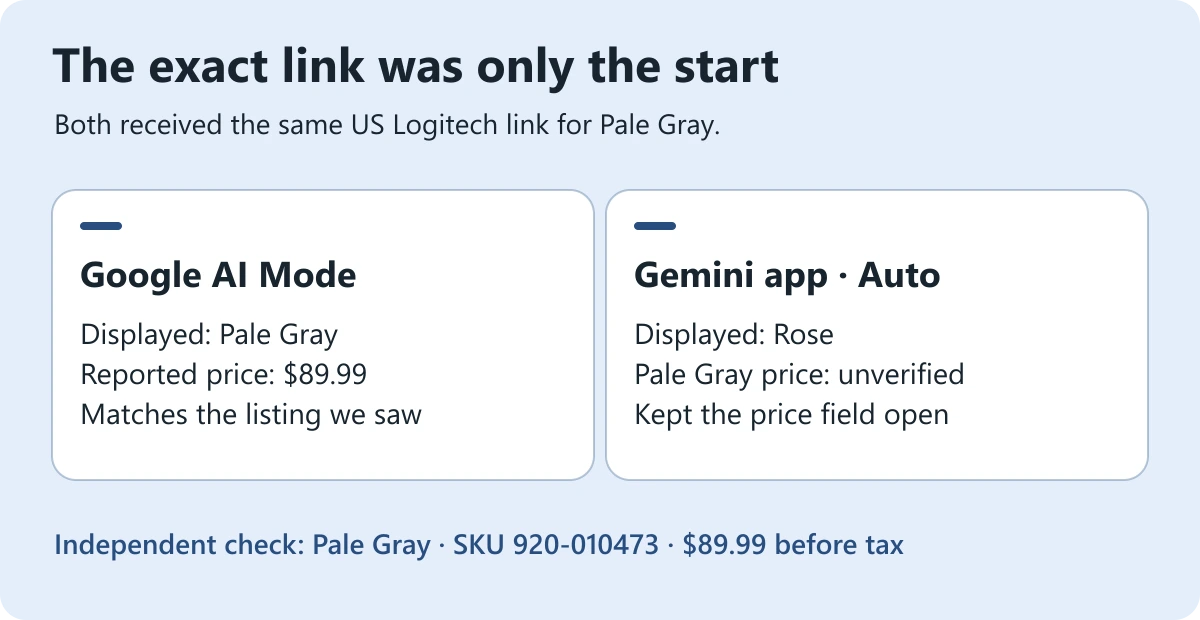
Continue in each existing conversation. Send the second prompt with both US Logitech URLs. It asks each tool to report the color actually displayed and to mark missing values unverified. AI Mode returned Pale Gray at $89.99. The Gemini app said its listing displayed Rose at the same price and left the Pale Gray price unverified. Both gave $33.99 for the Tonal Rose Pebble.
We opened the URLs ourselves. The MX page showed Pale Gray, US English layout, SKU 920-010473 and $89.99, with $99.99 listed separately. The Pebble page showed Tonal Rose at $33.99, with $39.99 listed separately. Those observations reflect the shown listings at the time of the test.
Please recheck these exact Logitech US listings: https://www.logitech.com/en-us/shop/p/mx-keys-mini.920-010473 and https://www.logitech.com/en-us/shop/p/pebble-keys-2. Do not substitute the for-Mac version or another color. For each page state the color and price actually displayed to you, and say “unverified” if the exact variant or price is not visible. Keep the $70 pre-tax budget and the backlight requirement. Return a two-row table and a final decision.Make the decision from the manufacturer’s evidence
Both models support switching among up to three devices, and Logitech lists macOS and iPadOS compatibility. The Pale Gray MX Keys Mini has backlighting and exceeds $70 before tax. The Tonal Rose Pebble fits the budget and lacks backlighting. If both requirements are firm, keep looking.
The MX rating applies to its rechargeable battery, and the five-month figure requires backlighting to be off. Logitech rates the Pebble at up to 36 months in standard conditions. Battery life can vary with use. For your own comparison, record the selected color, SKU, current and list prices, and which hard requirement rules each candidate out.
| Logitech US listing | Observed price | Backlit / paired devices | Manufacturer battery rating |
|---|---|---|---|
| MX Keys Mini, Pale Gray | $89.99 ($99.99 list) | Yes / up to 3 | Rechargeable, up to 10 days or up to 5 months with backlighting off |
| Pebble Keys 2 K380s, Tonal Rose | $33.99 ($39.99 list) | No / up to 3 | Two replaceable AAA batteries, up to 36 months under standard conditions |
Sources & verification
Two turns per tool in one signed-in desktop session on November 16, 2026. The Gemini app was set to Auto and did not identify the model that answered. We compared the two experiences after Google’s announcement. Prices are US listing snapshots before tax. We verified listings and published specifications without buying or testing the hardware.
- Google Search’s Gemini 4 Hydrogen upgrade
- Google’s Gemini 4 Hydrogen announcement
- Logitech US MX Keys Mini Pale Gray product page
- Logitech US Pebble Keys 2 K380s product page
- Logitech support on Pebble Keys 2 backlighting
- Logitech support on Pebble Keys 2 batteries
Sources checked: 2026.11.16