- Only selected US personal plans and US banks are eligible during the rollout.
- Verify a recurring charge against the posting date and merchant receipt.
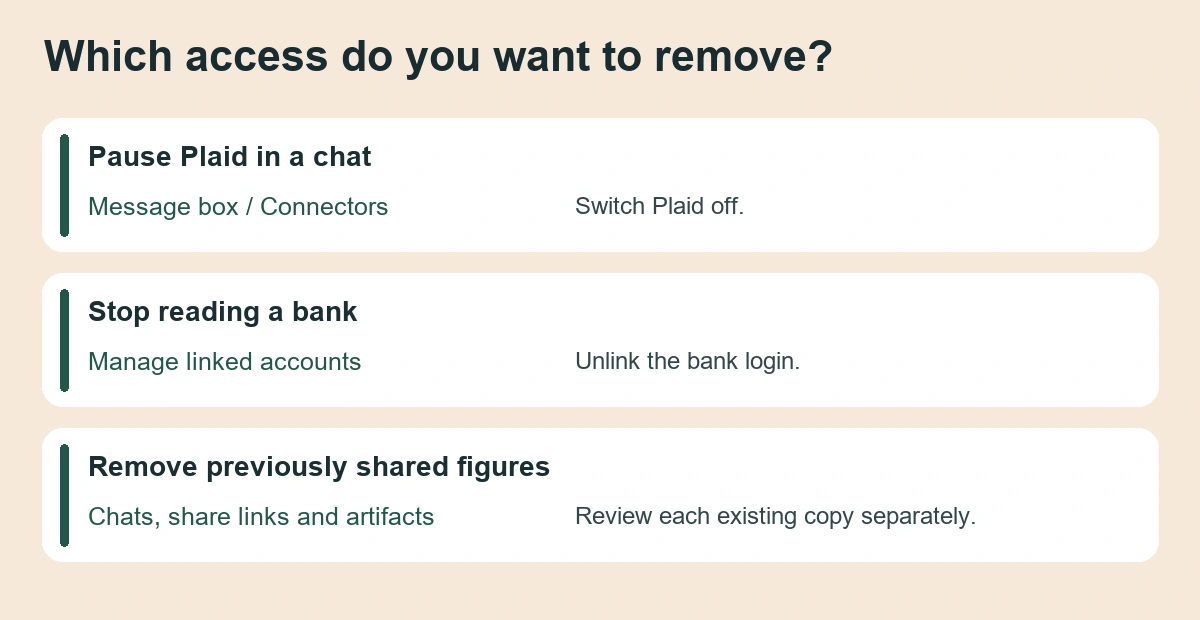
- Disconnecting the bank stops future reads. Review shared links, chats and published artifacts separately.
Claude can read transactions from the accounts you select and help explain recurring charges. It cannot move funds or cancel a subscription. You can test whether the answers you want are useful with a small sample before deciding whether to share banking history.
Files for this exercise
AIHotple example files and prompts. Try the exercise before substituting real work data.
Check whether the feature is available to you
Anthropic is rolling out Personal Finance to US users on Pro, Max and Ultra with US banks. In a personal account, open the side menu and look under More for Personal Finance. Free, Team and Enterprise accounts are outside the announced beta. An eligible plan can still be waiting for access.
A practical reason to use the feature is a narrow question such as “Which charges renewed in October?” For a one-off question, the fictional CSV below lets you try the same reasoning without sharing a real account.
Read the permission screen before choosing accounts
From Personal Finance, choose Get started, complete or skip the goals, and continue to Link accounts with Plaid. Pause at the access summary. Continuing opens Plaid’s bank selection and authentication flow. Select only the accounts relevant to the question, then return to Claude to verify which accounts appeared. Enter bank credentials only in the institution or Plaid authentication flow.
The data can include balances, credit limits, merchant descriptions and up to two years of transaction history. A description that contains identifying information can carry that information into the connection. Reading a balance does not give Claude payment authority. Investment balances alone also tell you little about individual holdings.
Try a subscription review with six fictional entries
Open the sample CSV and select October 2026. Positive amounts are charges and negative amounts are credits. Compare each merchant’s dates and receipt notes. The September row gives you a prior month to compare against. The prompt works with the sample alone.
| Merchant | October statement evidence | How to describe it |
|---|---|---|
| Lake Music | B2: $12 posted; B1 shows the previous month | The monthly plan cost $12 in October. |
| Field Maps | B3: $60 posted, annual renewal | October cash cost was $60. Its monthly budget equivalent is $5. |
| Cloud Desk | B4 pending; B5 +$9; B6 −$9 | The posted day pass and refund net to $0. Set the pending authorization aside. |
Use only this fictional CSV. For October, show posted outflow net of refunds, charges with monthly receipts, and charges with annual receipts. Cite the row IDs. Separate pending authorizations. Show the monthly equivalent of confirmed recurring costs in a separate column and flag any assumptions.Separate the money that left from the monthly budget
The sample’s October posted net outflow is $72 ($12 + $60 + $9 − $9). Its two recurring plans work out to $17 per month ($12 + $60 ÷ 12). A response claiming that $17 left the account in October has answered the budget question with the wrong figure. Check important totals against the bank’s settled statement.
In a real account, confirm an unfamiliar charge with a receipt or merchant. Similar amounts can come from separate purchases. If a bank needs reauthentication or a balance is stale, treat the answer as incomplete until the account is current.
Choose what you want to stop
For a conversation on the web or desktop, use the plus button beside the message box, open Connectors and switch Plaid off. To end the bank connection itself, open Personal Finance, use the three-dot menu and choose Manage linked accounts. On mobile, use the gear and select the bank. Choose Unlink and confirm. This disconnects accounts shared through that bank login. Removing the last bank also resets the dashboard and its saved settings.
Manage connections directly with Plaid ↗
Check where the answer went
Suppose you shared a chat that included the $72 total. Disconnecting the bank prevents fresh reads, but the recipient can still see figures in that shared conversation. Review its sharing link, the chat itself and any published artifact. An artifact has its own lifetime and can survive deletion of its source chat. Someone who saved a copy already has that copy.
Anthropic distinguishes chats in its finance hub, which it excludes from training, from material shared elsewhere, where your privacy settings apply. If you plan to end a paid subscription, unlink first if you want the connection removed. A lapsed subscription restricts access while a bank can remain linked.
Sources & verification
We reviewed Anthropic’s US beta documentation and checked the example arithmetic locally. The downloadable transactions are fictional. We did not connect a bank, authorize Plaid or test an eligible account.
- Anthropic introduces Personal Finance
- Claude Help Center on access, sharing and disconnection
- Plaid’s connection management portal
Sources checked: 2026.11.07