- Keep viewer page numbers separate from printed labels.
- An image-only PDF and an unreadable AI response are not the same finding.
- Check current PDF and attachment-route conditions.
- Verify both the source quotation and the interpretation.
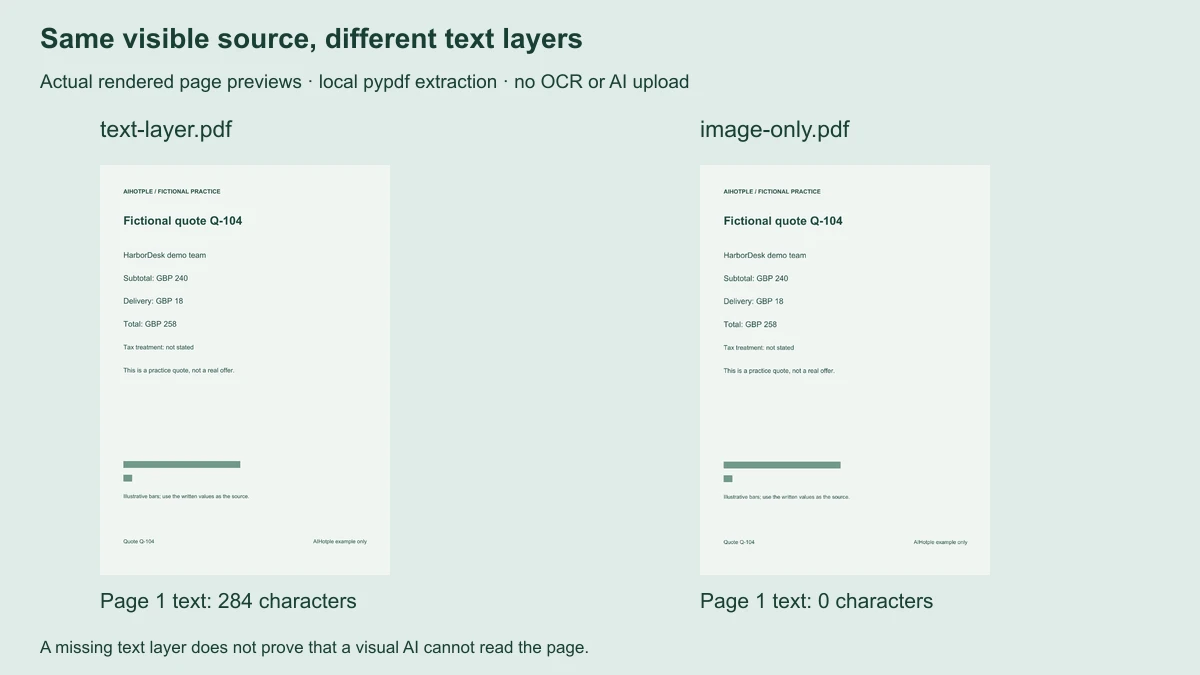
Inspect the source page, note how you attached it and test a short relevant excerpt. Our two fictional PDFs look alike, but one exposes text and the image-only copy exposes none to a plain text extractor. That does not mean Claude cannot read the image: visual support and attachment conditions are separate. Use the pair to check your assumptions before trusting a missing or invented detail.
Files for this exercise
AIHotple example files and prompts. Try the exercise before substituting real work data.
Find the missing detail on the original page
Open the PDF in a viewer and locate the number, chart or footnote you expected Claude to use. Note the viewer page number separately from any printed label. In our example, the second viewer page is labeled Appendix A, not “page 2”. A confident page citation can still point to the wrong part of a document.
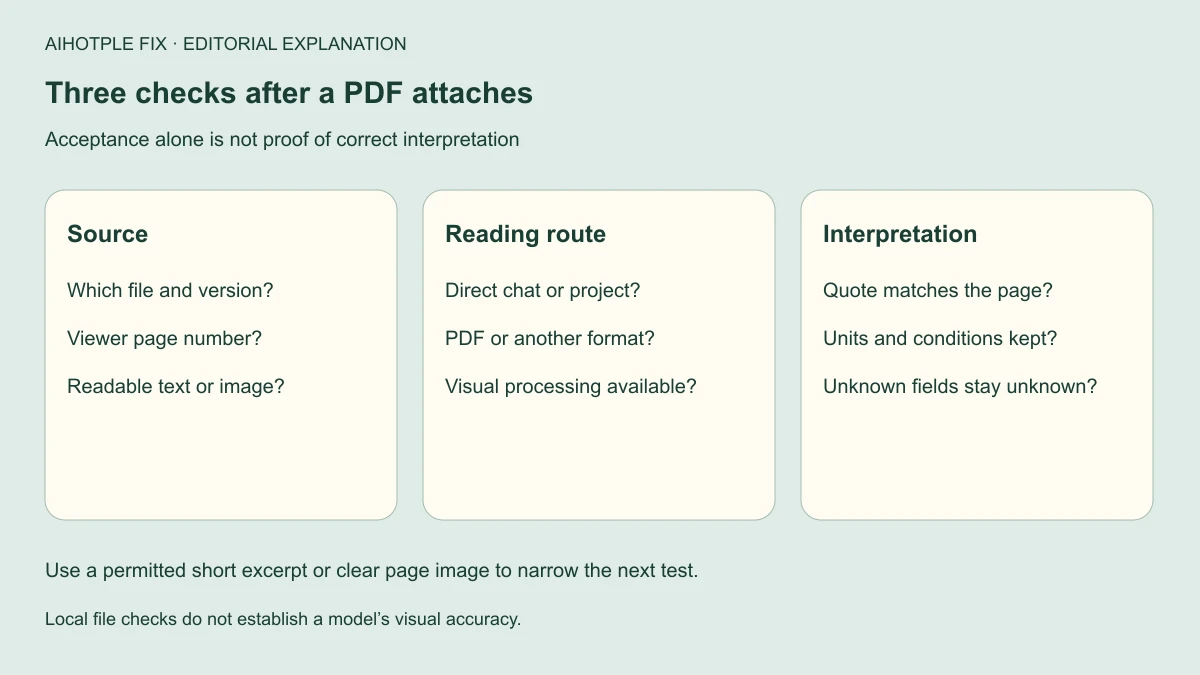
Try selecting and copying one sentence into a local text editor. This can reveal a missing or unusual text layer. It is only a diagnostic signal: it does not establish what Claude’s visual processing can read or whether a whole document has been understood.
Choose your situation in AIHotple Fix ↗
Use the practice pair to separate appearance from extractable text
Download text-layer.pdf and image-only.pdf from the kit. Both contain the fictional Q-104 quote and the conditions page. Read the written subtotal GBP 240, delivery GBP 18 and total GBP 258. The tax treatment and dispatch date are not stated.
We rendered the files and checked their text extraction. The image-only document contains page images without an OCR text layer. The identical-looking content therefore gives a useful control: if you test an assistant, record which version and attachment route you used instead of describing both simply as “the PDF”.
Check the current PDF and project conditions
Claude’s current upload documentation distinguishes chat attachments from project files and describes different PDF handling by page count. In the version checked for this guide, PDFs up to 100 pages receive visual and text processing, while 101–1000-page PDFs are text-only. Check that source again if your account or document behaves differently.
For non-PDF documents, embedded images may not be included in text extraction. A chart inside another document type can therefore need a direct PDF attachment or a separate permitted image. Keep the relevant source page with the image so the reviewer can check labels, units and any adjacent condition.
Do not assume “the file fits in megabytes” means it fits every page or context condition. Review the documented route and the exact account error before splitting or changing the source.
Ask a bounded reading question
Use the available + → Add files or photos control to attach the permitted source. Ask about a few named fields and require short quotations plus viewer page numbers. If you use a project source, identify it clearly. This is a suggested product procedure, not a new upload executed for this local comparison.
Avoid putting the expected answer into the question when your purpose is to test access. A request that already says “the total is GBP 258” cannot show that the assistant read that number from the attachment. Keep the fact ledger separately and use it for review afterward.
- Test the exact page.
Choose the two-page fictional source or your own short authorized excerpt. Record its filename and route.
- Verify one number and one condition.
Check the total on viewer page 1 and the return condition on viewer page 2. Preserve missing fields as unknown.
- Change one input if needed.
Try the relevant page image or accessible source version, keeping the question and review criteria the same.
Use only the attached fictional PDF. For subtotal, delivery, total, tax treatment and dispatch date, return the value, a short supporting quotation and the PDF viewer page number. Distinguish the viewer page number from any printed page label. For any visual you cannot inspect, state the limitation. Do not fill missing fields or use outside sources.Separate locating a page from understanding it
The quote’s small illustrative bars are not an independently measured chart. The written amounts are the authoritative practice facts. That distinction is deliberate: an attractive graphic should not silently become evidence for an amount the document never states.
If an assistant claims a value, match the supporting quotation to the original page. Then check whether the interpretation follows. “Return approval is required” is not a promise that every return will be approved. A correct citation can accompany an incorrect conclusion.
Keep useful work and visible limits together
If the source remains unreadable, request an accessible version from its owner or record the missing field explicitly. Do not treat a polished summary as a substitute for a readable original. For consequential work, retain the page and the reviewed claim table with the final result.
The kit includes the original text, both PDFs, their local extraction results and a suggested reading request. It does not contain a claimed Claude answer or an OCR repair. Continue with the cross-tool fact-check exercise if the source is available but the answer still changes its numbers or conditions.
Audit five claims against the fictional quote and conditions →
If the actual warning concerns context or usage, choose that different path →
Sources & verification
Official Claude file-upload documentation checked on 6 November 2026. AIHotple created and rendered two two-page PDFs, then checked their text extraction locally with pypdf. The text-layer copy yielded 284 and 294 characters; the image-only copy yielded zero on both pages. No OCR was performed. These are actual local file checks, not a reproduced Claude failure, visual-recognition benchmark, project retrieval test or account-limit test.
Sources checked: 2026.11.06