- Rich Text and Markdown support direct browser editing.
- Keep confirmed facts separate from pending details.
- An export can follow the older version being previewed.
Based on official documentation checked on 16 October 2026 and original fictional exercises. Downloads contain our inputs and expected checks, not completed exports generated by Genspark. The article separately describes the scope observed in an actual account.
Files for this exercise
AIHotple example files and prompts. Try the exercise before substituting real work data.
A polished notice still needs truthful gaps
Our fictional reading event has a date and capacity but no venue or registration channel. A useful notice makes those gaps explicit instead of inventing a link. Current v2 is14November2026,20participants,free. Superseded v1 was7November and12participants. The exercise preserves current facts and then changes just the bring-list.
1. Choose how you will edit before generating
The documented format is locked after content exists. A Word generation mode is distinct from exporting a Rich Text document to a Word file.
Our start screen showed Word, Web Doc and Markdown, with no Rich Text option. We therefore used Markdown for the actual trial; choose an available editable format rather than searching for a missing control.
| Mode | Direct browser editing | Use in this exercise |
|---|---|---|
| Rich Text | Yes; visual editor | Review and adjust a one-page notice |
| Markdown | Yes; text editor | Move structured text to a notes workflow |
| Web Doc | Preview-oriented | Request targeted changes through AI |
| Word | Preview-oriented | Generate a Word-style document and request AI edits |
2. Attach the current note
Open AI Docs and choose Markdown for this exercise. Unzip the kit and attach event-note-v2-en.txt. The Korean alternative is separate. The source includes a revision to apply later: start with one book, then change it to one book and note-taking materials. This gives you a concrete before-and-after comparison.
3. Request a reader-facing first draft
The participant notice does not need every line of internal revision history. Put confirmed facts first and pending items together.
Create a one-page participant notice from event note v2: title; date/capacity/admission; audience; what to bring; pending information. Omit superseded v1 date and capacity. Mark venue, registration and contact pending; invent no URL or phone. For this first draft use only the original one-book requirement; apply the listed revision only when I request it later. Use concise factual sentences.4. Compare facts before polishing
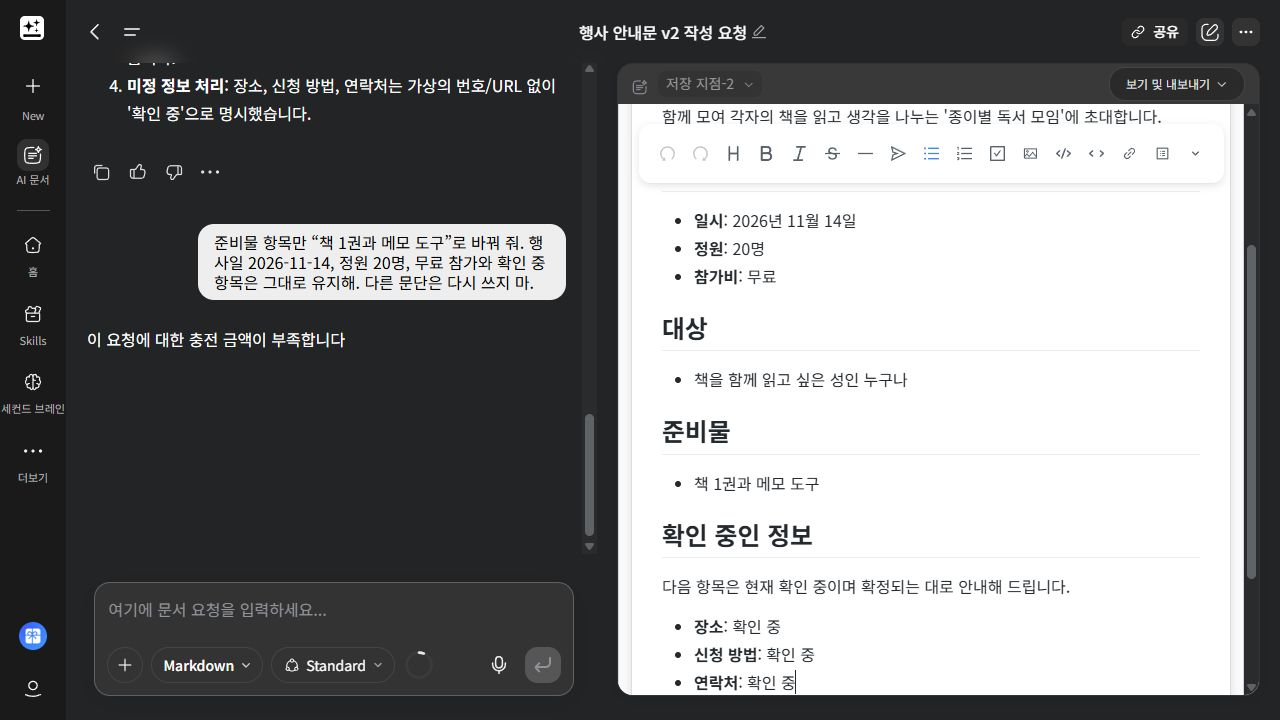
In Markdown, edit the sentence directly or identify it in a targeted AI request. Our AI revision was blocked by insufficient credits. We instead used Switch to Source Mode and changed only the bring-list line, preserving heading and list markers. The prompt below is for accounts with AI revision access.
| Field | First-draft expectation |
|---|---|
| Event | Paper Star Reading Club |
| Date/capacity/admission | 2026-11-14 /20/free |
| Audience/bring | Adults who want to read together /one book |
| Pending | Venue, registration, contact |
| Exclude | Superseded2026-11-07/capacity12; invented links |
Reopening exposed a useful distinction: chat versus current document
The first document preserved14November,20participants,free admission and pending venue/registration/contact. After manually changing the bring-list and reloading, Save Point2 retained “책 1권과 메모 도구” with the other facts intact.
The older chat answer still said one book while the right-hand document contained the saved revision. Review the current document, not merely the completion message. The export menu labelled Markdown, Word and PDF as Plus; no file download was executed. The actual trial was Korean.
5. Revise the bring-list only
Select the sentence for an AI revision, or edit it directly when supported. Check whether the date, capacity and pending fields survive. A minor typo may be simpler to fix manually.
Change only the bring-list to “one book and note-taking materials.” Preserve2026-11-14,capacity20,free admission and all pending details. Do not rewrite other paragraphs.6. Export the intended version
View & Export appears after content exists and may be disabled during generation. File exports have plan conditions. Opening a separate browser view is not itself a downloaded document.
The documentation says export follows the Save Point being previewed. Return to the intended final version, check the revised bring-list, then export if your account allows it. Avoid using Rollback just to compare: it can discard subsequent edits.
Reopen the file and inspect title, date, capacity, revised sentence, selectable text and page clipping. If an older sentence remains, download to a distinct filename and compare with the current document. This fictional notice still lacks registration and venue details and is not ready to publish as a real event announcement.
Make meeting slides in Genspark from two proposals: inputs to PPTX checks →
Use Genspark AI Sheets to find why a CSV sales total is wrong →
Sources & verification
Based on official documentation checked on 16 October 2026 and original fictional exercises. Downloads contain our inputs and expected checks, not completed exports generated by Genspark. The article separately describes the scope observed in an actual account.
Sources checked: 2026.10.16